外观
本指南介绍将深度智能体从本地原型带往生产部署时需要考虑的事项。它逐步介绍限定记忆范围、配置执行环境、添加护栏以及连接前端。
概述
智能体使用来自记忆和执行环境的信息来完成任务。 在生产中,有几个原语决定信息的共享和访问方式:
- 线程(Thread):一次单独的对话。默认情况下,消息历史和临时文件的作用域限定于线程,不会延续。
- 用户(User):与你的智能体交互的人。记忆和文件可以对单个用户私密,也可以在用户之间共享。身份和授权来自你的认证层。
- 助手(Assistant):一个已配置的智能体实例。记忆和文件可以绑定到单个助手,也可以在它们之间共享。
本页涵盖:
- LangSmith 部署:托管基础设施,带认证、webhook 和 cron
- 生产注意事项:调用、多租户、身份验证、凭据、异步和持久化
- 记忆:跨对话持久化信息
- 执行环境:文件存储和代码执行
- 护栏:权限和数据隐私
- 前端:将你的 UI 连接到已部署的智能体
LangSmith 部署
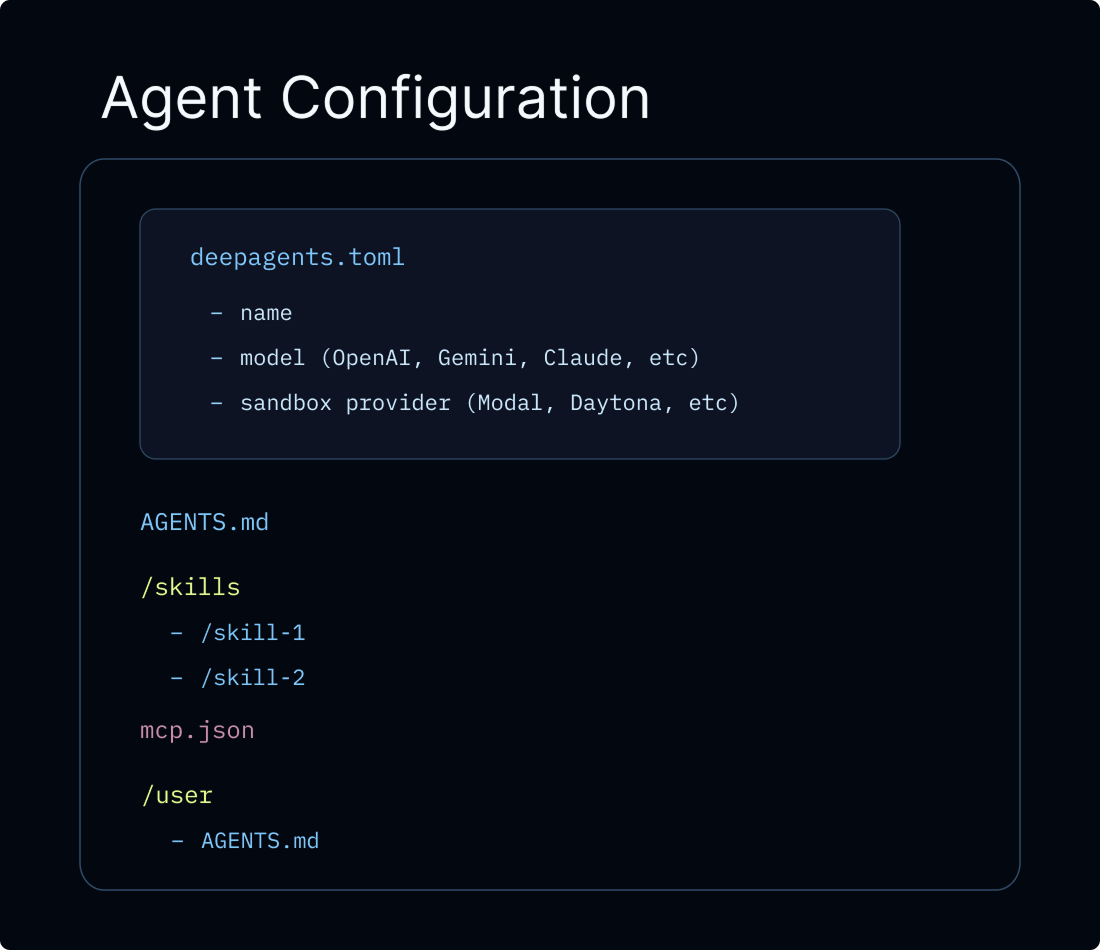
将 Deep Agent 投入生产的推荐路径是 Managed Deep Agents,这是一个以 CLI 为先的托管运行时,用于在 LangSmith 中创建、运行和运维深度智能体。Managed Deep Agents 目前处于私有预览阶段(加入等候名单)。对于需要自定义应用程序代码、自定义路由、高级认证的团队,你可以直接配置 LangSmith 部署。两条路径都会为你的智能体预配所需的基础设施:线程、运行、存储和检查点,因此你不必自行设置这些。传统的 LangSmith 部署还为你提供开箱即用的身份验证、webhook、cron 任务和可观测性,并可通过 MCP 或 A2A 暴露你的智能体。
你也可以在 JavaScript 框架和托管平台上部署,而无需 LangSmith Cloud。
Frameworks and platforms View all guides 
 LangSmith
 Next.js
 SvelteKit
 Nuxt
Nuxt 
 Cloudflare
 Deno
Deno
TIP
LangSmith Cloud 部署会自动将追踪信息发送到一个以你的部署命名的项目中。打开 LangSmith 调试运行并监控用量。对于混合或自托管设置,请参阅 LangSmith 追踪。我们还建议你设置 LangSmith Engine,它会监控你的追踪信息、检测问题并提出修复建议。
本页的所有代码片段均使用以下 langgraph.json,除非另有说明:
json
{
  "dependencies": ["."],
  "graphs": {
    "agent": "./agent.py:agent"
  },
  "env": ".env"
}
json
{
  "dependencies": ["."],
  "graphs": {
    "agent": "./src/agent.ts:agent"
  },
  "env": ".env"
}
langgraph.json 是告知 LangGraph 平台如何构建和运行你的应用程序的配置文件。它位于项目的根目录,对于本地开发(使用 langgraph dev)和生产部署都是必需的。关键字段如下:
| 字段 | 描述 |
|---|---|
dependencies | 要安装的包。["."] 将当前目录作为包安装(从 requirements.txt、pyproject.toml 或 package.json 读取)。 |
graphs | 将图 ID 映射到其代码位置。每个条目为 "<id>": "./<file>:<variable>",其中 <id> 是你通过 API 调用图时使用的名称,<variable> 是从 <file> 导出的已编译图或构造函数。 |
env | 包含环境变量(API 密钥、机密)的 .env 文件的路径。这些在构建时设置,并在运行时可用。 |
有关完整的配置选项(自定义 Docker 步骤、存储索引、认证处理程序等),请参阅 应用程序结构。
生产注意事项
调用智能体
在生产中,每次调用都应携带两个运行级参数:
thread_id(通过config={"configurable": {"thread_id": ...}}传入):对话的稳定标识符。检查点 使用它来持久化和恢复消息历史,因此后续轮次会继续同一对话。生成新的thread_id以开始新的对话。context:你的工具和中间件在调用时读取的每次运行的数据,例如user_id、API 密钥、功能标志或会话元数据。使用context_schema定义其结构,并通过runtime.context访问它。请参阅 运行时上下文。
两者相互独立,且几乎总是一起传入:
python
from dataclasses import dataclass

from deepagents import create_deep_agent
from langchain_core.utils.uuid import uuid7

@dataclass
class Context:
    user_id: str

agent = create_deep_agent(
    model="google_genai:gemini-3.6-flash",
    context_schema=Context,
)

# Start a conversation
config = {"configurable": {"thread_id": str(uuid7())}}
agent.invoke(
    {"messages": [{"role": "user", "content": "Plan a 3-day trip to Tokyo"}]},
    config=config,
    context=Context(user_id="user-123"),
)

# Follow-up on the same conversation: reuse the same thread_id
agent.invoke(
    {"messages": [{"role": "user", "content": "Make it 5 days instead"}]},
    config=config,
    context=Context(user_id="user-123"),
)
python
from dataclasses import dataclass

from deepagents import create_deep_agent
from langchain_core.utils.uuid import uuid7

@dataclass
class Context:
    user_id: str

agent = create_deep_agent(
    model="openai:gpt-5.5",
    context_schema=Context,
)

# Start a conversation
config = {"configurable": {"thread_id": str(uuid7())}}
agent.invoke(
    {"messages": [{"role": "user", "content": "Plan a 3-day trip to Tokyo"}]},
    config=config,
    context=Context(user_id="user-123"),
)

# Follow-up on the same conversation: reuse the same thread_id
agent.invoke(
    {"messages": [{"role": "user", "content": "Make it 5 days instead"}]},
    config=config,
    context=Context(user_id="user-123"),
)
python
from dataclasses import dataclass

from deepagents import create_deep_agent
from langchain_core.utils.uuid import uuid7

@dataclass
class Context:
    user_id: str

agent = create_deep_agent(
    model="anthropic:claude-sonnet-4-6",
    context_schema=Context,
)

# Start a conversation
config = {"configurable": {"thread_id": str(uuid7())}}
agent.invoke(
    {"messages": [{"role": "user", "content": "Plan a 3-day trip to Tokyo"}]},
    config=config,
    context=Context(user_id="user-123"),
)

# Follow-up on the same conversation: reuse the same thread_id
agent.invoke(
    {"messages": [{"role": "user", "content": "Make it 5 days instead"}]},
    config=config,
    context=Context(user_id="user-123"),
)
python
from dataclasses import dataclass

from deepagents import create_deep_agent
from langchain_core.utils.uuid import uuid7

@dataclass
class Context:
    user_id: str

agent = create_deep_agent(
    model="openrouter:z-ai/glm-5.2",
    context_schema=Context,
)

# Start a conversation
config = {"configurable": {"thread_id": str(uuid7())}}
agent.invoke(
    {"messages": [{"role": "user", "content": "Plan a 3-day trip to Tokyo"}]},
    config=config,
    context=Context(user_id="user-123"),
)

# Follow-up on the same conversation: reuse the same thread_id
agent.invoke(
    {"messages": [{"role": "user", "content": "Make it 5 days instead"}]},
    config=config,
    context=Context(user_id="user-123"),
)
python
from dataclasses import dataclass

from deepagents import create_deep_agent
from langchain_core.utils.uuid import uuid7

@dataclass
class Context:
    user_id: str

agent = create_deep_agent(
    model="fireworks:accounts/fireworks/models/glm-5p2",
    context_schema=Context,
)

# Start a conversation
config = {"configurable": {"thread_id": str(uuid7())}}
agent.invoke(
    {"messages": [{"role": "user", "content": "Plan a 3-day trip to Tokyo"}]},
    config=config,
    context=Context(user_id="user-123"),
)

# Follow-up on the same conversation: reuse the same thread_id
agent.invoke(
    {"messages": [{"role": "user", "content": "Make it 5 days instead"}]},
    config=config,
    context=Context(user_id="user-123"),
)
python
from dataclasses import dataclass

from deepagents import create_deep_agent
from langchain_core.utils.uuid import uuid7

@dataclass
class Context:
    user_id: str

agent = create_deep_agent(
    model="baseten:zai-org/GLM-5.2",
    context_schema=Context,
)

# Start a conversation
config = {"configurable": {"thread_id": str(uuid7())}}
agent.invoke(
    {"messages": [{"role": "user", "content": "Plan a 3-day trip to Tokyo"}]},
    config=config,
    context=Context(user_id="user-123"),
)

# Follow-up on the same conversation: reuse the same thread_id
agent.invoke(
    {"messages": [{"role": "user", "content": "Make it 5 days instead"}]},
    config=config,
    context=Context(user_id="user-123"),
)
python
from dataclasses import dataclass

from deepagents import create_deep_agent
from langchain_core.utils.uuid import uuid7

@dataclass
class Context:
    user_id: str

agent = create_deep_agent(
    model="ollama:north-mini-code-1.0",
    context_schema=Context,
)

# Start a conversation
config = {"configurable": {"thread_id": str(uuid7())}}
agent.invoke(
    {"messages": [{"role": "user", "content": "Plan a 3-day trip to Tokyo"}]},
    config=config,
    context=Context(user_id="user-123"),
)

# Follow-up on the same conversation: reuse the same thread_id
agent.invoke(
    {"messages": [{"role": "user", "content": "Make it 5 days instead"}]},
    config=config,
    context=Context(user_id="user-123"),
)
使用 LangGraph SDK 部署时,SDK 会为你管理线程,你将返回的 thread_id 传给每次运行:
python
from langgraph_sdk import get_client

client = get_client(url="<DEPLOYMENT_URL>", api_key="<LANGSMITH_API_KEY>")

thread = await client.threads.create()
async for chunk in client.runs.stream(
    thread["thread_id"],
    "agent",
    input={"messages": [{"role": "user", "content": "Plan a 3-day trip to Tokyo"}]},
    context={"user_id": "user-123"},
    stream_mode="updates",
):
print(chunk.data)ts
import { createDeepAgent } from "deepagents";
import { z } from "zod";

const contextSchema = z.object({ userId: z.string() });

const agent = createDeepAgent({
  model: "google-genai:gemini-3.6-flash",
  contextSchema,
});

// Start a conversation
const config = { configurable: { thread_id: crypto.randomUUID() } };
await agent.invoke(
  { messages: [{ role: "user", content: "Plan a 3-day trip to Tokyo" }] },
  { ...config, context: { userId: "user-123" } },
);

// Follow-up on the same conversation: reuse the same thread_id
await agent.invoke(
  { messages: [{ role: "user", content: "Make it 5 days instead" }] },
  { ...config, context: { userId: "user-123" } },
);
ts
import { createDeepAgent } from "deepagents";
import { z } from "zod";

const contextSchema = z.object({ userId: z.string() });

const agent = createDeepAgent({
  model: "openai:gpt-5.5",
  contextSchema,
});

// Start a conversation
const config = { configurable: { thread_id: crypto.randomUUID() } };
await agent.invoke(
  { messages: [{ role: "user", content: "Plan a 3-day trip to Tokyo" }] },
  { ...config, context: { userId: "user-123" } },
);

// Follow-up on the same conversation: reuse the same thread_id
await agent.invoke(
  { messages: [{ role: "user", content: "Make it 5 days instead" }] },
  { ...config, context: { userId: "user-123" } },
);
ts
import { createDeepAgent } from "deepagents";
import { z } from "zod";

const contextSchema = z.object({ userId: z.string() });

const agent = createDeepAgent({
  model: "anthropic:claude-sonnet-4-6",
  contextSchema,
});

// Start a conversation
const config = { configurable: { thread_id: crypto.randomUUID() } };
await agent.invoke(
  { messages: [{ role: "user", content: "Plan a 3-day trip to Tokyo" }] },
  { ...config, context: { userId: "user-123" } },
);

// Follow-up on the same conversation: reuse the same thread_id
await agent.invoke(
  { messages: [{ role: "user", content: "Make it 5 days instead" }] },
  { ...config, context: { userId: "user-123" } },
);
ts
import { createDeepAgent } from "deepagents";
import { z } from "zod";

const contextSchema = z.object({ userId: z.string() });

const agent = createDeepAgent({
  model: "openrouter:openrouter:z-ai/glm-5.2",
  contextSchema,
});

// Start a conversation
const config = { configurable: { thread_id: crypto.randomUUID() } };
await agent.invoke(
  { messages: [{ role: "user", content: "Plan a 3-day trip to Tokyo" }] },
  { ...config, context: { userId: "user-123" } },
);

// Follow-up on the same conversation: reuse the same thread_id
await agent.invoke(
  { messages: [{ role: "user", content: "Make it 5 days instead" }] },
  { ...config, context: { userId: "user-123" } },
);
ts
import { createDeepAgent } from "deepagents";
import { z } from "zod";

const contextSchema = z.object({ userId: z.string() });

const agent = createDeepAgent({
  model: "fireworks:accounts/fireworks/models/glm-5p2",
  contextSchema,
});

// Start a conversation
const config = { configurable: { thread_id: crypto.randomUUID() } };
await agent.invoke(
  { messages: [{ role: "user", content: "Plan a 3-day trip to Tokyo" }] },
  { ...config, context: { userId: "user-123" } },
);

// Follow-up on the same conversation: reuse the same thread_id
await agent.invoke(
  { messages: [{ role: "user", content: "Make it 5 days instead" }] },
  { ...config, context: { userId: "user-123" } },
);
ts
import { createDeepAgent } from "deepagents";
import { z } from "zod";

const contextSchema = z.object({ userId: z.string() });

const agent = createDeepAgent({
  model: "baseten:zai-org/GLM-5.2",
  contextSchema,
});

// Start a conversation
const config = { configurable: { thread_id: crypto.randomUUID() } };
await agent.invoke(
  { messages: [{ role: "user", content: "Plan a 3-day trip to Tokyo" }] },
  { ...config, context: { userId: "user-123" } },
);

// Follow-up on the same conversation: reuse the same thread_id
await agent.invoke(
  { messages: [{ role: "user", content: "Make it 5 days instead" }] },
  { ...config, context: { userId: "user-123" } },
);
ts
import { createDeepAgent } from "deepagents";
import { z } from "zod";

const contextSchema = z.object({ userId: z.string() });

const agent = createDeepAgent({
  model: "ollama:north-mini-code-1.0",
  contextSchema,
});

// Start a conversation
const config = { configurable: { thread_id: crypto.randomUUID() } };
await agent.invoke(
  { messages: [{ role: "user", content: "Plan a 3-day trip to Tokyo" }] },
  { ...config, context: { userId: "user-123" } },
);

// Follow-up on the same conversation: reuse the same thread_id
await agent.invoke(
  { messages: [{ role: "user", content: "Make it 5 days instead" }] },
  { ...config, context: { userId: "user-123" } },
);
使用 LangGraph SDK 部署时,SDK 会为你管理线程,你将返回的 thread_id 传给每次运行:
typescript
import { Client } from "@langchain/langgraph-sdk";

const client = new Client({ apiUrl: "<DEPLOYMENT_URL>", apiKey: "<LANGSMITH_API_KEY>" });

const thread = await client.threads.create();
for await (const chunk of client.runs.stream(
  thread.thread_id,
  "agent",
  {
    input: { messages: [{ role: "user", content: "Plan a 3-day trip to Tokyo" }] },
    context: { userId: "user-123" },
    streamMode: "updates",
  },
)) {
  console.log(chunk.data);
}
TIP
thread_id 限定对话(消息历史、检查点)的范围。context 携带你的工具和中间件读取的每次运行的数据。两者相互独立:更改其中一个不会影响另一个,你可以只传其一或两者都传。
多租户
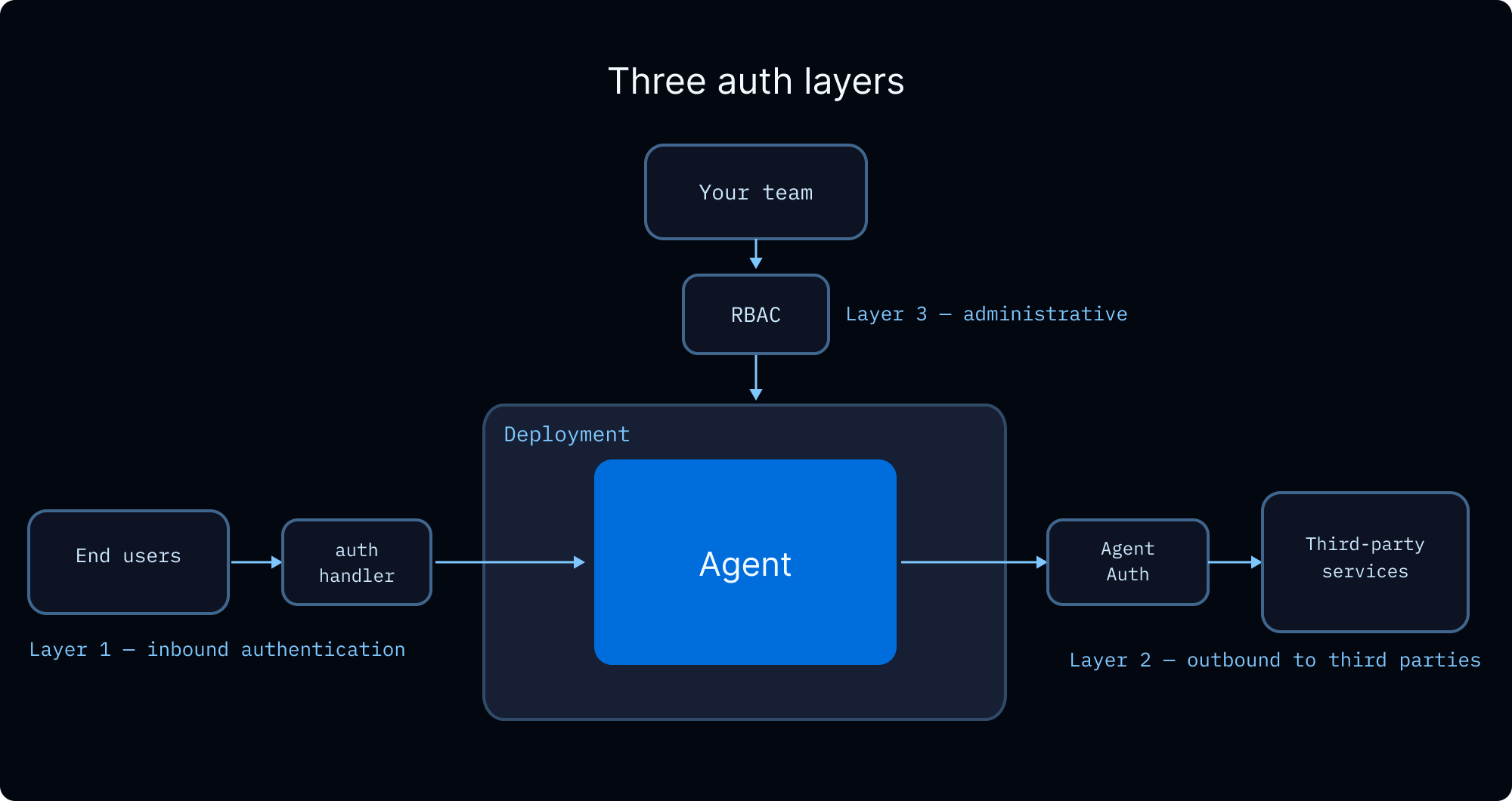
当你的智能体服务多个用户时,你需要处理三个问题:验证每个用户是谁,控制他们可以访问的内容,以及管理智能体代表他们行事时使用的凭据。
用户身份与访问控制
LangSmith 部署 支持自定义认证以建立用户身份,并支持授权处理程序来控制对线程、助手和存储命名空间等资源的访问。授权处理程序在认证成功之后运行,可以:
- 使用所有权元数据标记资源(例如
owner: user_id) - 返回过滤器,使用户只能看到自己的资源
- 对未授权的操作以 HTTP 403 拒绝访问
有关分步教程,请参阅 让对话私密化。有关操作演示,请观看自定义认证视频。
你如何限定记忆和执行环境的范围,决定了用户之间共享哪些数据。详情请参阅以下各节。
团队访问控制(RBAC)
LangSmith 的基于角色的访问控制管理你的团队中谁可以部署、配置和监控智能体。这与上述终端用户授权是分开的。
| 角色 | 访问权限 |
|---|---|
| 工作区管理员 | 完全权限,包括设置和成员管理 |
| 工作区编辑者 | 可以创建和修改资源,但不能删除运行或管理成员 |
| 工作区查看者 | 只读访问 |
Enterprise 计划提供具有细粒度权限的自定义角色。完整的权限模型请参阅 RBAC 参考。
终端用户凭据
当你的智能体需要代表用户调用外部 API(例如读取其 GitHub 仓库、发送 Slack 消息、查询其数据仓库)时,你需要一种方式将用户的凭据传给智能体,而无需硬编码它们。
通过 Agent Auth 使用 OAuth。 Agent Auth 提供托管的 OAuth 2.0 流程。配置一个 OAuth 提供商,智能体就可以请求针对每个用户限定范围的 token。在首次使用时,智能体会中断执行并呈现 OAuth 同意 URL。在用户完成身份验证后,智能体会使用有效 token 恢复。Token 会自动存储和刷新。
python
from langchain_auth import Client
from langchain.tools import tool, ToolRuntime

auth_client = Client()

# 在你的智能体工具内部:
@tool
async def github_action(runtime: ToolRuntime):
    """Perform an action on behalf of the user via GitHub."""
    auth_result = await auth_client.authenticate(
        provider="github",
        scopes=["repo", "read:org"],
        user_id=runtime.server_info.user.identity,
    )
    # 使用 auth_result.token 代表用户进行 GitHub API 调用
typescript
import { Client } from "@langchain/auth";

const authClient = new Client();

// 在你的智能体工具内部:
// 通过 runtime.serverInfo 访问已认证用户
const authResult = await authClient.authenticate({
  provider: "github",
  scopes: ["repo", "read:org"],
  userId: runtime.serverInfo.user.identity,
});
// 使用 authResult.token 代表用户进行 GitHub API 调用
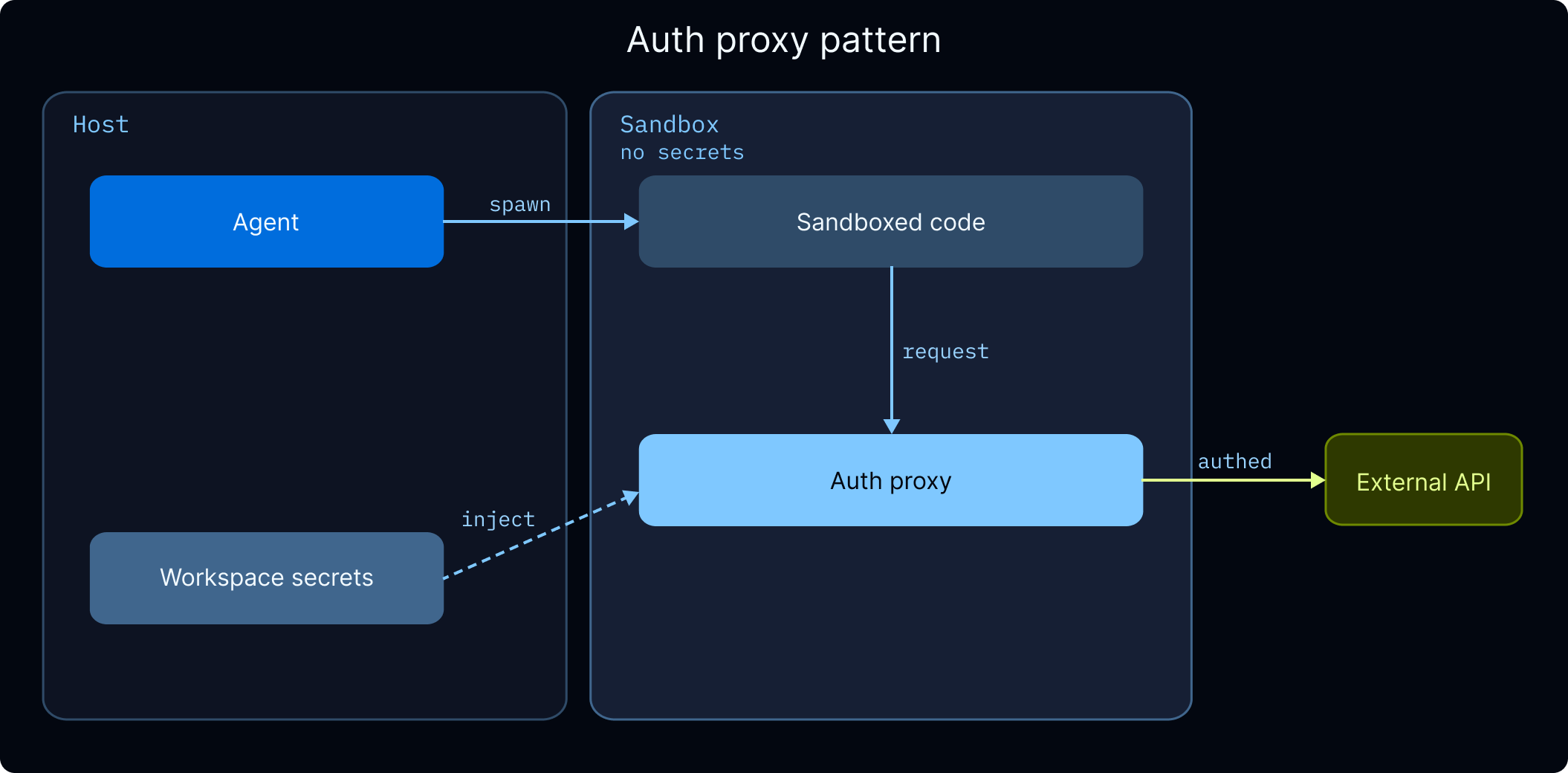
沙箱的凭据注入。 如果你的智能体在调用外部 API 的沙箱内运行代码,沙箱认证代理可以自动将凭据注入出站请求,因此沙箱代码永远不会收到原始 API 密钥。设置详情请参阅 管理机密。
工作区机密。 对于所有用户共享的 API 密钥(例如你的组织的 LLM 提供商密钥、搜索 API 密钥),请将它们作为工作区机密存储在 LangSmith 中。详情请参阅 管理机密。
异步
基于 LLM 的应用程序高度依赖 I/O:调用语言模型、数据库和外部服务。异步编程让这些操作并发运行而不是阻塞,从而提升吞吐量和响应能力。
INFO
LangChain 遵循在异步方法名前加 a 前缀的约定(例如 ainvoke、abefore_agent、astream)。同步和异步变体位于同一个类或命名空间中。
面向生产构建时:
- 创建异步工具。 LangChain 在单独的线程中运行同步工具以避免阻塞,但原生异步完全避免了线程开销。
- 使用异步中间件方法。 自定义中间件应实现异步钩子(例如用
abefore_agent代替before_agent)。 - 对外部资源生命周期使用异步。 创建沙箱或连接到 MCP 服务器涉及网络调用,应使用 await 等待。这就是预配这些资源的图工厂是异步的原因。
持久化
Deep Agents 运行在 LangGraph 上,LangGraph 开箱即用地提供持久化执行。持久化层在每个步骤对状态做检查点,因此被故障、超时或人在回路暂停所中断的运行,会从其最后记录的状态恢复,而无需重新处理之前的步骤。对于派生许多子智能体的长时间运行的深度智能体,这意味着运行中途失败不会丢失已完成的工作。
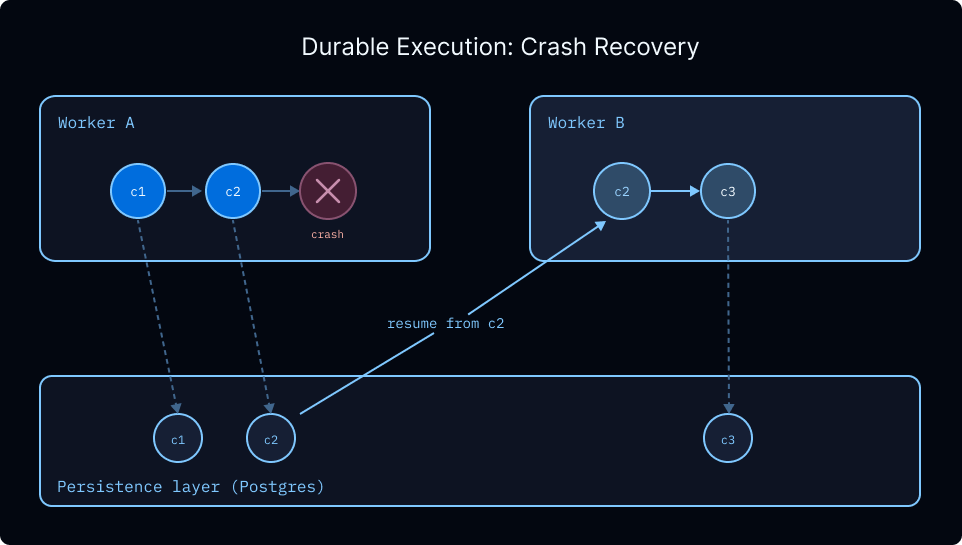
检查点持久化还支持:
- 无限期的中断。 人在回路工作流可以暂停几分钟或几天,并精确地从离开的地方恢复。
- 时间旅行。 每个已做检查点的步骤都是一个可以回退到的快照,让你在出错时可以从更早的状态重放。
- 敏感操作的安全处理。 对于涉及支付或其他不可逆操作的工作流,检查点提供了审计跟踪和恢复点,可以检查导致某操作的确切状态。
TIP
LangSmith 部署 会自动配置持久化检查点。如果你要自托管,请参阅持久化获取设置说明。
记忆
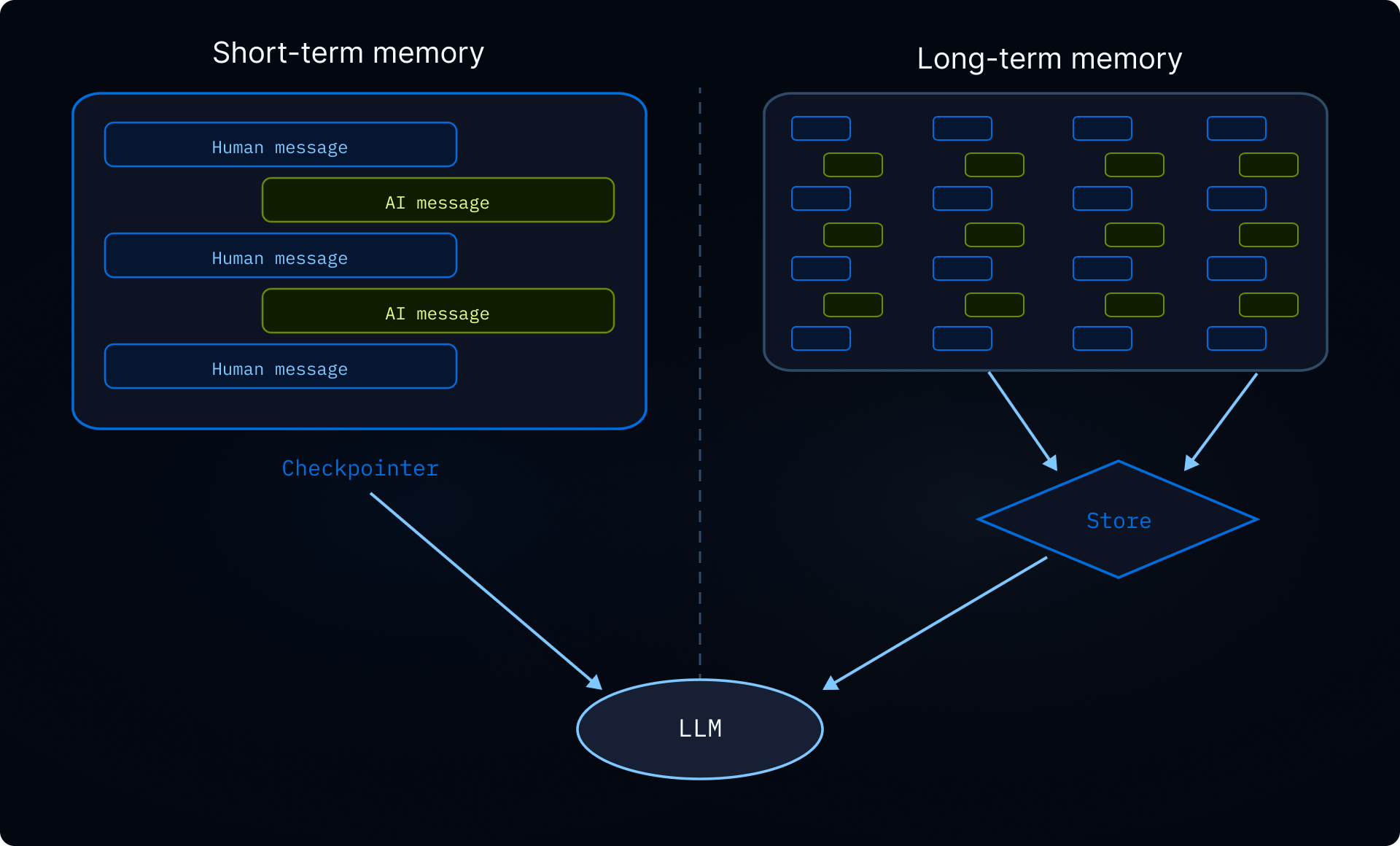
没有记忆,每次对话都从零开始。记忆让你的智能体跨对话保留信息(用户偏好、学到的指令、过往经验),从而随着时间的推移个性化其行为。有关记忆类型的概述,请参阅记忆概念指南。
范围限定
记忆总是跨对话持久化的。主要问题是它如何在用户和助手的边界之间限定范围。正确的范围取决于谁应该看到和修改数据:
| 范围 | 命名空间 | 用例 | 示例 |
|---|---|---|---|
| 用户(推荐的默认值) | (user_id) | 每个用户的偏好和上下文 | “我更喜欢简洁的回答” |
| 助手 | (assistant_id) | 单个助手的共享指令 | “将帖子限制在 280 个字符内” |
| 全局 | (org_id) | 对所有用户和助手的只读策略 | “绝不披露内部定价” |
WARNING
共享记忆(助手、用户或组织范围)是提示词注入的载体。如果某个用户可以写入另一个用户的对话会读取的记忆,那么恶意用户就可以将指令注入该共享状态。在适当的地方强制执行只读访问。例如,让组织级策略只能通过应用程序代码写入,而不能由智能体自身写入。使用权限以声明式方式拒绝写入共享路径,或使用后端策略钩子实现自定义验证逻辑。
配置
在 Deep Agents 中,记忆以文件形式存储在虚拟文件系统中。默认情况下,文件的作用域限定在单个线程(对话)内,不会在线程之间共享。 否则,要跨线程共享记忆,请将 /memories/ 等路径路由到写入 LangGraph 存储的 StoreBackend。使用 CompositeBackend 为智能体同时提供线程限定的临时空间和跨线程的长期记忆。
INFO
下面显示的 rt.server_info 和 rt.execution_info 命名空间模式需要 deepagents>=0.5.0。
INFO
下面显示的 rt.serverInfo 和 rt.executionInfo 命名空间模式需要 deepagents>=1.9.0。
用户(推荐)
按 user_id 限定命名空间。每个用户都有自己的私有记忆。这是推荐的默认值,因为大多数应用程序只部署单个助手。
python
from deepagents import create_deep_agent
from deepagents.backends import CompositeBackend, StateBackend, StoreBackend

agent = create_deep_agent(
    model="google_genai:gemini-3.6-flash",
    backend=CompositeBackend(
        default=StateBackend(),
        routes={
            "/memories/": StoreBackend(
                namespace=lambda rt: (
                    rt.server_info.assistant_id,
                    rt.server_info.user.identity,
                ),
            ),
        },
    ),
    system_prompt="""You have persistent memory at /memories/.

    Read /memories/instructions.txt at the start of each conversation for
    accumulated knowledge and preferences. When you learn something that
    should persist, update that file.""",
)
typescript
import { createDeepAgent, CompositeBackend, StateBackend, StoreBackend } from "deepagents";

export const agent = createDeepAgent({
  backend: new CompositeBackend(
    new StateBackend(),
    {
      "/memories/": new StoreBackend({
        namespace: (rt) => [
          rt.serverInfo.assistantId,
          rt.serverInfo.user.identity,
        ],
      }),
    },
  ),
  systemPrompt: `You have persistent memory at /memories/.

  Read /memories/instructions.txt at the start of each conversation for
  accumulated knowledge and preferences. When you learn something that
  should persist, update that file.`,
});
助手
按 assistant_id 限定命名空间。记忆在同一助手的所有用户之间共享,因此任何用户都可以读取或更新它。将此用于适用于使用给定助手的每个人的共享指令或知识(例如“始终以正式语气回复”)。
python
from deepagents import create_deep_agent
from deepagents.backends import CompositeBackend, StateBackend, StoreBackend

agent = create_deep_agent(
    model="google_genai:gemini-3.6-flash",
    backend=CompositeBackend(
        default=StateBackend(),
        routes={
            "/memories/": StoreBackend(
                namespace=lambda rt: (
                    rt.server_info.assistant_id,
                ),
            ),
        },
    ),
)
typescript
import { createDeepAgent, CompositeBackend, StateBackend, StoreBackend } from "deepagents";

export const agent = createDeepAgent({
  backend: new CompositeBackend(
    new StateBackend(),
    {
      "/memories/": new StoreBackend({
        namespace: (rt) => [rt.serverInfo.assistantId],
      }),
    },
  ),
});
用户
仅按 user_id 限定命名空间。记忆跟随用户跨越所有助手。将此用于全局用户资料(姓名、时区、沟通偏好),无论用户在与哪个助手对话,这些资料都应适用。
python
from deepagents import create_deep_agent
from deepagents.backends import CompositeBackend, StateBackend, StoreBackend

agent = create_deep_agent(
    model="google_genai:gemini-3.6-flash",
    backend=CompositeBackend(
        default=StateBackend(),
        routes={
            "/memories/": StoreBackend(
                namespace=lambda rt: (rt.server_info.user.identity,),
            ),
        },
    ),
)
typescript
import { createDeepAgent, CompositeBackend, StateBackend, StoreBackend } from "deepagents";

export const agent = createDeepAgent({
  backend: new CompositeBackend(
    new StateBackend(),
    {
      "/memories/": new StoreBackend({
        namespace: (rt) => [rt.serverInfo.user.identity],
      }),
    },
  ),
});
组织
按 org_id 限定命名空间。记忆在所有用户和所有助手之间共享。通常用于对整个组织范围的策略(合规规则、品牌指南),这些策略对智能体应为只读。写入权限应限于应用程序代码,以防止提示词注入。
python
from deepagents import create_deep_agent
from deepagents.backends import CompositeBackend, StateBackend, StoreBackend

agent = create_deep_agent(
    model="google_genai:gemini-3.6-flash",
    backend=CompositeBackend(
        default=StateBackend(),
        routes={
            "/memories/": StoreBackend(
                namespace=lambda rt: (rt.context.org_id,),
            ),
        },
    ),
)
typescript
import { createDeepAgent, CompositeBackend, StateBackend, StoreBackend } from "deepagents";

export const agent = createDeepAgent({
  backend: new CompositeBackend(
    new StateBackend(),
    {
      "/memories/": new StoreBackend({
        namespace: (rt) => [rt.context.orgId],
      }),
    },
  ),
});
你也可以使用 Store API 从应用程序代码中读写存储。示例请参阅 高级用法。
完整的命名空间工厂 API,请参阅命名空间工厂。对于自我改进指令和知识库等记忆模式,请参阅长期记忆。
执行环境
在本地,智能体可以直接在磁盘上读写文件并运行 shell 命令。在生产中,你需要考虑隔离和持久化。正确的设置取决于你的智能体是否需要执行代码:
- 文件系统后端 如果你的智能体只读写文件,文件系统后端就够了。选择与你的持久化需求匹配的后端:线程限定的临时空间、跨线程存储,或两者混合。
- 沙箱 提供一个带
execute工具的隔离容器,用于运行 shell 命令。如果你的智能体需要运行代码、安装包或做任何超出文件 I/O 的事情,请使用沙箱。
文件系统
根据需要持久化的内容选择后端:
StateBackend(默认):线程限定的临时空间。文件通过你的检查点在单个线程内的各轮之间持久化,但不会在线程之间共享。每一步都做检查点,因此避免写入大文件。
StoreBackend:跨线程存储,在对话之间持续存在。使用命名空间工厂限定范围。
CompositeBackend:两者混合。默认使用线程限定的临时空间,并为
/memories/等特定路径提供跨线程路由。ContextHubBackend:LangSmith Hub 仓库(owner/name或name)中的持久化文件。当你想要 LangSmith 原生的持久化而不预配单独的 LangGraph 存储时使用它。
完整后端列表以及如何构建自定义后端,请参阅后端。
WARNING
FilesystemBackend 和 LocalShellBackend 直接访问主机。不要在已部署的智能体中使用它们。
沙箱
如果你的智能体需要运行代码(而不只是读写文件),请使用沙箱。沙箱同时提供文件系统和用于运行 shell 命令的 execute 工具,全部位于隔离的容器内。这种隔离也保护了你的主机:如果智能体的代码耗尽内存或崩溃,只有沙箱受影响。你的服务器会继续运行。
生命周期
关键决策是沙箱存活多久。每次对话都获得一个新沙箱,还是对话共享一个持久化的环境?
| 范围 | 沙箱 ID 存储于 | 生命周期 | 示例用例 |
|---|---|---|---|
| 线程限定 | 线程 元数据 | 每次对话新建,按 TTL 清理 | 数据分析机器人,每次对话都从干净状态开始 |
| 助手限定 | 助手 配置 | 所有对话共享 | 编码助手,跨对话维护一个克隆的仓库 |
INFO
下面的示例使用异步图工厂而不是静态图,因为沙箱需要 thread_id 或 assistant_id 来查找或创建正确的沙箱。图工厂不会收到完整的 Runtime(没有 server_info 或 execution_info);相反,接受一个 RunnableConfig 并从 config["configurable"] 读取 thread_id 和 assistant_id。工厂是异步的,因为沙箱创建是一个 I/O 密集的操作,需要仅在调用时才可用的每次运行信息。
线程限定(最常见)
每次对话都有自己的沙箱。图工厂 从运行配置中读取 thread_id,因此每个线程都会自动获得自己隔离的环境。命名沙箱查找可处理跨运行的去重。在沙箱 TTL 过期时清理。
python
from deepagents import create_deep_agent
from deepagents.backends.langsmith import LangSmithSandbox
from langchain_core.runnables import RunnableConfig
from langsmith.sandbox import SandboxClient

client = SandboxClient()

async def agent(config: RunnableConfig):
    thread_id = config["configurable"]["thread_id"]
    sandbox_name = f"thread-{thread_id}"
    existing = [
        sb
        for sb in client.list_sandboxes()
        if getattr(sb, "name", None) == sandbox_name
    ]
    if existing:
        ls_sandbox = existing[0]
    else:
        ls_sandbox = client.create_sandbox(
            name=sandbox_name,
            idle_ttl_seconds=3600,  # TTL: clean up when idle
        )
    return create_deep_agent(
        model="google_genai:gemini-3.6-flash",
        backend=LangSmithSandbox(sandbox=ls_sandbox),
    )
typescript
import { createDeepAgent, LangSmithSandbox } from "deepagents";
import { SandboxClient } from "langsmith/sandbox";
import type { LangGraphRunnableConfig } from "@langchain/langgraph";

const client = new SandboxClient();

export async function agent(config: LangGraphRunnableConfig) {
  const threadId = config.configurable?.thread_id as string;
  const sandboxName = `thread-${threadId}`;
  const existing = (await client.listSandboxes()).filter(
    (sb) => sb.name === sandboxName,
  );
  const lsSandbox =
    existing[0] ??
    (await client.createSandbox({
      name: sandboxName,
      idleTtlSeconds: 3600, // TTL: clean up when idle
    }));
  return createDeepAgent({
    model: "google_genai:gemini-3.6-flash",
    backend: new LangSmithSandbox({ sandbox: lsSandbox }),
  });
}
助手限定
所有对话共享一个沙箱。图工厂 从 config["configurable"] 读取助手 ID,因此同一助手上的每个线程都会回到同一个环境。文件、已安装的包和克隆的仓库会跨对话持久化。
python
from deepagents import create_deep_agent
from deepagents.backends.langsmith import LangSmithSandbox
from langchain_core.runnables import RunnableConfig
from langsmith.sandbox import SandboxClient

client = SandboxClient()

async def agent(config: RunnableConfig):
    assistant_id = config["configurable"]["assistant_id"]
    sandbox_name = f"assistant-{assistant_id}"
    existing = [
        sb
        for sb in client.list_sandboxes()
        if getattr(sb, "name", None) == sandbox_name
    ]
    if existing:
        ls_sandbox = existing[0]
    else:
        ls_sandbox = client.create_sandbox(name=sandbox_name)
    return create_deep_agent(
        model="google_genai:gemini-3.6-flash",
        backend=LangSmithSandbox(sandbox=ls_sandbox),
    )
typescript
import { createDeepAgent, LangSmithSandbox } from "deepagents";
import { SandboxClient } from "langsmith/sandbox";
import type { LangGraphRunnableConfig } from "@langchain/langgraph";

const client = new SandboxClient();

export async function agent(config: LangGraphRunnableConfig) {
  const assistantId = config.configurable?.assistant_id as string;
  const sandboxName = `assistant-${assistantId}`;
  const existing = (await client.listSandboxes()).filter(
    (sb) => sb.name === sandboxName,
  );
  const lsSandbox =
    existing[0] ??
    (await client.createSandbox({
      name: sandboxName,
    }));
  return createDeepAgent({
    model: "google_genai:gemini-3.6-flash",
    backend: new LangSmithSandbox({ sandbox: lsSandbox }),
  });
}
WARNING
助手限定的沙箱会随着时间的推移累积文件、已安装的包和其他沙箱内状态。请与你的沙箱提供商配置 TTL,使用快照定期重置,或实现清理逻辑,以防止沙箱的磁盘和内存无限制增长。
因为 agent 变量是一个异步函数(而不是已编译的图),服务器会将其视为图工厂,并在每次运行时调用它,注入配置。工厂按名称查找或创建沙箱,并返回一个连接到该沙箱的全新智能体图。
使用 langgraph deploy 部署后,使用 SDK 从你的应用程序代码调用智能体。无论范围如何,客户端代码都是相同的。范围限定完全在上面的智能体工厂中处理,但行为有所不同:
线程限定
每个线程都有自己的沙箱。同一线程内的后续消息复用同一个沙箱,但新线程总是从头开始,不保留先前对话中的遗留文件或已安装的包。
python
from langgraph_sdk import get_client

client = get_client(url="<DEPLOYMENT_URL>", api_key="<LANGSMITH_API_KEY>")

# 对话 1:安装 pandas 并分析数据
thread_1 = await client.threads.create()
async for chunk in client.runs.stream(
    thread_1["thread_id"],
    "agent",
    input={"messages": [{"role": "human", "content": "Install pandas and analyze sales_data.csv"}]},
    stream_mode="updates",
):
    print(chunk.data)

# 同一对话中的后续消息——pandas 仍然已安装
async for chunk in client.runs.stream(
    thread_1["thread_id"],
    "agent",
    input={"messages": [{"role": "human", "content": "Now plot the results"}]},
    stream_mode="updates",
):
    print(chunk.data)

# 对话 2:全新沙箱——未安装 pandas,且没有来自对话 1 的文件
thread_2 = await client.threads.create()
async for chunk in client.runs.stream(
    thread_2["thread_id"],
    "agent",
    input={"messages": [{"role": "human", "content": "What packages are installed?"}]},
    stream_mode="updates",
):
    print(chunk.data)
typescript
import { Client } from "@langchain/langgraph-sdk";

const client = new Client({ apiUrl: "<DEPLOYMENT_URL>", apiKey: "<LANGSMITH_API_KEY>" });

// 对话 1:安装 pandas 并分析数据
const thread1 = await client.threads.create();
for await (const chunk of client.runs.stream(
  thread1.thread_id,
  "agent",
  { input: { messages: [{ role: "human", content: "Install pandas and analyze sales_data.csv" }] } },
)) {
  console.log(chunk.data);
}

// 同一对话中的后续消息——pandas 仍然已安装
for await (const chunk of client.runs.stream(
  thread1.thread_id,
  "agent",
  { input: { messages: [{ role: "human", content: "Now plot the results" }] } },
)) {
  console.log(chunk.data);
}

// 对话 2:全新沙箱——未安装 pandas,且没有来自对话 1 的文件
const thread2 = await client.threads.create();
for await (const chunk of client.runs.stream(
  thread2.thread_id,
  "agent",
  { input: { messages: [{ role: "human", content: "What packages are installed?" }] } },
)) {
  console.log(chunk.data);
}
助手限定
所有线程共享一个沙箱。当沙箱具有难以重建的状态(例如克隆的仓库、已安装的依赖或构建产物)时,这很有用。同一助手上的任何对话都会从上一个对话结束的地方接续,而无需重复设置。
python
from langgraph_sdk import get_client

client = get_client(url="<DEPLOYMENT_URL>", api_key="<LANGSMITH_API_KEY>")

# 对话 1:克隆并设置项目
thread_1 = await client.threads.create()
async for chunk in client.runs.stream(
    thread_1["thread_id"],
    "agent",
    input={"messages": [{"role": "human", "content": "Clone https://github.com/org/repo and install dependencies"}]},
    stream_mode="updates",
):
    print(chunk.data)

# 对话 2:仓库和依赖仍然存在
thread_2 = await client.threads.create()
async for chunk in client.runs.stream(
    thread_2["thread_id"],
    "agent",
    input={"messages": [{"role": "human", "content": "Run the test suite and fix any failures"}]},
    stream_mode="updates",
):
    print(chunk.data)
typescript
import { Client } from "@langchain/langgraph-sdk";

const client = new Client({ apiUrl: "<DEPLOYMENT_URL>", apiKey: "<LANGSMITH_API_KEY>" });

// 对话 1:克隆并设置项目
const thread1 = await client.threads.create();
for await (const chunk of client.runs.stream(
  thread1.thread_id,
  "agent",
  { input: { messages: [{ role: "human", content: "Clone https://github.com/org/repo and install dependencies" }] } },
)) {
  console.log(chunk.data);
}

// 对话 2:仓库和依赖仍然存在
const thread2 = await client.threads.create();
for await (const chunk of client.runs.stream(
  thread2.thread_id,
  "agent",
  { input: { messages: [{ role: "human", content: "Run the test suite and fix any failures" }] } },
)) {
  console.log(chunk.data);
}
文件传输
沙箱是隔离的容器,因此你的应用程序代码无法直接访问其中的文件。使用 upload_files() 和 download_files() 跨沙箱边界移动数据:
- 在智能体运行前为沙箱播种:上传用户文件、技能脚本、配置或持久化记忆,让智能体从一开始就拥有所需的一切
- 在智能体完成后取回结果:下载生成的产物(报告、图表、导出),并将更新后的记忆同步回来以供未来对话使用
有关提供商特定的文件传输示例,请参阅处理文件。有关提供商设置、安全和生命周期模式,请参阅完整的沙箱指南。
示例:使用自定义中间件同步技能和记忆
智能体需要执行的技能脚本必须在智能体运行前上传到沙箱中。你可能还想同步记忆,以便智能体在容器内读取和更新它们。使用带 before_agent 和 after_agent 钩子的自定义中间件跨沙箱边界移动文件:
python
from deepagents import create_deep_agent
from deepagents.backends import CompositeBackend, StoreBackend
from deepagents.backends.langsmith import LangSmithSandbox
from langchain.agents.middleware import AgentMiddleware, AgentState
from langgraph.runtime import Runtime
from langsmith.sandbox import SandboxClient

def _safe_filename(key: str) -> str:
    """Reject keys that contain path traversal or glob characters."""
    name = key.split("/")[-1]
    if ".." in name or any(c in name for c in ("*", "?")):
        raise ValueError(f"Invalid key: {key}")
    return name

class SandboxSyncMiddleware(AgentMiddleware):
    """Sync skills and memories between the store and the sandbox."""

    def __init__(self, backend: CompositeBackend):
        super().__init__()
        self.backend = backend

    async def abefore_agent(self, state: AgentState, runtime: Runtime) -> None:
        """Upload skill scripts and memories into the sandbox."""
        user_id = runtime.server_info.user.identity
        store = runtime.store
        files = []
        for item in await store.asearch(("skills", user_id)):
            name = _safe_filename(item.key)
            files.append((f"/skills/{name}", item.value["content"].encode()))
        for item in await store.asearch(("memories", user_id)):
            name = _safe_filename(item.key)
            files.append((f"/memories/{name}", item.value["content"].encode()))
        if files:
            await self.backend.upload_files(files)

    async def aafter_agent(self, state: AgentState, runtime: Runtime) -> None:
        """Sync updated memories back to the store."""
        user_id = runtime.server_info.user.identity
        store = runtime.store
        items = await store.asearch(("memories", user_id))
        results = await self.backend.download_files(
            [f"/memories/{item.key}" for item in items]
        )
        for result in results:
            if result.content is not None:
                await store.aput(
                    ("memories", user_id),
                    result.path.split("/")[-1],
                    {"content": result.content.decode()},
                )

client = SandboxClient()
ls_sandbox = client.create_sandbox()

backend = CompositeBackend(
    default=LangSmithSandbox(sandbox=ls_sandbox),
    routes={
        "/skills/": StoreBackend(
            rt,
            namespace=lambda rt: ("skills", rt.server_info.user.identity),
        ),
        "/memories/": StoreBackend(
            rt,
            namespace=lambda rt: ("memories", rt.server_info.user.identity),
        ),
    },
)

agent = create_deep_agent(
    model="google_genai:gemini-3.6-flash",
    backend=backend,
    middleware=[SandboxSyncMiddleware(backend)],
)
typescript
import { createMiddleware } from "langchain";
import {
  createDeepAgent,
  CompositeBackend,
  LangSmithSandbox,
  StoreBackend,
} from "deepagents";
import { SandboxClient } from "langsmith/sandbox";

function safeFilename(key: string): string {
  const name = key.split("/").pop()!;
  if (name.includes("..") || /[*?]/.test(name)) {
    throw new Error(`Invalid key: ${key}`);
  }
  return name;
}

const createSandboxSyncMiddleware = (backend: CompositeBackend) => {
  return createMiddleware({
    name: "SandboxSyncMiddleware",
    beforeAgent: async (state, runtime) => {
      // 将技能脚本和记忆上传到沙箱
      const userId = runtime.serverInfo.user.identity;
      const store = runtime.store;
      const encoder = new TextEncoder();
      const files: [string, Uint8Array][] = [];
      for (const item of await store.search(["skills", userId])) {
        const name = safeFilename(item.key);
        files.push([`/skills/${name}`, encoder.encode(item.value.content)]);
      }
      for (const item of await store.search(["memories", userId])) {
        const name = safeFilename(item.key);
        files.push([`/memories/${name}`, encoder.encode(item.value.content)]);
      }
      if (files.length > 0) {
        await backend.uploadFiles(files);
      }
    },
    afterAgent: async (state, runtime) => {
      // 将更新后的记忆同步回存储
      const userId = runtime.serverInfo.user.identity;
      const store = runtime.store;
      const items = await store.search(["memories", userId]);
      const results = await backend.downloadFiles(
        items.map((item) => `/memories/${item.key}`),
      );
      const decoder = new TextDecoder();
      for (const result of results) {
        if (result.content) {
          await store.put(
            ["memories", userId],
            result.path.split("/").pop()!,
            { content: decoder.decode(result.content) },
          );
        }
      }
    },
  });
};

const client = new SandboxClient();
const lsSandbox = await client.createSandbox();

const backend = new CompositeBackend(
  new LangSmithSandbox({ sandbox: lsSandbox }),
  {
    "/skills/": new StoreBackend({
      namespace: (rt) => ["skills", rt.serverInfo.user.identity],
    }),
    "/memories/": new StoreBackend({
      namespace: (rt) => ["memories", rt.serverInfo.user.identity],
    }),
  },
);

export const agent = createDeepAgent({
  backend,
  middleware: [createSandboxSyncMiddleware(backend)],
});
管理机密
沙箱是隔离的容器,因此来自主机(host)的环境变量在沙箱内不可用。有两种方式为沙箱代码提供 API 密钥和其他机密:
认证代理(推荐)。 沙箱认证代理 拦截来自沙箱的出站请求,并自动注入认证头。沙箱代码正常调用外部 API,代理根据目标主机添加正确的凭据。这意味着 API 密钥永远不会出现在沙箱代码、环境变量或日志中。
json
{
  "proxy_config": {
    "rules": [
      {
        "name": "openai-api",
        "match_hosts": ["api.openai.com"],
        "inject_headers": {
          "Authorization": "Bearer ${OPENAI_API_KEY}"
        }
      },
      {
        "name": "anthropic-api",
        "match_hosts": ["api.anthropic.com"],
        "inject_headers": {
          "x-api-key": "${ANTHROPIC_API_KEY}"
        }
      }
    ]
  }
}
${SECRET_KEY} 引用会对照存储在 LangSmith 工作区设置 中的机密进行解析。在创建引用它们的模板之前,请在那里配置机密。
工作区机密。 对于不需要基于代理注入的 API 密钥(例如由智能体服务器自身使用、而不是由沙箱代码使用的密钥),请将它们作为工作区机密存储在 LangSmith 中。在运行时,这些密钥可作为工作区内所有智能体的环境变量使用。
WARNING
避免通过环境变量或文件上传将机密传入沙箱。智能体可以读取沙箱内任何可访问的文件或环境变量,包括凭据。认证代理能完全将机密挡在沙箱之外。
护栏
生产中的智能体是自主运行的,这意味着它们可能无限循环、触发限流,或处理包含敏感信息的用户数据。Deep Agents 提供两层保护:
权限
权限 是声明式的允许/拒绝规则,控制智能体可以读取或写入哪些文件和目录。使用权限将智能体隔离到工作目录、保护敏感文件或强制只读记忆。规则按声明顺序求值,第一条匹配的规则生效。
容错
有关限流、重试、回退和错误处理,请参阅容错。
数据隐私
如果你的智能体处理可能包含电子邮件、信用卡号或其他 PII 的用户输入,你可以在它到达模型或被存储到日志之前进行检测和处理:
python
from deepagents import create_deep_agent
from langchain.agents.middleware import PIIMiddleware

agent = create_deep_agent(
    model="google_genai:gemini-3.6-flash",
    middleware=[
        PIIMiddleware("email", strategy="redact", apply_to_input=True),
        PIIMiddleware("credit_card", strategy="mask", apply_to_input=True),
    ],
)
typescript
import { createAgent, piiMiddleware } from "langchain";

const agent = createAgent({
  model: "google_genai:gemini-3.6-flash",
  middleware: [
    piiMiddleware("email", { strategy: "redact", applyToInput: true }),
    piiMiddleware("credit_card", { strategy: "mask", applyToInput: true }),
  ],
});
策略包括 redact(替换为 [REDACTED_EMAIL])、mask(部分遮盖,如 ****-****-****-1234)、hash(确定性哈希)和 block(抛出错误)。你还可以为特定领域的模式编写自定义检测器。 完整配置请参阅 PIIMiddleware。 完整配置请参阅 piiMiddleware。
有关 Deep Agents 默认的中间件栈,请参阅自定义。有关更多 LangChain 预置中间件(重试、回退、PII 检测等),请参阅预置中间件。
前端
Deep Agents 使用 useStream 将你的 UI 连接到智能体后端。useStream 是一个前端钩子(适用于 React、Vue、Svelte 和 Angular),它实时流式输出来自你智能体的消息、子智能体进度和自定义状态。
在本地,useStream 指向 http://localhost:2024。在生产中,将其指向你的 LangSmith 部署,并配置重连,这样即使用户的连接中断也不会丢失进度。
tsx
import { useStream } from "@langchain/react";

function App() {
  const stream = useStream<typeof agent>({
    apiUrl: "https://your-deployment.langsmith.dev",
    assistantId: "agent",
  });
}
对于会派生许多子智能体的深度智能体工作流,在提交时设置较高的 recursionLimit,以避免截断长时间运行的执行:
tsx
stream.submit(
  { messages: [{ type: "human", content: text }] },
  {
    streamSubgraphs: true,
    config: { recursionLimit: 10000 },
  },
);
有关深度智能体特有的 UI 模式(如子智能体卡片、待办事项列表和自定义状态渲染),请参阅前端指南。