外观
AI 应用需要记忆来跨多次交互共享上下文。在 LangGraph 中,你可以添加两种类型的记忆:
添加短期记忆
短期记忆(线程级持久化)使智能体能够追踪多轮对话。要添加短期记忆:
python
from langgraph.checkpoint.memory import InMemorySaver
from langgraph.graph import StateGraph

checkpointer = InMemorySaver()

builder = StateGraph(...)
graph = builder.compile(checkpointer=checkpointer)

graph.invoke(
    {"messages": [{"role": "user", "content": "hi! i am Bob"}]},
    {"configurable": {"thread_id": "1"}},
)
typescript
import { MemorySaver, StateGraph } from "@langchain/langgraph";

const checkpointer = new MemorySaver();

const builder = new StateGraph(...);
const graph = builder.compile({ checkpointer });

await graph.invoke(
  { messages: [{ role: "user", content: "hi! i am Bob" }] },
  { configurable: { thread_id: "1" } }
);
在生产环境中使用
在生产环境中,使用由数据库支持的检查点:
python
from langgraph.checkpoint.postgres import PostgresSaver

DB_URI = "postgresql://postgres:postgres@localhost:5432/postgres?sslmode=disable"
with PostgresSaver.from_conn_string(DB_URI) as checkpointer:
    builder = StateGraph(...)
    graph = builder.compile(checkpointer=checkpointer)
Postgres
typescript
import { PostgresSaver } from "@langchain/langgraph-checkpoint-postgres";

const DB_URI = "postgresql://postgres:postgres@localhost:5432/postgres?sslmode=disable";
const checkpointer = PostgresSaver.fromConnString(DB_URI);

const builder = new StateGraph(...);
const graph = builder.compile({ checkpointer });
MongoDB
typescript
import { MongoClient } from "mongodb";
import { MongoDBSaver } from "@langchain/langgraph-checkpoint-mongodb";

const client = new MongoClient("mongodb://user:password@localhost:27017");
const checkpointer = new MongoDBSaver({ client });

const builder = new StateGraph(...);
const graph = builder.compile({ checkpointer });
示例:使用 Postgres 检查点
pip install -U "psycopg[binary,pool]" langgraph langgraph-checkpoint-postgresTIP
首次使用 Postgres 检查点时,你需要调用 checkpointer.setup()
Sync
python
from langchain.chat_models import init_chat_model
from langgraph.graph import StateGraph, MessagesState, START
from langgraph.checkpoint.postgres import PostgresSaver

model = init_chat_model(model="claude-haiku-4-5-20251001")

DB_URI = "postgresql://postgres:postgres@localhost:5432/postgres?sslmode=disable"
with PostgresSaver.from_conn_string(DB_URI) as checkpointer:
    # checkpointer.setup()

    def call_model(state: MessagesState):
        response = model.invoke(state["messages"])
        return {"messages": response}

    builder = StateGraph(MessagesState)
    builder.add_node(call_model)
    builder.add_edge(START, "call_model")

    graph = builder.compile(checkpointer=checkpointer)

    config = {
        "configurable": {
            "thread_id": "1"
        }
    }

    stream = graph.stream_events(
        {"messages": [{"role": "user", "content": "hi! I'm bob"}]},
        config,
        version="v3",
    )
    for snapshot in stream.values:
        print(snapshot)

    stream = graph.stream_events(
        {"messages": [{"role": "user", "content": "what's my name?"}]},
        config,
        version="v3",
    )
    for snapshot in stream.values:
        print(snapshot)
Async
python
from langchain.chat_models import init_chat_model
from langgraph.graph import StateGraph, MessagesState, START
from langgraph.checkpoint.postgres.aio import AsyncPostgresSaver

model = init_chat_model(model="claude-haiku-4-5-20251001")

DB_URI = "postgresql://postgres:postgres@localhost:5432/postgres?sslmode=disable"
async with AsyncPostgresSaver.from_conn_string(DB_URI) as checkpointer:
    # await checkpointer.setup()

    async def call_model(state: MessagesState):
        response = await model.ainvoke(state["messages"])
        return {"messages": response}

    builder = StateGraph(MessagesState)
    builder.add_node(call_model)
    builder.add_edge(START, "call_model")

    graph = builder.compile(checkpointer=checkpointer)

    config = {
        "configurable": {
            "thread_id": "1"
        }
    }

    stream = await graph.astream_events(
        {"messages": [{"role": "user", "content": "hi! I'm bob"}]},
        config,
        version="v3",
    )
    async for message in stream.messages:
        async for token in message.text:
            print(token, end="", flush=True)

    stream = await graph.astream_events(
        {"messages": [{"role": "user", "content": "what's my name?"}]},
        config,
        version="v3",
    )
    async for message in stream.messages:
        async for token in message.text:
            print(token, end="", flush=True)
npm install @langchain/langgraph-checkpoint-postgresTIP
首次使用 Postgres 检查点时,你需要调用 checkpointer.setup()
typescript
import { ChatAnthropic } from "@langchain/anthropic";
import { StateGraph, StateSchema, MessagesValue, GraphNode, START } from "@langchain/langgraph";
import { PostgresSaver } from "@langchain/langgraph-checkpoint-postgres";

const State = new StateSchema({
  messages: MessagesValue,
});

const model = new ChatAnthropic({ model: "claude-haiku-4-5-20251001" });

const DB_URI = "postgresql://postgres:postgres@localhost:5432/postgres?sslmode=disable";
const checkpointer = PostgresSaver.fromConnString(DB_URI);
// await checkpointer.setup();

const callModel: GraphNode<typeof State> = async (state) => {
  const response = await model.invoke(state.messages);
  return { messages: [response] };
};

const builder = new StateGraph(State)
  .addNode("call_model", callModel)
  .addEdge(START, "call_model");

const graph = builder.compile({ checkpointer });

const config = {
  configurable: {
    thread_id: "1"
  }
};

const stream1 = await graph.streamEvents(
  { messages: [{ role: "user", content: "hi! I'm bob" }] },
  { ...config, version: "v3" }
);
for await (const snapshot of stream1.values) {
  console.log(snapshot);
}

const stream2 = await graph.streamEvents(
  { messages: [{ role: "user", content: "what's my name?" }] },
  { ...config, version: "v3" }
);
for await (const snapshot of stream2.values) {
  console.log(snapshot);
}
示例:使用 MongoDB 检查点
pip install -U pymongo langgraph langgraph-checkpoint-mongodbTIP
环境准备 要使用 MongoDB 检查点,你需要一个 MongoDB 集群。如果你还没有集群,请按照本指南创建。
Sync
python
from langchain.chat_models import init_chat_model
from langgraph.graph import StateGraph, MessagesState, START
from langgraph.checkpoint.mongodb import MongoDBSaver

model = init_chat_model(model="claude-haiku-4-5-20251001")

MONGODB_URI = "localhost:27017"
with MongoDBSaver.from_conn_string(MONGODB_URI) as checkpointer:

    def call_model(state: MessagesState):
        response = model.invoke(state["messages"])
        return {"messages": response}

    builder = StateGraph(MessagesState)
    builder.add_node(call_model)
    builder.add_edge(START, "call_model")

    graph = builder.compile(checkpointer=checkpointer)

    config = {
        "configurable": {
            "thread_id": "1"
        }
    }

    stream = graph.stream_events(
        {"messages": [{"role": "user", "content": "hi! I'm bob"}]},
        config,
        version="v3",
    )
    for snapshot in stream.values:
        print(snapshot)

    stream = graph.stream_events(
        {"messages": [{"role": "user", "content": "what's my name?"}]},
        config,
        version="v3",
    )
    for snapshot in stream.values:
        print(snapshot)
Async
python
from langchain.chat_models import init_chat_model
from langgraph.graph import StateGraph, MessagesState, START
from langgraph.checkpoint.mongodb.aio import AsyncMongoDBSaver

model = init_chat_model(model="claude-haiku-4-5-20251001")

MONGODB_URI = "localhost:27017"
async with AsyncMongoDBSaver.from_conn_string(MONGODB_URI) as checkpointer:

    async def call_model(state: MessagesState):
        response = await model.ainvoke(state["messages"])
        return {"messages": response}

    builder = StateGraph(MessagesState)
    builder.add_node(call_model)
    builder.add_edge(START, "call_model")

    graph = builder.compile(checkpointer=checkpointer)

    config = {
        "configurable": {
            "thread_id": "1"
        }
    }

    stream = await graph.astream_events(
        {"messages": [{"role": "user", "content": "hi! I'm bob"}]},
        config,
        version="v3",
    )
    async for message in stream.messages:
        async for token in message.text:
            print(token, end="", flush=True)

    stream = await graph.astream_events(
        {"messages": [{"role": "user", "content": "what's my name?"}]},
        config,
        version="v3",
    )
    async for message in stream.messages:
        async for token in message.text:
            print(token, end="", flush=True)
npm install @langchain/langgraph-checkpoint-mongodbTIP
环境准备 要使用 MongoDBSaver,你需要一个 MongoDB 集群。如果你还没有集群,请按照本指南创建。
typescript
import { ChatAnthropic } from "@langchain/anthropic";
import { StateGraph, StateSchema, MessagesValue, GraphNode, START } from "@langchain/langgraph";
import { MongoDBSaver } from "@langchain/langgraph-checkpoint-mongodb";
import { MongoClient } from "mongodb";

const State = new StateSchema({
  messages: MessagesValue,
});

const model = new ChatAnthropic({ model: "claude-haiku-4-5-20251001" });

const client = new MongoClient("mongodb://user:password@localhost:27017");
const checkpointer = new MongoDBSaver({ client, dbName: "langgraph" });

const callModel: GraphNode<typeof State> = async (state) => {
  const response = await model.invoke(state.messages);
  return { messages: [response] };
};

const builder = new StateGraph(State)
  .addNode("call_model", callModel)
  .addEdge(START, "call_model");

const graph = builder.compile({ checkpointer });

const config = { configurable: { thread_id: "1" } };

const stream1 = await graph.streamEvents(
  { messages: [{ role: "user", content: "hi! I'm bob" }] },
  { ...config, version: "v3" }
);
for await (const snapshot of stream1.values) {
  console.log(snapshot);
}

const stream2 = await graph.streamEvents(
  { messages: [{ role: "user", content: "what's my name?" }] },
  { ...config, version: "v3" }
);
for await (const snapshot of stream2.values) {
  console.log(snapshot);
}
示例:使用 Redis 检查点
pip install -U langgraph langgraph-checkpoint-redisTIP
首次使用 Redis 检查点时,你需要调用 checkpointer.setup()。
Sync
python
from langchain.chat_models import init_chat_model
from langgraph.graph import StateGraph, MessagesState, START
from langgraph.checkpoint.redis import RedisSaver

model = init_chat_model(model="claude-haiku-4-5-20251001")

DB_URI = "redis://localhost:6379"
with RedisSaver.from_conn_string(DB_URI) as checkpointer:
    # checkpointer.setup()

    def call_model(state: MessagesState):
        response = model.invoke(state["messages"])
        return {"messages": response}

    builder = StateGraph(MessagesState)
    builder.add_node(call_model)
    builder.add_edge(START, "call_model")

    graph = builder.compile(checkpointer=checkpointer)

    config = {
        "configurable": {
            "thread_id": "1"
        }
    }

    stream = graph.stream_events(
        {"messages": [{"role": "user", "content": "hi! I'm bob"}]},
        config,
        version="v3",
    )
    for snapshot in stream.values:
        print(snapshot)

    stream = graph.stream_events(
        {"messages": [{"role": "user", "content": "what's my name?"}]},
        config,
        version="v3",
    )
    for snapshot in stream.values:
        print(snapshot)
Async
python
from langchain.chat_models import init_chat_model
from langgraph.graph import StateGraph, MessagesState, START
from langgraph.checkpoint.redis.aio import AsyncRedisSaver

model = init_chat_model(model="claude-haiku-4-5-20251001")

DB_URI = "redis://localhost:6379"
async with AsyncRedisSaver.from_conn_string(DB_URI) as checkpointer:
    # await checkpointer.asetup()

    async def call_model(state: MessagesState):
        response = await model.ainvoke(state["messages"])
        return {"messages": response}

    builder = StateGraph(MessagesState)
    builder.add_node(call_model)
    builder.add_edge(START, "call_model")

    graph = builder.compile(checkpointer=checkpointer)

    config = {
        "configurable": {
            "thread_id": "1"
        }
    }

    stream = await graph.astream_events(
        {"messages": [{"role": "user", "content": "hi! I'm bob"}]},
        config,
        version="v3",
    )
    async for message in stream.messages:
        async for token in message.text:
            print(token, end="", flush=True)

    stream = await graph.astream_events(
        {"messages": [{"role": "user", "content": "what's my name?"}]},
        config,
        version="v3",
    )
    async for message in stream.messages:
        async for token in message.text:
            print(token, end="", flush=True)
示例:使用 Oracle 检查点
pip install -U langgraph langgraph-oracledbINFO
环境准备 要使用 Oracle 检查点,你需要一个 Oracle AI Database 实例。本地容器(例如 gvenzl/oracle-free:23-slim)或 OCI 中的 Oracle Autonomous Database 均可。
TIP
首次使用 Oracle 检查点时,你需要调用 checkpointer.setup()。
Sync
python
from langchain.chat_models import init_chat_model
from langgraph.graph import StateGraph, MessagesState, START
from langgraph_oracledb.checkpoint.oracle import OracleSaver

model = init_chat_model(model="claude-haiku-4-5-20251001")

DB_URI = "user/password@localhost:1521/FREEPDB1"
with OracleSaver.from_conn_string(DB_URI) as checkpointer:
    # checkpointer.setup()

    def call_model(state: MessagesState):
        response = model.invoke(state["messages"])
        return {"messages": response}

    builder = StateGraph(MessagesState)
    builder.add_node(call_model)
    builder.add_edge(START, "call_model")

    graph = builder.compile(checkpointer=checkpointer)

    config = {
        "configurable": {
            "thread_id": "1"
        }
    }

    stream = graph.stream_events(
        {"messages": [{"role": "user", "content": "hi! I'm bob"}]},
        config,
        version="v3",
    )
    for snapshot in stream.values:
        print(snapshot)

    stream = graph.stream_events(
        {"messages": [{"role": "user", "content": "what's my name?"}]},
        config,
        version="v3",
    )
    for snapshot in stream.values:
        print(snapshot)
Async
python
from langchain.chat_models import init_chat_model
from langgraph.graph import StateGraph, MessagesState, START
from langgraph_oracledb.checkpoint.oracle import AsyncOracleSaver

model = init_chat_model(model="claude-haiku-4-5-20251001")

DB_URI = "user/password@localhost:1521/FREEPDB1"
async with AsyncOracleSaver.from_conn_string(DB_URI) as checkpointer:
    # await checkpointer.setup()

    async def call_model(state: MessagesState):
        response = await model.ainvoke(state["messages"])
        return {"messages": response}

    builder = StateGraph(MessagesState)
    builder.add_node(call_model)
    builder.add_edge(START, "call_model")

    graph = builder.compile(checkpointer=checkpointer)

    config = {
        "configurable": {
            "thread_id": "1"
        }
    }

    stream = await graph.astream_events(
        {"messages": [{"role": "user", "content": "hi! I'm bob"}]},
        config,
        version="v3",
    )
    async for message in stream.messages:
        async for token in message.text:
            print(token, end="", flush=True)

    stream = await graph.astream_events(
        {"messages": [{"role": "user", "content": "what's my name?"}]},
        config,
        version="v3",
    )
    async for message in stream.messages:
        async for token in message.text:
            print(token, end="", flush=True)
在子图中使用
如果你的图包含子图,你只需要在编译父图时提供检查点。LangGraph 会自动将检查点传播到子图。
python
from langgraph.graph import START, StateGraph
from langgraph.checkpoint.memory import InMemorySaver
from typing import TypedDict

class State(TypedDict):
    foo: str

# 子图

def subgraph_node_1(state: State):
    return {"foo": state["foo"] + "bar"}

subgraph_builder = StateGraph(State)
subgraph_builder.add_node(subgraph_node_1)
subgraph_builder.add_edge(START, "subgraph_node_1")
subgraph = subgraph_builder.compile()

# 父图

builder = StateGraph(State)
builder.add_node("node_1", subgraph)
builder.add_edge(START, "node_1")

checkpointer = InMemorySaver()
graph = builder.compile(checkpointer=checkpointer)
typescript
import { StateGraph, StateSchema, START, MemorySaver } from "@langchain/langgraph";
import { z } from "zod/v4";

const State = new StateSchema({ foo: z.string() });

const subgraphBuilder = new StateGraph(State)
  .addNode("subgraph_node_1", (state) => {
    return { foo: state.foo + "bar" };
  })
  .addEdge(START, "subgraph_node_1");
const subgraph = subgraphBuilder.compile();

const builder = new StateGraph(State)
  .addNode("node_1", subgraph)
  .addEdge(START, "node_1");

const checkpointer = new MemorySaver();
const graph = builder.compile({ checkpointer });你可以配置子图特定的检查点持久化行为。有关持久化级别(包括中断支持和有状态延续)的详细信息,请参阅子图持久化。
python
subgraph_builder = StateGraph(...)
subgraph = subgraph_builder.compile(checkpointer=True)
typescript
const subgraphBuilder = new StateGraph(...);
const subgraph = subgraphBuilder.compile({ checkpointer: true });
添加长期记忆
使用长期记忆跨会话存储特定用户或特定应用的数据。
python
from langgraph.store.memory import InMemoryStore
from langgraph.graph import StateGraph

store = InMemoryStore()

builder = StateGraph(...)
graph = builder.compile(store=store)
typescript
import { InMemoryStore, StateGraph } from "@langchain/langgraph";

const store = new InMemoryStore();

const builder = new StateGraph(...);
const graph = builder.compile({ store });
在节点内访问存储
一旦你用存储编译图,LangGraph 会自动将存储注入到你的节点函数中。访问存储的推荐方式是通过 Runtime 对象。
python
from dataclasses import dataclass
from langgraph.runtime import Runtime
from langgraph.graph import StateGraph, MessagesState, START
import uuid

@dataclass
class Context:
    user_id: str

async def call_model(state: MessagesState, runtime: Runtime[Context]):
    user_id = runtime.context.user_id
    namespace = (user_id, "memories")

    # 搜索相关的记忆
    memories = await runtime.store.asearch(
        namespace, query=state["messages"][-1].content, limit=3
    )
    info = "\n".join([d.value["data"] for d in memories])

    # ... 在模型调用中使用这些记忆

    # 存储一条新记忆
    await runtime.store.aput(
        namespace, str(uuid.uuid4()), {"data": "User prefers dark mode"}
    )

builder = StateGraph(MessagesState, context_schema=Context)
builder.add_node(call_model)
builder.add_edge(START, "call_model")
graph = builder.compile(store=store)

# 在调用时传递上下文
graph.invoke(
    {"messages": [{"role": "user", "content": "hi"}]},
    {"configurable": {"thread_id": "1"}},
    context=Context(user_id="1"),
)
typescript
import { StateGraph, StateSchema, MessagesValue, GraphNode, START } from "@langchain/langgraph";

const State = new StateSchema({
  messages: MessagesValue,
});

const callModel: GraphNode<typeof State> = async (state, runtime) => {
  const userId = runtime.context?.userId;
  const namespace = [userId, "memories"];

  // 搜索相关的记忆
  const memories = await runtime.store?.search(namespace, {
    query: state.messages.at(-1)?.content,
    limit: 3,
  });
  const info = memories?.map((d) => d.value.data).join("\n") || "";

  // ... 在模型调用中使用这些记忆

  // 存储一条新记忆
  await runtime.store?.put(namespace, crypto.randomUUID(), { data: "User prefers dark mode" });
};

const builder = new StateGraph(State)
  .addNode("call_model", callModel)
  .addEdge(START, "call_model");
const graph = builder.compile({ store });

// 在调用时传递上下文
await graph.invoke(
  { messages: [{ role: "user", content: "hi" }] },
  { configurable: { thread_id: "1" }, context: { userId: "1" } }
);
在生产环境中使用
在生产环境中,使用由数据库支持的存储:
python
from langgraph.store.postgres import PostgresStore

DB_URI = "postgresql://postgres:postgres@localhost:5432/postgres?sslmode=disable"
with PostgresStore.from_conn_string(DB_URI) as store:
    builder = StateGraph(...)
    graph = builder.compile(store=store)
Postgres
typescript
import { PostgresStore } from "@langchain/langgraph-checkpoint-postgres/store";

const DB_URI = "postgresql://postgres:postgres@localhost:5432/postgres?sslmode=disable";
const store = PostgresStore.fromConnString(DB_URI);

const builder = new StateGraph(...);
const graph = builder.compile({ store });
MongoDB
typescript
import { MongoDBStore } from "@langchain/langgraph-checkpoint-mongodb";

const MONGODB_URI = "mongodb://user:password@localhost:27017";
const store = await MongoDBStore.fromConnString(MONGODB_URI, {
  dbName: "langgraph",
  collectionName: "store",
});

const builder = new StateGraph(...);
const graph = builder.compile({ store });
示例:使用 Postgres 存储
pip install -U "psycopg[binary,pool]" langgraph langgraph-checkpoint-postgresTIP
首次使用 Postgres 存储时,你需要调用 store.setup()
Async
python
from dataclasses import dataclass
from langchain.chat_models import init_chat_model
from langgraph.graph import StateGraph, MessagesState, START
from langgraph.checkpoint.postgres.aio import AsyncPostgresSaver
from langgraph.store.postgres.aio import AsyncPostgresStore
from langgraph.runtime import Runtime
import uuid

model = init_chat_model(model="claude-haiku-4-5-20251001")

@dataclass
class Context:
    user_id: str

async def call_model(
    state: MessagesState,
    runtime: Runtime[Context],
):
    user_id = runtime.context.user_id
    namespace = ("memories", user_id)
    memories = await runtime.store.asearch(namespace, query=str(state["messages"][-1].content))
    info = "\n".join([d.value["data"] for d in memories])
    system_msg = f"You are a helpful assistant talking to the user. User info: {info}"

    # 如果用户要求模型记住,就存储新的记忆
    last_message = state["messages"][-1]
    if "remember" in last_message.content.lower():
        memory = "User name is Bob"
        await runtime.store.aput(namespace, str(uuid.uuid4()), {"data": memory})

    response = await model.ainvoke(
        [{"role": "system", "content": system_msg}] + state["messages"]
    )
    return {"messages": response}

DB_URI = "postgresql://postgres:postgres@localhost:5432/postgres?sslmode=disable"

async with (
    AsyncPostgresStore.from_conn_string(DB_URI) as store,
    AsyncPostgresSaver.from_conn_string(DB_URI) as checkpointer,
):
    # await store.setup()
    # await checkpointer.setup()

    builder = StateGraph(MessagesState, context_schema=Context)
    builder.add_node(call_model)
    builder.add_edge(START, "call_model")

    graph = builder.compile(
        checkpointer=checkpointer,
        store=store,
    )

    config = {"configurable": {"thread_id": "1"}}
    stream = await graph.astream_events(
        {"messages": [{"role": "user", "content": "Hi! Remember: my name is Bob"}]},
        config,
        version="v3",
        context=Context(user_id="1"),
    )
    async for message in stream.messages:
        async for token in message.text:
            print(token, end="", flush=True)

    config = {"configurable": {"thread_id": "2"}}
    stream = await graph.astream_events(
        {"messages": [{"role": "user", "content": "what is my name?"}]},
        config,
        version="v3",
        context=Context(user_id="1"),
    )
    async for message in stream.messages:
        async for token in message.text:
            print(token, end="", flush=True)
Sync
python
from dataclasses import dataclass
from langchain.chat_models import init_chat_model
from langgraph.graph import StateGraph, MessagesState, START
from langgraph.checkpoint.postgres import PostgresSaver
from langgraph.store.postgres import PostgresStore
from langgraph.runtime import Runtime
import uuid

model = init_chat_model(model="claude-haiku-4-5-20251001")

@dataclass
class Context:
    user_id: str

def call_model(
    state: MessagesState,
    runtime: Runtime[Context],
):
    user_id = runtime.context.user_id
    namespace = ("memories", user_id)
    memories = runtime.store.search(namespace, query=str(state["messages"][-1].content))
    info = "\n".join([d.value["data"] for d in memories])
    system_msg = f"You are a helpful assistant talking to the user. User info: {info}"

    # 如果用户要求模型记住,就存储新的记忆
    last_message = state["messages"][-1]
    if "remember" in last_message.content.lower():
        memory = "User name is Bob"
        runtime.store.put(namespace, str(uuid.uuid4()), {"data": memory})

    response = model.invoke(
        [{"role": "system", "content": system_msg}] + state["messages"]
    )
    return {"messages": response}

DB_URI = "postgresql://postgres:postgres@localhost:5432/postgres?sslmode=disable"

with (
    PostgresStore.from_conn_string(DB_URI) as store,
    PostgresSaver.from_conn_string(DB_URI) as checkpointer,
):
    # store.setup()
    # checkpointer.setup()

    builder = StateGraph(MessagesState, context_schema=Context)
    builder.add_node(call_model)
    builder.add_edge(START, "call_model")

    graph = builder.compile(
        checkpointer=checkpointer,
        store=store,
    )

    config = {"configurable": {"thread_id": "1"}}
    stream = graph.stream_events(
        {"messages": [{"role": "user", "content": "Hi! Remember: my name is Bob"}]},
        config,
        version="v3",
        context=Context(user_id="1"),
    )
    for snapshot in stream.values:
        print(snapshot)

    config = {"configurable": {"thread_id": "2"}}
    stream = graph.stream_events(
        {"messages": [{"role": "user", "content": "what is my name?"}]},
        config,
        version="v3",
        context=Context(user_id="1"),
    )
    for snapshot in stream.values:
        print(snapshot)
npm install @langchain/langgraph-checkpoint-postgresTIP
首次使用 Postgres 存储时,你需要调用 store.setup()
typescript
import { ChatAnthropic } from "@langchain/anthropic";
import { StateGraph, StateSchema, MessagesValue, GraphNode, START } from "@langchain/langgraph";
import { PostgresSaver } from "@langchain/langgraph-checkpoint-postgres";
import { PostgresStore } from "@langchain/langgraph-checkpoint-postgres/store";

const State = new StateSchema({
  messages: MessagesValue,
});

const model = new ChatAnthropic({ model: "claude-haiku-4-5-20251001" });

const callModel: GraphNode<typeof State> = async (state, runtime) => {
  const userId = runtime.context?.userId;
  const namespace = ["memories", userId];
  const memories = await runtime.store?.search(namespace, { query: state.messages.at(-1)?.content });
  const info = memories?.map(d => d.value.data).join("\n") || "";
  const systemMsg = `You are a helpful assistant talking to the user. User info: ${info}`;

  // 如果用户要求模型记住,就存储新的记忆
  const lastMessage = state.messages.at(-1);
  if (lastMessage?.content?.toLowerCase().includes("remember")) {
    const memory = "User name is Bob";
    await runtime.store?.put(namespace, crypto.randomUUID(), { data: memory });
  }

  const response = await model.invoke([
    { role: "system", content: systemMsg },
    ...state.messages
  ]);
  return { messages: [response] };
};

const DB_URI = "postgresql://postgres:postgres@localhost:5432/postgres?sslmode=disable";

const store = PostgresStore.fromConnString(DB_URI);
const checkpointer = PostgresSaver.fromConnString(DB_URI);
// await store.setup();
// await checkpointer.setup();

const builder = new StateGraph(State)
  .addNode("call_model", callModel)
  .addEdge(START, "call_model");

const graph = builder.compile({
  checkpointer,
  store,
});

const stream1 = await graph.streamEvents(
  { messages: [{ role: "user", content: "Hi! Remember: my name is Bob" }] },
  { configurable: { thread_id: "1" }, context: { userId: "1" }, version: "v3" }
);
for await (const snapshot of stream1.values) {
  console.log(snapshot);
}

const stream2 = await graph.streamEvents(
  { messages: [{ role: "user", content: "what is my name?" }] },
  { configurable: { thread_id: "2" }, context: { userId: "1" }, version: "v3" }
);
for await (const snapshot of stream2.values) {
  console.log(snapshot);
}
示例:使用 MongoDB 存储
npm install @langchain/langgraph-checkpoint-mongodbtypescript
import { ChatAnthropic } from "@langchain/anthropic";
import { MemorySaver, StateGraph, StateSchema, MessagesValue, GraphNode, START } from "@langchain/langgraph";
import { MongoDBStore } from "@langchain/langgraph-checkpoint-mongodb";

const State = new StateSchema({
  messages: MessagesValue,
});

const model = new ChatAnthropic({ model: "claude-sonnet-4-6" });

const callModel: GraphNode<typeof State> = async (state, runtime) => {
  const userId = runtime.context?.userId;
  const namespace = ["memories", userId];
  const memories = await runtime.store?.search(namespace);
  const info = memories?.map(d => d.value.data).join("\n") || "n/a";
  const systemMsg = `You are a helpful assistant talking to the user. User info: ${info}`;

  // 如果用户要求模型记住,就存储新的记忆
  const lastMessage = state.messages.at(-1);
  if (lastMessage?.content?.toLowerCase().includes("remember")) {
    const memory = "User name is Bob";
    await runtime.store?.put(namespace, crypto.randomUUID(), { data: memory });
  }

  const response = await model.invoke([
    { role: "system", content: systemMsg },
    ...state.messages
  ]);
  return { messages: [response] };
};

const MONGODB_URI = "mongodb://user:password@localhost:27017";

const store = await MongoDBStore.fromConnString(MONGODB_URI, {
  dbName: "langgraph",
  collectionName: "store",
});

const checkpointer = new MemorySaver();

const builder = new StateGraph(State)
  .addNode("call_model", callModel)
  .addEdge(START, "call_model");

const graph = builder.compile({ checkpointer, store });

const stream1 = await graph.streamEvents(
  { messages: [{ role: "user", content: "Hi! Remember: my name is Bob" }] },
  { configurable: { thread_id: "1" }, context: { userId: "1" }, version: "v3" }
);
for await (const snapshot of stream1.values) {
  console.log(snapshot);
}

const stream2 = await graph.streamEvents(
  { messages: [{ role: "user", content: "what is my name?" }] },
  { configurable: { thread_id: "2" }, context: { userId: "1" }, version: "v3" }
);
for await (const snapshot of stream2.values) {
  console.log(snapshot);
}
示例:使用 Redis 存储
pip install -U langgraph langgraph-checkpoint-redisTIP
首次使用 Redis 存储时,你需要调用 store.setup()。
Async
python
from dataclasses import dataclass
from langchain.chat_models import init_chat_model
from langgraph.graph import StateGraph, MessagesState, START
from langgraph.checkpoint.redis.aio import AsyncRedisSaver
from langgraph.store.redis.aio import AsyncRedisStore
from langgraph.runtime import Runtime
import uuid

model = init_chat_model(model="claude-haiku-4-5-20251001")

@dataclass
class Context:
    user_id: str

async def call_model(
    state: MessagesState,
    runtime: Runtime[Context],
):
    user_id = runtime.context.user_id
    namespace = ("memories", user_id)
    memories = await runtime.store.asearch(namespace, query=str(state["messages"][-1].content))
    info = "\n".join([d.value["data"] for d in memories])
    system_msg = f"You are a helpful assistant talking to the user. User info: {info}"

    # 如果用户要求模型记住,就存储新的记忆
    last_message = state["messages"][-1]
    if "remember" in last_message.content.lower():
        memory = "User name is Bob"
        await runtime.store.aput(namespace, str(uuid.uuid4()), {"data": memory})

    response = await model.ainvoke(
        [{"role": "system", "content": system_msg}] + state["messages"]
    )
    return {"messages": response}

DB_URI = "redis://localhost:6379"

async with (
    AsyncRedisStore.from_conn_string(DB_URI) as store,
    AsyncRedisSaver.from_conn_string(DB_URI) as checkpointer,
):
    # await store.setup()
    # await checkpointer.asetup()

    builder = StateGraph(MessagesState, context_schema=Context)
    builder.add_node(call_model)
    builder.add_edge(START, "call_model")

    graph = builder.compile(
        checkpointer=checkpointer,
        store=store,
    )

    config = {"configurable": {"thread_id": "1"}}
    stream = await graph.astream_events(
        {"messages": [{"role": "user", "content": "Hi! Remember: my name is Bob"}]},
        config,
        version="v3",
        context=Context(user_id="1"),
    )
    async for snapshot in stream.values:
        snapshot["messages"][-1].pretty_print()

    config = {"configurable": {"thread_id": "2"}}
    stream = await graph.astream_events(
        {"messages": [{"role": "user", "content": "what is my name?"}]},
        config,
        version="v3",
        context=Context(user_id="1"),
    )
    async for snapshot in stream.values:
        snapshot["messages"][-1].pretty_print()
Sync
python
from dataclasses import dataclass
from langchain.chat_models import init_chat_model
from langgraph.graph import StateGraph, MessagesState, START
from langgraph.checkpoint.redis import RedisSaver
from langgraph.store.redis import RedisStore
from langgraph.runtime import Runtime
import uuid

model = init_chat_model(model="claude-haiku-4-5-20251001")

@dataclass
class Context:
    user_id: str

def call_model(
    state: MessagesState,
    runtime: Runtime[Context],
):
    user_id = runtime.context.user_id
    namespace = ("memories", user_id)
    memories = runtime.store.search(namespace, query=str(state["messages"][-1].content))
    info = "\n".join([d.value["data"] for d in memories])
    system_msg = f"You are a helpful assistant talking to the user. User info: {info}"

    # 如果用户要求模型记住,就存储新的记忆
    last_message = state["messages"][-1]
    if "remember" in last_message.content.lower():
        memory = "User name is Bob"
        runtime.store.put(namespace, str(uuid.uuid4()), {"data": memory})

    response = model.invoke(
        [{"role": "system", "content": system_msg}] + state["messages"]
    )
    return {"messages": response}

DB_URI = "redis://localhost:6379"

with (
    RedisStore.from_conn_string(DB_URI) as store,
    RedisSaver.from_conn_string(DB_URI) as checkpointer,
):
    store.setup()
    checkpointer.setup()

    builder = StateGraph(MessagesState, context_schema=Context)
    builder.add_node(call_model)
    builder.add_edge(START, "call_model")

    graph = builder.compile(
        checkpointer=checkpointer,
        store=store,
    )

    config = {"configurable": {"thread_id": "1"}}
    stream = graph.stream_events(
        {"messages": [{"role": "user", "content": "Hi! Remember: my name is Bob"}]},
        config,
        version="v3",
        context=Context(user_id="1"),
    )
    for snapshot in stream.values:
        snapshot["messages"][-1].pretty_print()

    config = {"configurable": {"thread_id": "2"}}
    stream = graph.stream_events(
        {"messages": [{"role": "user", "content": "what is my name?"}]},
        config,
        version="v3",
        context=Context(user_id="1"),
    )
    for snapshot in stream.values:
        snapshot["messages"][-1].pretty_print()
示例:使用 Oracle 存储
pip install -U langgraph langgraph-oracledb langchain-openaiINFO
环境准备 要使用 Oracle 存储,你需要一个 Oracle AI Database 实例——用于语义 search 的向量索引需要 Oracle AI Vector Search。
TIP
首次使用 Oracle 存储和检查点时,你需要调用 store.setup() 和 checkpointer.setup()。
Sync
python
import uuid

from langchain.chat_models import init_chat_model
from langchain.embeddings import init_embeddings
from langchain_core.runnables import RunnableConfig
from langgraph.graph import StateGraph, MessagesState, START
from langgraph.store.base import BaseStore
from langgraph_oracledb.checkpoint.oracle import OracleSaver
from langgraph_oracledb.store.oracle import OracleStore

model = init_chat_model(model="claude-haiku-4-5-20251001")
embeddings = init_embeddings("openai:text-embedding-3-small")

DB_URI = "user/password@localhost:1521/FREEPDB1"

with (
    OracleStore.from_conn_string(
        DB_URI,
        index={"embed": embeddings, "dims": 1536},
    ) as store,
    OracleSaver.from_conn_string(DB_URI) as checkpointer,
):
    store.setup()
    checkpointer.setup()

    def call_model(
        state: MessagesState,
        config: RunnableConfig,
        *,
        store: BaseStore,
    ):
        user_id = config["configurable"]["user_id"]
        namespace = ("memories", user_id)
        memories = store.search(namespace, query=str(state["messages"][-1].content))
        info = "\n".join([d.value["data"] for d in memories])
        system_msg = f"You are a helpful assistant talking to the user. User info: {info}"

        # 如果用户要求模型记住,就存储新的记忆
        last_message = state["messages"][-1]
        if "remember" in last_message.content.lower():
            memory = "User name is Bob"
            store.put(namespace, str(uuid.uuid4()), {"data": memory})

        response = model.invoke(
            [{"role": "system", "content": system_msg}] + state["messages"]
        )
        return {"messages": response}

    builder = StateGraph(MessagesState)
    builder.add_node(call_model)
    builder.add_edge(START, "call_model")

    graph = builder.compile(
        checkpointer=checkpointer,
        store=store,
    )

    config = {
        "configurable": {
            "thread_id": "1",
            "user_id": "1",
        }
    }
    stream = graph.stream_events(
        {"messages": [{"role": "user", "content": "Hi! Remember: my name is Bob"}]},
        config,
        version="v3",
    )
    for snapshot in stream.values:
        snapshot["messages"][-1].pretty_print()

    config = {
        "configurable": {
            "thread_id": "2",
            "user_id": "1",
        }
    }

    stream = graph.stream_events(
        {"messages": [{"role": "user", "content": "what is my name?"}]},
        config,
        version="v3",
    )
    for snapshot in stream.values:
        snapshot["messages"][-1].pretty_print()
Async
python
import uuid

from langchain.chat_models import init_chat_model
from langchain.embeddings import init_embeddings
from langchain_core.runnables import RunnableConfig
from langgraph.graph import StateGraph, MessagesState, START
from langgraph.store.base import BaseStore
from langgraph_oracledb.checkpoint.oracle import AsyncOracleSaver
from langgraph_oracledb.store.oracle import AsyncOracleStore

model = init_chat_model(model="claude-haiku-4-5-20251001")
embeddings = init_embeddings("openai:text-embedding-3-small")

DB_URI = "user/password@localhost:1521/FREEPDB1"

async with (
    AsyncOracleStore.from_conn_string(
        DB_URI,
        index={"embed": embeddings, "dims": 1536},
    ) as store,
    AsyncOracleSaver.from_conn_string(DB_URI) as checkpointer,
):
    await store.setup()
    await checkpointer.setup()

    async def call_model(
        state: MessagesState,
        config: RunnableConfig,
        *,
        store: BaseStore,
    ):
        user_id = config["configurable"]["user_id"]
        namespace = ("memories", user_id)
        memories = await store.asearch(namespace, query=str(state["messages"][-1].content))
        info = "\n".join([d.value["data"] for d in memories])
        system_msg = f"You are a helpful assistant talking to the user. User info: {info}"

        # 如果用户要求模型记住,就存储新的记忆
        last_message = state["messages"][-1]
        if "remember" in last_message.content.lower():
            memory = "User name is Bob"
            await store.aput(namespace, str(uuid.uuid4()), {"data": memory})

        response = await model.ainvoke(
            [{"role": "system", "content": system_msg}] + state["messages"]
        )
        return {"messages": response}

    builder = StateGraph(MessagesState)
    builder.add_node(call_model)
    builder.add_edge(START, "call_model")

    graph = builder.compile(
        checkpointer=checkpointer,
        store=store,
    )

    config = {
        "configurable": {
            "thread_id": "1",
            "user_id": "1",
        }
    }
    stream = await graph.astream_events(
        {"messages": [{"role": "user", "content": "Hi! Remember: my name is Bob"}]},
        config,
        version="v3",
    )
    async for snapshot in stream.values:
        snapshot["messages"][-1].pretty_print()

    config = {
        "configurable": {
            "thread_id": "2",
            "user_id": "1",
        }
    }

    stream = await graph.astream_events(
        {"messages": [{"role": "user", "content": "what is my name?"}]},
        config,
        version="v3",
    )
    async for snapshot in stream.values:
        snapshot["messages"][-1].pretty_print()
使用语义搜索
在图的记忆存储中启用语义搜索,让图智能体能够按语义相似度搜索存储中的条目。
python
from langchain.embeddings import init_embeddings
from langgraph.store.memory import InMemoryStore

    # 创建启用语义搜索的存储
embeddings = init_embeddings("openai:text-embedding-3-small")
store = InMemoryStore(
    index={
        "embed": embeddings,
        "dims": 1536,
    }
)

store.put(("user_123", "memories"), "1", {"text": "I love pizza"})
store.put(("user_123", "memories"), "2", {"text": "I am a plumber"})

items = store.search(
    ("user_123", "memories"), query="I'm hungry", limit=1
)
typescript
import { OpenAIEmbeddings } from "@langchain/openai";
import { InMemoryStore } from "@langchain/langgraph";

// 创建启用语义搜索的存储
const embeddings = new OpenAIEmbeddings({ model: "text-embedding-3-small" });
const store = new InMemoryStore({
  index: {
    embeddings,
    dims: 1536,
  },
});

await store.put(["user_123", "memories"], "1", { text: "I love pizza" });
await store.put(["user_123", "memories"], "2", { text: "I am a plumber" });

const items = await store.search(["user_123", "memories"], {
  query: "I'm hungry",
  limit: 1,
});
TIP
InMemoryStore 适用于开发环境。生产环境请使用 PostgresStore、MongoDBStore 或 RedisStore 等持久化存储。
使用语义搜索的长期记忆
python
from langchain.embeddings import init_embeddings
from langchain.chat_models import init_chat_model
from langgraph.store.memory import InMemoryStore
from langgraph.graph import START, MessagesState, StateGraph
from langgraph.runtime import Runtime

model = init_chat_model("gpt-5.4-mini")

# 创建启用语义搜索的存储
embeddings = init_embeddings("openai:text-embedding-3-small")
store = InMemoryStore(
    index={
        "embed": embeddings,
        "dims": 1536,
    }
)

store.put(("user_123", "memories"), "1", {"text": "I love pizza"})
store.put(("user_123", "memories"), "2", {"text": "I am a plumber"})

async def chat(state: MessagesState, runtime: Runtime):
    # 根据用户的最后一条消息进行搜索
    items = await runtime.store.asearch(
        ("user_123", "memories"), query=state["messages"][-1].content, limit=2
    )
    memories = "\n".join(item.value["text"] for item in items)
    memories = f"## Memories of user\n{memories}" if memories else ""
    response = await model.ainvoke(
        [
            {"role": "system", "content": f"You are a helpful assistant.\n{memories}"},
            *state["messages"],
        ]
    )
    return {"messages": [response]}

builder = StateGraph(MessagesState)
builder.add_node(chat)
builder.add_edge(START, "chat")
graph = builder.compile(store=store)

stream = await graph.astream_events(
    {"messages": [{"role": "user", "content": "I'm hungry"}]},
    version="v3",
)
async for message in stream.messages:
    async for token in message.text:
        print(token, end="", flush=True)
InMemoryStore
typescript
import { OpenAIEmbeddings, ChatOpenAI } from "@langchain/openai";
import { StateGraph, StateSchema, MessagesValue, GraphNode, START, InMemoryStore } from "@langchain/langgraph";

const State = new StateSchema({
  messages: MessagesValue,
});

const model = new ChatOpenAI({ model: "gpt-5.4-mini" });

// 创建启用语义搜索的存储
const embeddings = new OpenAIEmbeddings({ model: "text-embedding-3-small" });
const store = new InMemoryStore({
  index: {
    embeddings,
    dims: 1536,
  }
});

await store.put(["user_123", "memories"], "1", { text: "I love pizza" });
await store.put(["user_123", "memories"], "2", { text: "I am a plumber" });

const chat: GraphNode<typeof State> = async (state, runtime) => {
  // 根据用户的最后一条消息进行搜索
  const items = await runtime.store.search(
    ["user_123", "memories"],
    { query: state.messages.at(-1)?.content, limit: 2 }
  );
  const memories = items.map(item => item.value.text).join("\n");
  const memoriesText = memories ? `## Memories of user\n${memories}` : "";

  const response = await model.invoke([
    { role: "system", content: `You are a helpful assistant.\n${memoriesText}` },
    ...state.messages,
  ]);

  return { messages: [response] };
};

const builder = new StateGraph(State)
  .addNode("chat", chat)
  .addEdge(START, "chat");
const graph = builder.compile({ store });

const stream = await graph.streamEvents(
  { messages: [{ role: "user", content: "I'm hungry" }] },
  { version: "v3" }
);
for await (const message of stream.messages) {
  for await (const token of message.text) {
    process.stdout.write(token);
  }
}
MongoDB (manual embedding)
typescript
import { ChatOpenAI, OpenAIEmbeddings } from "@langchain/openai";
import { MongoDBStore } from "@langchain/langgraph-checkpoint-mongodb";
import { StateGraph, StateSchema, MessagesValue, GraphNode, START } from "@langchain/langgraph";

const State = new StateSchema({
  messages: MessagesValue,
});

const model = new ChatOpenAI({ model: "gpt-5.4-mini" });

// 创建启用语义搜索的存储
const MONGODB_URI = "mongodb://user:password@localhost:27017";
const store = await MongoDBStore.fromConnString(MONGODB_URI, {
  dbName: "langgraph",
  collectionName: "store",
  embeddings: new OpenAIEmbeddings({ model: "text-embedding-3-small" }),
  indexConfig: {
    name: "store_vector_index",
    dims: 1536,
    embeddingKey: "text",
  },
});

await store.put(["user_123", "memories"], "1", { text: "I love pizza" });
await store.put(["user_123", "memories"], "2", { text: "I am a plumber" });

const chat: GraphNode<typeof State> = async (state, runtime) => {
  // 根据用户的最后一条消息进行搜索
  const items = await runtime.store.search(
    ["user_123", "memories"],
    { query: state.messages.at(-1)?.content, limit: 2 }
  );
  const memories = items.map(item => item.value.text).join("\n");
  const memoriesText = memories ? `## Memories of user\n${memories}` : "";

  const response = await model.invoke([
    { role: "system", content: `You are a helpful assistant.\n${memoriesText}` },
    ...state.messages,
  ]);

  return { messages: [response] };
};

const builder = new StateGraph(State)
  .addNode("chat", chat)
  .addEdge(START, "chat");
const graph = builder.compile({ store });

const stream = await graph.streamEvents(
  { messages: [{ role: "user", content: "I'm hungry" }] },
  { version: "v3" }
);
for await (const message of stream.messages) {
  for await (const token of message.text) {
    process.stdout.write(token);
  }
}
MongoDB(自动嵌入)
INFO
自动嵌入需要 MongoDB Atlas。MongoDB 通过 Voyage AI 在服务端生成嵌入。有关更多信息,请参阅自动嵌入文档。
typescript
import { StateGraph, StateSchema, MessagesValue, GraphNode, START } from "@langchain/langgraph";
import { MongoDBStore } from "@langchain/langgraph-checkpoint-mongodb";
import { ChatOpenAI } from "@langchain/openai";

const State = new StateSchema({
  messages: MessagesValue,
});

const model = new ChatOpenAI({ model: "gpt-5.4-mini" });

// 自动嵌入:无需 embeddings 实例。
// 配置 Voyage AI 模型以及 MongoDB 将要在服务端读取的字段路径。
const MONGODB_URI = "mongodb://user:password@localhost:27017";
const store = await MongoDBStore.fromConnString(MONGODB_URI, {
  dbName: "langgraph",
  collectionName: "store",
  indexConfig: {
    name: "store_vector_index",
    path: "value.content",  // MongoDB 读取此字段并在服务端嵌入它
    model: "voyage-4",      // MongoDB Atlas 使用的 Voyage AI 模型
  },
});

// 值必须具有与配置路径匹配的 content 字段(value.content)
await store.put(["user_123", "memories"], "1", { content: "I love pizza" });
await store.put(["user_123", "memories"], "2", { content: "I am a plumber" });

const chat: GraphNode<typeof State> = async (state, runtime) => {
  // MongoDB 在服务端生成查询嵌入
  const items = await runtime.store.search(
    ["user_123", "memories"],
    { query: state.messages.at(-1)?.content, limit: 2 }
  );
  const memories = items.map(item => item.value.content).join("\n");
  const memoriesText = memories ? `## Memories of user\n${memories}` : "";

  const response = await model.invoke([
    { role: "system", content: `You are a helpful assistant.\n${memoriesText}` },
    ...state.messages,
  ]);

  return { messages: [response] };
};

const builder = new StateGraph(State)
  .addNode("chat", chat)
  .addEdge(START, "chat");
const graph = builder.compile({ store });

const stream = await graph.streamEvents(
  { messages: [{ role: "user", content: "I'm hungry" }] },
  { version: "v3" }
);
for await (const message of stream.messages) {
  for await (const token of message.text) {
    process.stdout.write(token);
  }
}
管理短期记忆
启用短期记忆后,长对话可能超出 LLM 的上下文窗口。常见解决方案包括:
- 裁剪消息:删除前 N 条或后 N 条消息(在调用 LLM 之前)
- 从 LangGraph 状态中永久删除消息
- 摘要化消息:对历史中较早的消息进行摘要,并用摘要替换它们
- 管理检查点以存储和检索消息历史
- 自定义策略(例如消息过滤等)
这样智能体就能在不超出 LLM 上下文窗口的情况下持续追踪对话。
裁剪消息
大多数 LLM 都有最大支持的上下文窗口(以 token 计)。决定何时截断消息的一种方法是统计消息历史中的 token 数量,并在接近该限制时截断。如果你使用的是 LangChain,可以使用 trim messages 工具,指定要从列表中保留的 token 数量,以及用于处理边界的 strategy(例如,保留最后的 max_tokens)。 大多数 LLM 都有最大支持的上下文窗口(以 token 计)。决定何时截断消息的一种方法是统计消息历史中的 token 数量,并在接近该限制时截断。如果你使用的是 LangChain,可以使用 trim messages 工具,指定要从列表中保留的 token 数量,以及用于处理边界的 strategy(例如,保留最后的 maxTokens)。
要裁剪消息历史,请使用 trim_messages 函数:
python
from langchain_core.messages.utils import (
    trim_messages,
    count_tokens_approximately
)

def call_model(state: MessagesState):
    messages = trim_messages(
        state["messages"],
        strategy="last",
        token_counter=count_tokens_approximately,
        max_tokens=128,
        start_on="human",
        end_on=("human", "tool"),
    )
    response = model.invoke(messages)
    return {"messages": [response]}

builder = StateGraph(MessagesState)
builder.add_node(call_model)
...
要裁剪消息历史,请使用 trimMessages 函数:
typescript
import { trimMessages } from "@langchain/core/messages";
import { StateSchema, MessagesValue, GraphNode } from "@langchain/langgraph";

const State = new StateSchema({
  messages: MessagesValue,
});

const callModel: GraphNode<typeof State> = async (state) => {
  const messages = trimMessages(state.messages, {
    strategy: "last",
    maxTokens: 128,
    startOn: "human",
    endOn: ["human", "tool"],
  });
  const response = await model.invoke(messages);
  return { messages: [response] };
};

const builder = new StateGraph(State)
  .addNode("call_model", callModel);
  // ...
完整示例:裁剪消息
python
from langchain_core.messages.utils import (
    trim_messages,
    count_tokens_approximately
)
from langchain.chat_models import init_chat_model
from langgraph.graph import StateGraph, START, MessagesState

model = init_chat_model("claude-sonnet-4-6")
summarization_model = model.bind(max_tokens=128)

def call_model(state: MessagesState):
    messages = trim_messages(
        state["messages"],
        strategy="last",
        token_counter=count_tokens_approximately,
        max_tokens=128,
        start_on="human",
        end_on=("human", "tool"),
    )
    response = model.invoke(messages)
    return {"messages": [response]}

checkpointer = InMemorySaver()
builder = StateGraph(MessagesState)
builder.add_node(call_model)
builder.add_edge(START, "call_model")
graph = builder.compile(checkpointer=checkpointer)

config = {"configurable": {"thread_id": "1"}}
graph.invoke({"messages": "hi, my name is bob"}, config)
graph.invoke({"messages": "write a short poem about cats"}, config)
graph.invoke({"messages": "now do the same but for dogs"}, config)
final_response = graph.invoke({"messages": "what's my name?"}, config)

final_response["messages"][-1].pretty_print()
================================== Ai Message ==================================
Your name is Bob, as you mentioned when you first introduced yourself.typescript
import { trimMessages } from "@langchain/core/messages";
import { ChatAnthropic } from "@langchain/anthropic";
import { StateGraph, StateSchema, MessagesValue, GraphNode, START, MemorySaver } from "@langchain/langgraph";

const State = new StateSchema({
  messages: MessagesValue,
});

const model = new ChatAnthropic({ model: "claude-3-5-sonnet-20241022" });

const callModel: GraphNode<typeof State> = async (state) => {
  const messages = trimMessages(state.messages, {
    strategy: "last",
    maxTokens: 128,
    startOn: "human",
    endOn: ["human", "tool"],
    tokenCounter: model,
  });
  const response = await model.invoke(messages);
  return { messages: [response] };
};

const checkpointer = new MemorySaver();
const builder = new StateGraph(State)
  .addNode("call_model", callModel)
  .addEdge(START, "call_model");
const graph = builder.compile({ checkpointer });

const config = { configurable: { thread_id: "1" } };
await graph.invoke({ messages: [{ role: "user", content: "hi, my name is bob" }] }, config);
await graph.invoke({ messages: [{ role: "user", content: "write a short poem about cats" }] }, config);
await graph.invoke({ messages: [{ role: "user", content: "now do the same but for dogs" }] }, config);
const finalResponse = await graph.invoke({ messages: [{ role: "user", content: "what's my name?" }] }, config);

console.log(finalResponse.messages.at(-1)?.content);
Your name is Bob, as you mentioned when you first introduced yourself.删除消息
你可以从图状态中删除消息来管理消息历史。当你想要删除特定消息或清除整个消息历史时,这会很有用。
要从图状态中删除消息,你可以使用 RemoveMessage。为了让 RemoveMessage 生效,你需要使用带有 add_messages reducer 的状态键,例如 MessagesState。
要删除特定消息:
python
from langchain.messages import RemoveMessage

def delete_messages(state):
    messages = state["messages"]
    if len(messages) > 2:
          # 删除最早的两条消息
return {"messages": [RemoveMessage(id=m.id) for m in messages[:2]]} 要删除所有消息:
python
from langgraph.graph.message import REMOVE_ALL_MESSAGES

def delete_messages(state):
    return {"messages": [RemoveMessage(id=REMOVE_ALL_MESSAGES)]}
要从图状态中删除消息,你可以使用 RemoveMessage。为了让 RemoveMessage 生效,你需要使用带有 messagesStateReducer reducer 的状态键,例如 MessagesValue。
要删除特定消息:
typescript
import { RemoveMessage } from "@langchain/core/messages";

const deleteMessages = (state) => {
  const messages = state.messages;
  if (messages.length > 2) {
      // 删除最早的两条消息
    return {
      messages: messages
        .slice(0, 2)
        .map((m) => new RemoveMessage({ id: m.id })),
    };
  }
};
WARNING
删除消息时,请确保最终的消息历史是有效的。请检查你所用 LLM 提供商的限制。例如:
- 某些提供商期望消息历史以
user消息开头 - 大多数提供商要求带工具调用的
assistant消息后面跟上对应的tool结果消息。
完整示例:删除消息
python
from langchain.messages import RemoveMessage

def delete_messages(state):
    messages = state["messages"]
    if len(messages) > 2:
      # 删除最早的两条消息
        return {"messages": [RemoveMessage(id=m.id) for m in messages[:2]]}

def call_model(state: MessagesState):
    response = model.invoke(state["messages"])
    return {"messages": response}

builder = StateGraph(MessagesState)
builder.add_sequence([call_model, delete_messages])
builder.add_edge(START, "call_model")

checkpointer = InMemorySaver()
app = builder.compile(checkpointer=checkpointer)

stream = app.stream_events(
    {"messages": [{"role": "user", "content": "hi! I'm bob"}]},
    config,
    version="v3"
)
for snapshot in stream.values:
    print([(message.type, message.content) for message in snapshot["messages"]])

stream = app.stream_events(
    {"messages": [{"role": "user", "content": "what's my name?"}]},
    config,
    version="v3"
)
for snapshot in stream.values:
    print([(message.type, message.content) for message in snapshot["messages"]])
[('human', "hi! I'm bob")]
[('human', "hi! I'm bob"), ('ai', 'Hi Bob! How are you doing today? Is there anything I can help you with?')]
[('human', "hi! I'm bob"), ('ai', 'Hi Bob! How are you doing today? Is there anything I can help you with?'), ('human', "what's my name?")]
[('human', "hi! I'm bob"), ('ai', 'Hi Bob! How are you doing today? Is there anything I can help you with?'), ('human', "what's my name?"), ('ai', 'Your name is Bob.')]
[('human', "what's my name?"), ('ai', 'Your name is Bob.')]typescript
import { RemoveMessage } from "@langchain/core/messages";
import { ChatAnthropic } from "@langchain/anthropic";
import { StateGraph, StateSchema, MessagesValue, GraphNode, START, MemorySaver } from "@langchain/langgraph";

const State = new StateSchema({
  messages: MessagesValue,
});

const model = new ChatAnthropic({ model: "claude-3-5-sonnet-20241022" });

const deleteMessages: GraphNode<typeof State> = (state) => {
  const messages = state.messages;
  if (messages.length > 2) {
  // 删除最早的两条消息
    return { messages: messages.slice(0, 2).map(m => new RemoveMessage({ id: m.id })) };
  }
  return {};
};

const callModel: GraphNode<typeof State> = async (state) => {
  const response = await model.invoke(state.messages);
  return { messages: [response] };
};

const builder = new StateGraph(State)
  .addNode("call_model", callModel)
  .addNode("delete_messages", deleteMessages)
  .addEdge(START, "call_model")
  .addEdge("call_model", "delete_messages");

const checkpointer = new MemorySaver();
const app = builder.compile({ checkpointer });

const config = { configurable: { thread_id: "1" } };

const stream1 = await app.streamEvents(
  { messages: [{ role: "user", content: "hi! I'm bob" }] },
  { ...config, version: "v3" }
);
for await (const snapshot of stream1.values) {
  console.log(snapshot.messages.map(message => [message.getType(), message.content]));
}

const stream2 = await app.streamEvents(
  { messages: [{ role: "user", content: "what's my name?" }] },
  { ...config, version: "v3" }
);
for await (const snapshot of stream2.values) {
  console.log(snapshot.messages.map(message => [message.getType(), message.content]));
}
[['human', "hi! I'm bob"]]
[['human', "hi! I'm bob"], ['ai', 'Hi Bob! How are you doing today? Is there anything I can help you with?']]
[['human', "hi! I'm bob"], ['ai', 'Hi Bob! How are you doing today? Is there anything I can help you with?'], ['human', "what's my name?"]]
[['human', "hi! I'm bob"], ['ai', 'Hi Bob! How are you doing today? Is there anything I can help you with?'], ['human', "what's my name?"], ['ai', 'Your name is Bob.']]
[['human', "what's my name?"], ['ai', 'Your name is Bob.']]摘要化消息
如上所示,裁剪或删除消息的问题在于,你可能会因削减消息队列而丢失信息。因此,某些应用可以从使用对话模型对消息历史进行摘要这种更复杂的方法中受益。
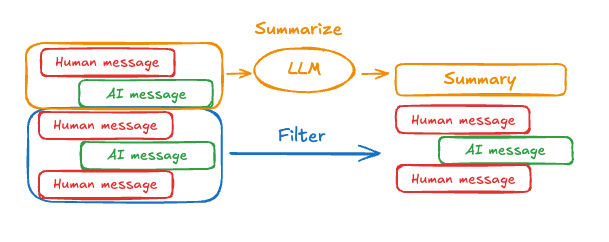
可以使用提示词和编排逻辑对消息历史进行摘要。例如,在 LangGraph 中,你可以扩展 MessagesState 以包含 summary 键:
python
from langgraph.graph import MessagesState
class State(MessagesState):
    summary: str
然后,你可以生成对话历史的摘要,并将任何现有摘要作为下一次摘要的上下文。当 messages 状态键中累积了一定数量的消息后,就可以调用这个 summarize_conversation 节点。
python
def summarize_conversation(state: State):

    # 首先,我们获取任何现有的摘要
    summary = state.get("summary", "")

    # 创建我们的摘要提示词
    if summary:

        # 摘要已存在
        summary_message = (
            f"This is a summary of the conversation to date: {summary}\n\n"
            "Extend the summary by taking into account the new messages above:"
        )

    else:
        summary_message = "Create a summary of the conversation above:"

    # 将提示词添加到历史中
    messages = state["messages"] + [HumanMessage(content=summary_message)]
    response = model.invoke(messages)

    # 删除除最近 2 条消息外的所有消息
    delete_messages = [RemoveMessage(id=m.id) for m in state["messages"][:-2]]
    return {"summary": response.content, "messages": delete_messages}
可以使用提示词和编排逻辑对消息历史进行摘要。例如,在 LangGraph 中,你可以在状态中与 messages 键一起包含一个 summary 键:
typescript
import { StateSchema, MessagesValue, GraphNode } from "@langchain/langgraph";
import { z } from "zod/v4";

const State = new StateSchema({
  messages: MessagesValue,
  summary: z.string().optional(),
});
然后,你可以生成对话历史的摘要,并将任何现有摘要作为下一次摘要的上下文。当 messages 状态键中累积了一定数量的消息后,就可以调用这个 summarizeConversation 节点。
typescript
import { RemoveMessage, HumanMessage } from "@langchain/core/messages";

const summarizeConversation: GraphNode<typeof State> = async (state) => {
  // 首先,我们获取任何现有的摘要
  const summary = state.summary || "";

  // 创建我们的摘要提示词
  let summaryMessage: string;
  if (summary) {
    // 摘要已存在
    summaryMessage =
      `This is a summary of the conversation to date: ${summary}\n\n` +
      "Extend the summary by taking into account the new messages above:";
  } else {
    summaryMessage = "Create a summary of the conversation above:";
  }

  // 将提示词添加到历史中
  const messages = [
    ...state.messages,
    new HumanMessage({ content: summaryMessage })
  ];
  const response = await model.invoke(messages);

  // 删除除最近 2 条消息外的所有消息
  const deleteMessages = state.messages
    .slice(0, -2)
    .map(m => new RemoveMessage({ id: m.id }));

  return {
    summary: response.content,
    messages: deleteMessages
  };
};
完整示例:摘要化消息
python
from typing import Any, TypedDict

from langchain.chat_models import init_chat_model
from langchain.messages import AnyMessage
from langchain_core.messages.utils import count_tokens_approximately
from langgraph.graph import StateGraph, START, MessagesState
from langgraph.checkpoint.memory import InMemorySaver
from langmem.short_term import SummarizationNode, RunningSummary

model = init_chat_model("claude-sonnet-4-6")
summarization_model = model.bind(max_tokens=128)

class State(MessagesState):
    context: dict[str, RunningSummary]

class LLMInputState(TypedDict):
    summarized_messages: list[AnyMessage]
    context: dict[str, RunningSummary]

summarization_node = SummarizationNode(
    token_counter=count_tokens_approximately,
    model=summarization_model,
    max_tokens=256,
    max_tokens_before_summary=256,
    max_summary_tokens=128,
)

def call_model(state: LLMInputState):
    response = model.invoke(state["summarized_messages"])
    return {"messages": [response]}

checkpointer = InMemorySaver()
builder = StateGraph(State)
builder.add_node(call_model)
builder.add_node("summarize", summarization_node)
builder.add_edge(START, "summarize")
builder.add_edge("summarize", "call_model")
graph = builder.compile(checkpointer=checkpointer)

# 调用图
config = {"configurable": {"thread_id": "1"}}
graph.invoke({"messages": "hi, my name is bob"}, config)
graph.invoke({"messages": "write a short poem about cats"}, config)
graph.invoke({"messages": "now do the same but for dogs"}, config)
final_response = graph.invoke({"messages": "what's my name?"}, config)

final_response["messages"][-1].pretty_print()
print("\nSummary:", final_response["context"]["running_summary"].summary)- 我们将在
context字段中持续追踪运行中的摘要
(SummarizationNode 期望如此)。
- 定义仅用于过滤的私有状态
call_model 节点的输入。
- 我们在此传入私有输入状态,以隔离摘要节点返回的消息
================================== Ai Message ==================================

From our conversation, I can see that you introduced yourself as Bob. That's the name you shared with me when we began talking.

Summary: In this conversation, I was introduced to Bob, who then asked me to write a poem about cats. I composed a poem titled "The Mystery of Cats" that captured cats' graceful movements, independent nature, and their special relationship with humans. Bob then requested a similar poem about dogs, so I wrote "The Joy of Dogs," which highlighted dogs' loyalty, enthusiasm, and loving companionship. Both poems were written in a similar style but emphasized the distinct characteristics that make each pet special.
typescript
import { ChatAnthropic } from "@langchain/anthropic";
import {
  SystemMessage,
  HumanMessage,
  RemoveMessage,
} from "@langchain/core/messages";
import {
  StateGraph,
  StateSchema,
  MessagesValue,
  GraphNode,
  ConditionalEdgeRouter,
  START,
  END,
  MemorySaver,
} from "@langchain/langgraph";
import * as z from "zod";

const memory = new MemorySaver();

// 我们将添加一个 `summary` 属性(在 `messages` 键之外)
const GraphState = new StateSchema({
  messages: MessagesValue,
  summary: z.string().default(""),
});

// 我们将使用此模型来进行对话和摘要
const model = new ChatAnthropic({ model: "claude-haiku-4-5-20251001" });

// 定义调用模型的逻辑
const callModel: GraphNode<typeof GraphState> = async (state) => {
  // 如果存在摘要,我们将其作为系统消息添加进来
  const { summary } = state;
  let { messages } = state;
  if (summary) {
    const systemMessage = new SystemMessage({
      id: crypto.randomUUID(),
      content: `Summary of conversation earlier: ${summary}`,
    });
    messages = [systemMessage, ...messages];
  }
  const response = await model.invoke(messages);
  // 我们返回一个对象,因为它会被添加到现有状态中
  return { messages: [response] };
};

// 我们现在定义用于决定是结束还是摘要对话的逻辑
const shouldContinue: ConditionalEdgeRouter<typeof GraphState, "summarize_conversation"> = (state) => {
  const messages = state.messages;
  // 如果消息超过六条,我们就对对话进行摘要
  if (messages.length > 6) {
    return "summarize_conversation";
  }
  // 否则我们可以直接结束
  return END;
};

const summarizeConversation: GraphNode<typeof GraphState> = async (state) => {
  // 首先,我们对对话进行摘要
  const { summary, messages } = state;
  let summaryMessage: string;
  if (summary) {
    // 如果摘要已存在,我们会使用不同的系统提示词
    // 来对它进行摘要
    summaryMessage =
      `This is summary of the conversation to date: ${summary}\n\n` +
      "Extend the summary by taking into account the new messages above:";
  } else {
    summaryMessage = "Create a summary of the conversation above:";
  }

  const allMessages = [
    ...messages,
    new HumanMessage({ id: crypto.randomUUID(), content: summaryMessage }),
  ];

  const response = await model.invoke(allMessages);

  // 我们现在需要删除不再希望显示的消息
  // 我将删除除最后两条消息外的所有消息,但你可以更改这一点
  const deleteMessages = messages
    .slice(0, -2)
    .map((m) => new RemoveMessage({ id: m.id! }));

  if (typeof response.content !== "string") {
    throw new Error("Expected a string response from the model");
  }

  return { summary: response.content, messages: deleteMessages };
};

// 定义一个新图
const workflow = new StateGraph(GraphState)
  // 定义对话节点和摘要节点
  .addNode("conversation", callModel)
  .addNode("summarize_conversation", summarizeConversation)
  // 将入口点设置为 conversation
  .addEdge(START, "conversation")
  // 我们现在添加一条条件边
  .addConditionalEdges(
    // 首先,我们定义起始节点。我们使用 `conversation`。
    // 这意味着这些是 `conversation` 节点被调用后所走的边。
    "conversation",
    // 接下来,我们传入决定下一个调用哪个节点的函数。
    shouldContinue,
  )
  // 我们现在从 `summarize_conversation` 添加一条到 END 的普通边。
  // 这意味着在调用 `summarize_conversation` 之后,我们结束。
  .addEdge("summarize_conversation", END);

// 最后,我们编译它!
const app = workflow.compile({ checkpointer: memory });
管理检查点
你可以查看和删除检查点存储的信息。
查看线程状态
Graph/Functional API
python
config = {
"configurable": {
"thread_id": "1",
# 可选地提供特定检查点的 ID,
# 否则显示最新的检查点
# "checkpoint_id": "1f029ca3-1f5b-6704-8004-820c16b69a5a" #
StateSnapshot(
    values={'messages': [HumanMessage(content="hi! I'm bob"), AIMessage(content='Hi Bob! How are you doing today?), HumanMessage(content="what's my name?"), AIMessage(content='Your name is Bob.')]}, next=(),
    config={'configurable': {'thread_id': '1', 'checkpoint_ns': '', 'checkpoint_id': '1f029ca3-1f5b-6704-8004-820c16b69a5a'}},
    metadata={
        'source': 'loop',
        'writes': {'call_model': {'messages': AIMessage(content='Your name is Bob.')}},
        'step': 4,
        'parents': {},
        'thread_id': '1'
    },
    created_at='2025-05-05T16:01:24.680462+00:00',
    parent_config={'configurable': {'thread_id': '1', 'checkpoint_ns': '', 'checkpoint_id': '1f029ca3-1790-6b0a-8003-baf965b6a38f'}},
    tasks=(),
    interrupts=()
)
Checkpointer API
python
config = {
"configurable": {
"thread_id": "1",
# 可选地提供特定检查点的 ID,
# 否则显示最新的检查点
# "checkpoint_id": "1f029ca3-1f5b-6704-8004-820c16b69a5a" #
CheckpointTuple(
    config={'configurable': {'thread_id': '1', 'checkpoint_ns': '', 'checkpoint_id': '1f029ca3-1f5b-6704-8004-820c16b69a5a'}},
    checkpoint={
        'v': 3,
        'ts': '2025-05-05T16:01:24.680462+00:00',
        'id': '1f029ca3-1f5b-6704-8004-820c16b69a5a',
        'channel_versions': {'__start__': '00000000000000000000000000000005.0.5290678567601859', 'messages': '00000000000000000000000000000006.0.3205149138784782', 'branch:to:call_model': '00000000000000000000000000000006.0.14611156755133758'}, 'versions_seen': {'__input__': {}, '__start__': {'__start__': '00000000000000000000000000000004.0.5736472536395331'}, 'call_model': {'branch:to:call_model': '00000000000000000000000000000005.0.1410174088651449'}},
        'channel_values': {'messages': [HumanMessage(content="hi! I'm bob"), AIMessage(content='Hi Bob! How are you doing today?), HumanMessage(content="what's my name?"), AIMessage(content='Your name is Bob.')]},
    },
    metadata={
        'source': 'loop',
        'writes': {'call_model': {'messages': AIMessage(content='Your name is Bob.')}},
        'step': 4,
        'parents': {},
        'thread_id': '1'
    },
    parent_config={'configurable': {'thread_id': '1', 'checkpoint_ns': '', 'checkpoint_id': '1f029ca3-1790-6b0a-8003-baf965b6a38f'}},
    pending_writes=[]
)
typescript
const config = {
  configurable: {
    thread_id: "1",
    // 可选地提供特定检查点的 ID,
    // 否则显示最新的检查点
    // checkpoint_id: "1f029ca3-1f5b-6704-8004-820c16b69a5a"
  },
};
await graph.getState(config);
{
values: { messages: [HumanMessage(...), AIMessage(...), HumanMessage(...), AIMessage(...)] },
next: [],
config: { configurable: { thread_id: '1', checkpoint_ns: '', checkpoint_id: '1f029ca3-1f5b-6704-8004-820c16b69a5a' } },
metadata: {
source: 'loop',
writes: { call_model: { messages: AIMessage(...) } },
step: 4,
parents: {},
thread_id: '1'
},
createdAt: '2025-05-05T16:01:24.680462+00:00',
parentConfig: { configurable: { thread_id: '1', checkpoint_ns: '', checkpoint_id: '1f029ca3-1790-6b0a-8003-baf965b6a38f' } },
tasks: [],
interrupts: []
}查看线程的历史
Graph/Functional API
python
config = {
    "configurable": {
        "thread_id": "1"
    }
}
list(graph.get_state_history(config))
[
StateSnapshot(
values={'messages': [HumanMessage(content="hi! I'm bob"), AIMessage(content='Hi Bob! How are you doing today? Is there anything I can help you with?'), HumanMessage(content="what's my name?"), AIMessage(content='Your name is Bob.')]},
next=(),
config={'configurable': {'thread_id': '1', 'checkpoint_ns': '', 'checkpoint_id': '1f029ca3-1f5b-6704-8004-820c16b69a5a'}},
metadata={'source': 'loop', 'writes': {'call_model': {'messages': AIMessage(content='Your name is Bob.')}}, 'step': 4, 'parents': {}, 'thread_id': '1'},
created_at='2025-05-05T16:01:24.680462+00:00',
parent_config={'configurable': {'thread_id': '1', 'checkpoint_ns': '', 'checkpoint_id': '1f029ca3-1790-6b0a-8003-baf965b6a38f'}},
tasks=(),
interrupts=()
),
StateSnapshot(
values={'messages': [HumanMessage(content="hi! I'm bob"), AIMessage(content='Hi Bob! How are you doing today? Is there anything I can help you with?'), HumanMessage(content="what's my name?")]},
next=('call_model',),
config={'configurable': {'thread_id': '1', 'checkpoint_ns': '', 'checkpoint_id': '1f029ca3-1790-6b0a-8003-baf965b6a38f'}},
metadata={'source': 'loop', 'writes': None, 'step': 3, 'parents': {}, 'thread_id': '1'},
created_at='2025-05-05T16:01:23.863421+00:00',
parent_config={...}
tasks=(PregelTask(id='8ab4155e-6b15-b885-9ce5-bed69a2c305c', name='call_model', path=('__pregel_pull', 'call_model'), error=None, interrupts=(), state=None, result={'messages': AIMessage(content='Your name is Bob.')}),),
interrupts=()
),
StateSnapshot(
values={'messages': [HumanMessage(content="hi! I'm bob"), AIMessage(content='Hi Bob! How are you doing today? Is there anything I can help you with?')]},
next=('__start__',),
config={...},
metadata={'source': 'input', 'writes': {'__start__': {'messages': [{'role': 'user', 'content': "what's my name?"}]}}, 'step': 2, 'parents': {}, 'thread_id': '1'},
created_at='2025-05-05T16:01:23.863173+00:00',
parent_config={...}
tasks=(PregelTask(id='24ba39d6-6db1-4c9b-f4c5-682aeaf38dcd', name='__start__', path=('__pregel_pull', '__start__'), error=None, interrupts=(), state=None, result={'messages': [{'role': 'user', 'content': "what's my name?"}]}),),
interrupts=()
),
StateSnapshot(
values={'messages': [HumanMessage(content="hi! I'm bob"), AIMessage(content='Hi Bob! How are you doing today? Is there anything I can help you with?')]},
next=(),
config={...},
metadata={'source': 'loop', 'writes': {'call_model': {'messages': AIMessage(content='Hi Bob! How are you doing today? Is there anything I can help you with?')}}, 'step': 1, 'parents': {}, 'thread_id': '1'},
created_at='2025-05-05T16:01:23.862295+00:00',
parent_config={...}
tasks=(),
interrupts=()
),
StateSnapshot(
values={'messages': [HumanMessage(content="hi! I'm bob")]},
next=('call_model',),
config={...},
metadata={'source': 'loop', 'writes': None, 'step': 0, 'parents': {}, 'thread_id': '1'},
created_at='2025-05-05T16:01:22.278960+00:00',
parent_config={...}
tasks=(PregelTask(id='8cbd75e0-3720-b056-04f7-71ac805140a0', name='call_model', path=('__pregel_pull', 'call_model'), error=None, interrupts=(), state=None, result={'messages': AIMessage(content='Hi Bob! How are you doing today? Is there anything I can help you with?')}),),
interrupts=()
),
StateSnapshot(
values={'messages': []},
next=('__start__',),
config={'configurable': {'thread_id': '1', 'checkpoint_ns': '', 'checkpoint_id': '1f029ca3-0870-6ce2-bfff-1f3f14c3e565'}},
metadata={'source': 'input', 'writes': {'__start__': {'messages': [{'role': 'user', 'content': "hi! I'm bob"}]}}, 'step': -1, 'parents': {}, 'thread_id': '1'},
created_at='2025-05-05T16:01:22.277497+00:00',
parent_config=None,
tasks=(PregelTask(id='d458367b-8265-812c-18e2-33001d199ce6', name='__start__', path=('__pregel_pull', '__start__'), error=None, interrupts=(), state=None, result={'messages': [{'role': 'user', 'content': "hi! I'm bob"}]}),),
interrupts=()
)
]Checkpointer API
python
config = {
    "configurable": {
        "thread_id": "1"
    }
}
list(checkpointer.list(config))
[
CheckpointTuple(
config={'configurable': {'thread_id': '1', 'checkpoint_ns': '', 'checkpoint_id': '1f029ca3-1f5b-6704-8004-820c16b69a5a'}},
checkpoint={
'v': 3,
'ts': '2025-05-05T16:01:24.680462+00:00',
'id': '1f029ca3-1f5b-6704-8004-820c16b69a5a',
'channel_versions': {'__start__': '00000000000000000000000000000005.0.5290678567601859', 'messages': '00000000000000000000000000000006.0.3205149138784782', 'branch:to:call_model': '00000000000000000000000000000006.0.14611156755133758'},
'versions_seen': {'__input__': {}, '__start__': {'__start__': '00000000000000000000000000000004.0.5736472536395331'}, 'call_model': {'branch:to:call_model': '00000000000000000000000000000005.0.1410174088651449'}},
'channel_values': {'messages': [HumanMessage(content="hi! I'm bob"), AIMessage(content='Hi Bob! How are you doing today? Is there anything I can help you with?'), HumanMessage(content="what's my name?"), AIMessage(content='Your name is Bob.')]},
},
metadata={'source': 'loop', 'writes': {'call_model': {'messages': AIMessage(content='Your name is Bob.')}}, 'step': 4, 'parents': {}, 'thread_id': '1'},
parent_config={'configurable': {'thread_id': '1', 'checkpoint_ns': '', 'checkpoint_id': '1f029ca3-1790-6b0a-8003-baf965b6a38f'}},
pending_writes=[]
),
CheckpointTuple(
config={'configurable': {'thread_id': '1', 'checkpoint_ns': '', 'checkpoint_id': '1f029ca3-1790-6b0a-8003-baf965b6a38f'}},
checkpoint={
'v': 3,
'ts': '2025-05-05T16:01:23.863421+00:00',
'id': '1f029ca3-1790-6b0a-8003-baf965b6a38f',
'channel_versions': {'__start__': '00000000000000000000000000000005.0.5290678567601859', 'messages': '00000000000000000000000000000006.0.3205149138784782', 'branch:to:call_model': '00000000000000000000000000000006.0.14611156755133758'},
'versions_seen': {'__input__': {}, '__start__': {'__start__': '00000000000000000000000000000004.0.5736472536395331'}, 'call_model': {'branch:to:call_model': '00000000000000000000000000000005.0.1410174088651449'}},
'channel_values': {'messages': [HumanMessage(content="hi! I'm bob"), AIMessage(content='Hi Bob! How are you doing today? Is there anything I can help you with?'), HumanMessage(content="what's my name?")], 'branch:to:call_model': None}
},
metadata={'source': 'loop', 'writes': None, 'step': 3, 'parents': {}, 'thread_id': '1'},
parent_config={...},
pending_writes=[('8ab4155e-6b15-b885-9ce5-bed69a2c305c', 'messages', AIMessage(content='Your name is Bob.'))]
),
CheckpointTuple(
config={...},
checkpoint={
'v': 3,
'ts': '2025-05-05T16:01:23.863173+00:00',
'id': '1f029ca3-1790-616e-8002-9e021694a0cd',
'channel_versions': {'__start__': '00000000000000000000000000000004.0.5736472536395331', 'messages': '00000000000000000000000000000003.0.7056767754077798', 'branch:to:call_model': '00000000000000000000000000000003.0.22059023329132854'},
'versions_seen': {'__input__': {}, '__start__': {'__start__': '00000000000000000000000000000001.0.7040775356287469'}, 'call_model': {'branch:to:call_model': '00000000000000000000000000000002.0.9300422176788571'}},
'channel_values': {'__start__': {'messages': [{'role': 'user', 'content': "what's my name?"}]}, 'messages': [HumanMessage(content="hi! I'm bob"), AIMessage(content='Hi Bob! How are you doing today? Is there anything I can help you with?')]}
},
metadata={'source': 'input', 'writes': {'__start__': {'messages': [{'role': 'user', 'content': "what's my name?"}]}}, 'step': 2, 'parents': {}, 'thread_id': '1'},
parent_config={...},
pending_writes=[('24ba39d6-6db1-4c9b-f4c5-682aeaf38dcd', 'messages', [{'role': 'user', 'content': "what's my name?"}]), ('24ba39d6-6db1-4c9b-f4c5-682aeaf38dcd', 'branch:to:call_model', None)]
),
CheckpointTuple(
config={...},
checkpoint={
'v': 3,
'ts': '2025-05-05T16:01:23.862295+00:00',
'id': '1f029ca3-178d-6f54-8001-d7b180db0c89',
'channel_versions': {'__start__': '00000000000000000000000000000002.0.18673090920108737', 'messages': '00000000000000000000000000000003.0.7056767754077798', 'branch:to:call_model': '00000000000000000000000000000003.0.22059023329132854'},
'versions_seen': {'__input__': {}, '__start__': {'__start__': '00000000000000000000000000000001.0.7040775356287469'}, 'call_model': {'branch:to:call_model': '00000000000000000000000000000002.0.9300422176788571'}},
'channel_values': {'messages': [HumanMessage(content="hi! I'm bob"), AIMessage(content='Hi Bob! How are you doing today? Is there anything I can help you with?')]}
},
metadata={'source': 'loop', 'writes': {'call_model': {'messages': AIMessage(content='Hi Bob! How are you doing today? Is there anything I can help you with?')}}, 'step': 1, 'parents': {}, 'thread_id': '1'},
parent_config={...},
pending_writes=[]
),
CheckpointTuple(
config={...},
checkpoint={
'v': 3,
'ts': '2025-05-05T16:01:22.278960+00:00',
'id': '1f029ca3-0874-6612-8000-339f2abc83b1',
'channel_versions': {'__start__': '00000000000000000000000000000002.0.18673090920108737', 'messages': '00000000000000000000000000000002.0.30296526818059655', 'branch:to:call_model': '00000000000000000000000000000002.0.9300422176788571'},
'versions_seen': {'__input__': {}, '__start__': {'__start__': '00000000000000000000000000000001.0.7040775356287469'}},
'channel_values': {'messages': [HumanMessage(content="hi! I'm bob")], 'branch:to:call_model': None}
},
metadata={'source': 'loop', 'writes': None, 'step': 0, 'parents': {}, 'thread_id': '1'},
parent_config={...},
pending_writes=[('8cbd75e0-3720-b056-04f7-71ac805140a0', 'messages', AIMessage(content='Hi Bob! How are you doing today? Is there anything I can help you with?'))]
),
CheckpointTuple(
config={'configurable': {'thread_id': '1', 'checkpoint_ns': '', 'checkpoint_id': '1f029ca3-0870-6ce2-bfff-1f3f14c3e565'}},
checkpoint={
'v': 3,
'ts': '2025-05-05T16:01:22.277497+00:00',
'id': '1f029ca3-0870-6ce2-bfff-1f3f14c3e565',
'channel_versions': {'__start__': '00000000000000000000000000000001.0.7040775356287469'},
'versions_seen': {'__input__': {}},
'channel_values': {'__start__': {'messages': [{'role': 'user', 'content': "hi! I'm bob"}]}}
},
metadata={'source': 'input', 'writes': {'__start__': {'messages': [{'role': 'user', 'content': "hi! I'm bob"}]}}, 'step': -1, 'parents': {}, 'thread_id': '1'},
parent_config=None,
pending_writes=[('d458367b-8265-812c-18e2-33001d199ce6', 'messages', [{'role': 'user', 'content': "hi! I'm bob"}]), ('d458367b-8265-812c-18e2-33001d199ce6', 'branch:to:call_model', None)]
)
]typescript
const config = {
  configurable: {
    thread_id: "1",
  },
};

const history = [];
for await (const state of graph.getStateHistory(config)) {
  history.push(state);
}
删除线程的所有检查点
python
thread_id = "1"
checkpointer.delete_thread(thread_id)
typescript
const threadId = "1";
await checkpointer.deleteThread(threadId);
数据库管理
如果你使用任何由数据库支持的持久化实现(如 Postgres、Redis 或 Oracle)来存储短期和/或长期记忆,你需要运行迁移以设置所需的模式,然后才能在你的数据库中使用它。
按照惯例,大多数数据库特定的库都会在检查点或存储实例上定义一个 setup() 方法来运行所需的迁移。不过,你应该查阅 BaseCheckpointSaver 或 BaseStore 的具体实现,以确认确切的方法名和用法。
我们建议将运行迁移作为一个专门的部署步骤,或者确保它们在服务器启动时运行。