外观
存储让智能体能够跨线程持久化信息,包括用户偏好、累积的知识以及应在单次对话之外保留的事实。与检查点(将完整图状态保存并限定在单个线程内)不同,存储保存的是可从任何线程访问的任意键值数据。
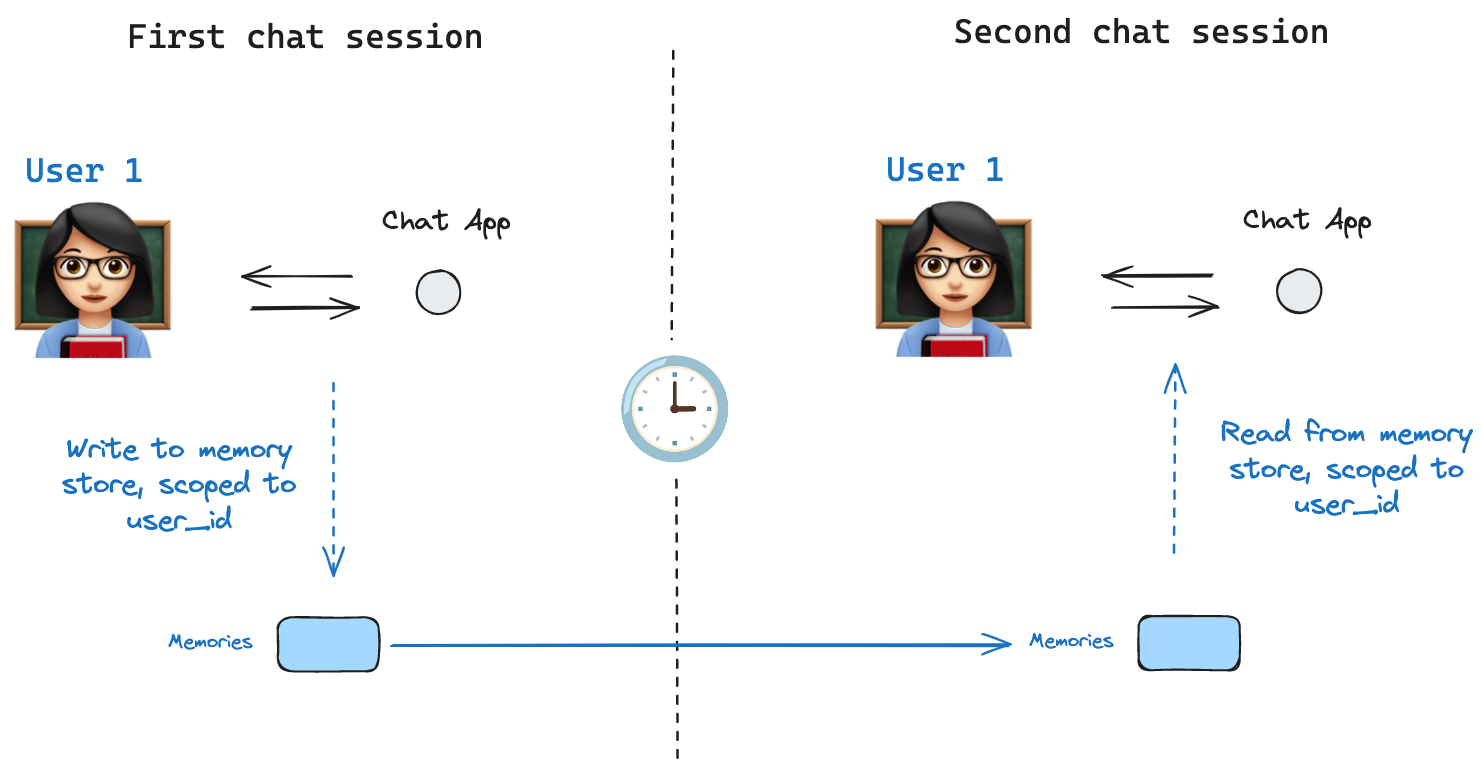
INFO
Agent Server 会自动处理存储 使用 Agent Server 时,你无需手动实现或配置存储。API 会在后台为你处理所有存储基础设施。
INFO
InMemoryStore 适用于开发和测试。生产环境请使用 PostgresStore、MongoDBStore 或 RedisStore 等持久化存储。所有实现都扩展自 BaseStore,这是在节点函数签名中使用的类型注解。
基本用法
以下代码片段在不使用 LangGraph 的情况下单独展示了 InMemoryStore:
python
from langgraph.store.memory import InMemoryStore
store = InMemoryStore()
typescript
import { MemoryStore } from "@langchain/langgraph";

const memoryStore = new MemoryStore();
记忆通过 tuple 进行命名空间划分,在下面的示例中为 (<user_id>, "memories")。命名空间可以是任意长度,可以表示任何内容,不一定是用户特定的。
python
user_id = "1"
namespace_for_memory = (user_id, "memories")
typescript
const userId = "1";
const namespaceForMemory = [userId, "memories"];
使用 store.put 方法将记忆保存到存储中的命名空间。指定如上定义的命名空间,以及记忆的键值对:键只是记忆的唯一标识符(memory_id),值(字典)就是记忆本身。
python
memory_id = str(uuid.uuid4())
memory = {"food_preference" : "I like pizza"}
store.put(namespace_for_memory, memory_id, memory)
typescript
const memoryId = crypto.randomUUID();
const memory = { food_preference: "I like pizza" };
await memoryStore.put(namespaceForMemory, memoryId, memory);
使用 store.search 方法从你的命名空间中读取记忆,该方法以列表形式返回给定用户的记忆,最多返回 limit 参数指定的数量(默认 10)。使用 InMemoryStore 时,条目按插入顺序返回,因此最新的记忆在列表末尾;其他后端可能以不同的顺序排列记忆(参见列出命名空间中的条目)。
python
memories = store.search(namespace_for_memory)
memories[-1].dict()
{'value': {'food_preference': 'I like pizza'},
 'key': '07e0caf4-1631-47b7-b15f-65515d4c1843',
 'namespace': ['1', 'memories'],
 'created_at': '2024-10-02T17:22:31.590602+00:00',
 'updated_at': '2024-10-02T17:22:31.590605+00:00'}
每种记忆类型都是一个具有特定属性的 Python 类(Item)。我们可以通过 .dict 转换以字典形式访问它。
它包含以下属性:
value:此记忆的值(本身是一个字典)key:此记忆在此命名空间中的唯一键namespace:字符串元组,此记忆类型的命名空间
INFO
虽然类型是 tuple[str, ...],但在转换为 JSON 时可能会被序列化为列表(例如 ['1', 'memories'])。
created_at:此记忆创建时的时间戳updated_at:此记忆更新时的时间戳
typescript
const memories = await memoryStore.search(namespaceForMemory);
memories[memories.length - 1];

// {
//   value: { food_preference: 'I like pizza' },
//   key: '07e0caf4-1631-47b7-b15f-65515d4c1843',
//   namespace: ['1', 'memories'],
//   createdAt: '2024-10-02T17:22:31.590602+00:00',
//   updatedAt: '2024-10-02T17:22:31.590605+00:00'
// }
它包含以下属性:
value:此记忆的值key:此记忆在此命名空间中的唯一键namespace:字符串元组,此记忆类型的命名空间
INFO
虽然类型是 tuple,但在转换为 JSON 时可能会被序列化为列表(例如 ['1', 'memories'])。
createdAt:此记忆创建时的时间戳updatedAt:此记忆更新时的时间戳
列出命名空间中的条目
在不带 query 和 filter 的情况下调用 store.search(或异步的 store.asearch)会返回存储在 namespace_prefix 下的条目,最多 limit 个。当你不需要语义排序时,可使用此方法枚举命名空间中的所有内容。
在不带 query 和 filter 的情况下调用 store.search 会返回存储在命名空间前缀下的条目,最多 limit 个。当你不需要语义排序时,可使用此方法枚举命名空间中的所有内容。
python
# 返回存储在 ("alice", "memories") 下的最多 100 项。
items = store.search(("alice", "memories"), limit=100)
ts
// 返回存储在 ["alice", "memories"] 下的最多 100 项。
const items = await store.search(["alice", "memories"], { limit: 100 });
需要注意三种行为:
namespace_prefix按前缀匹配,而不是精确匹配。("alice",)也会返回("alice", "memories")、("alice", "preferences")等前缀下的条目。要限制为单个层级,请传入完整的命名空间,或在客户端按item.namespace过滤返回的条目。- 超出
limit的结果会被静默截断。 没有溢出信号——请将limit设置为高于预期最大值,或使用offset进行分页。 - 默认排序取决于存储后端。
PostgresStore和AsyncPostgresStore按updated_at降序返回结果(最近更新的在前)。InMemoryStore按插入顺序返回结果(最近插入的在最后)。不要依赖跨实现的特定顺序;如果顺序重要,请在客户端按item.updated_at排序。
要分页浏览大型命名空间:
python
page_size = 50
offset = 0
while True:
    page = store.search(("alice", "memories"), limit=page_size, offset=offset)
    if not page:
        break
    for item in page:
        pass
    offset += page_size
要分页浏览大型命名空间:
ts
const pageSize = 50;
let offset = 0;
while (true) {
  const page = await store.search(["alice", "memories"], { limit: pageSize, offset });
  if (page.length === 0) break;
  for (const item of page) {
    // ...
  }
  offset += pageSize;
}
要发现存在哪些命名空间(例如,在列出每个用户的记忆之前对其进行迭代),请使用 store.list_namespaces 或 store.alist_namespaces:
python
# 所有以 ("alice",) 开头的命名空间,最多向下两层。
namespaces = store.list_namespaces(prefix=("alice",), max_depth=2)
要发现存在哪些命名空间(例如,在列出每个用户的记忆之前对其进行迭代),请使用 store.listNamespaces:
ts
// 所有以 ["alice"] 开头的命名空间,最多向下两层。
const namespaces = await store.listNamespaces({ prefix: ["alice"], maxDepth: 2 });
语义搜索
除了简单的检索之外,存储还支持语义搜索,让你能够基于含义而非精确匹配来查找记忆。要启用此功能,请使用嵌入模型配置存储:
python
from langchain.embeddings import init_embeddings

store = InMemoryStore(
    index={
        "embed": init_embeddings("openai:text-embedding-3-small"),  # 嵌入提供方
        "dims": 1536,                              # 嵌入维度
        "fields": ["food_preference", "$"]              # 要嵌入的字段
    }
)
typescript
import { OpenAIEmbeddings } from "@langchain/openai";

const store = new InMemoryStore({
  index: {
    embeddings: new OpenAIEmbeddings({ model: "text-embedding-3-small" }),
    dims: 1536,
    fields: ["food_preference", "$"], // 要嵌入的字段
  },
});
现在搜索时,你可以使用自然语言查询来查找相关的记忆:
python
# 查找关于食物偏好的记忆
# (这可以在将记忆存入存储之后进行)
memories = store.search(
    namespace_for_memory,
    query="What does the user like to eat?",
    limit=3  # 返回前 3 个匹配项
)
typescript
// 查找关于食物偏好的记忆
// (这可以在将记忆存入存储之后进行)
const memories = await store.search(namespaceForMemory, {
  query: "What does the user like to eat?",
  limit: 3, // 返回前 3 个匹配项
});
你可以通过配置 fields 参数,或在存储记忆时指定 index 参数,来控制记忆的哪些部分会被嵌入:
python
# 使用特定的字段进行嵌入存储
store.put(
    namespace_for_memory,
    str(uuid.uuid4()),
    {
        "food_preference": "I love Italian cuisine",
        "context": "Discussing dinner plans"
    },
    index=["food_preference"]  # 只嵌入 "food_preferences" 字段
)

# 不进行嵌入存储(仍可检索,但不可搜索)
store.put(
    namespace_for_memory,
    str(uuid.uuid4()),
    {"system_info": "Last updated: 2024-01-01"},
    index=False
)
typescript
// 使用特定的字段进行嵌入存储
await store.put(
  namespaceForMemory,
  crypto.randomUUID(),
  {
    food_preference: "I love Italian cuisine",
    context: "Discussing dinner plans",
  },
  { index: ["food_preference"] } // 只嵌入 "food_preferences" 字段
);

// 不进行嵌入存储(仍可检索,但不可搜索)
await store.put(
  namespaceForMemory,
  crypto.randomUUID(),
  { system_info: "Last updated: 2024-01-01" },
  { index: false }
);
在 LangGraph 中使用
存储与检查点紧密配合:如上所述,检查点将状态保存到线程中,而存储让你能够存储任意信息以在_线程之间_访问。如下所示,用检查点和存储同时编译图。
python
from dataclasses import dataclass
from langgraph.checkpoint.memory import InMemorySaver

@dataclass
class Context:
    user_id: str

# 我们需要这个,因为我们想启用线程(对话)
checkpointer = InMemorySaver()

# ... 定义图 ...

# 使用检查点和存储编译图
builder = StateGraph(MessagesState, context_schema=Context)
# ... 添加节点和边 ...
graph = builder.compile(checkpointer=checkpointer, store=store)
memoryStore 与检查点紧密配合:如上所述,检查点将状态保存到线程中,而 memoryStore 让你能够存储任意信息以在_线程之间_访问。如下所示,用检查点和 memoryStore 同时编译图。
typescript
import { MemorySaver } from "@langchain/langgraph";

// 我们需要这个,因为我们想启用线程(对话)
const checkpointer = new MemorySaver();

// ... 定义图 ...

// 使用检查点和存储编译图
const graph = workflow.compile({ checkpointer, store: memoryStore });
然后像之前一样用 thread_id 调用图,同时也要传入 user_id,它和之前一样作为该特定用户记忆的命名空间。
python
# 调用图
config = {"configurable": {"thread_id": "1"}}

# 先向 AI 打个招呼
for update in graph.stream(
    {"messages": [{"role": "user", "content": "hi"}]},
    config,
    stream_mode="updates",
    context=Context(user_id="1"),
):
    print(update)
typescript
// 调用图
const userId = "1";
const config = { configurable: { thread_id: "1" }, context: { userId } };

// 先向 AI 打个招呼
for await (const update of await graph.stream(
  { messages: [{ role: "user", content: "hi" }] },
  { ...config, streamMode: "updates" }
)) {
  console.log(update);
}
你可以通过 Runtime 对象从_任何节点_访问存储和 user_id。当你将 Runtime 作为参数添加到节点函数时,LangGraph 会自动注入它。你可以用它来保存记忆:
python
from langgraph.runtime import Runtime
from dataclasses import dataclass

@dataclass
class Context:
    user_id: str

async def update_memory(state: MessagesState, runtime: Runtime[Context]):

    # 从运行时上下文中获取用户 ID
    user_id = runtime.context.user_id

    # 为记忆创建命名空间
    namespace = (user_id, "memories")

    # ... 分析对话并创建新的记忆

    # 创建新的记忆 ID
    memory_id = str(uuid.uuid4())

    # 我们创建一条新记忆
    await runtime.store.aput(namespace, memory_id, {"memory": memory})
你可以使用 runtime 参数从_任何节点_访问存储和 userId。你可以用它来保存记忆:
typescript
import { StateSchema, MessagesValue, Runtime } from "@langchain/langgraph";

const MessagesState = new StateSchema({
  messages: MessagesValue,
});

const updateMemory: GraphNode<typeof MessagesState> = async (state, runtime) => {
  // 从配置中获取用户 ID
  const userId = runtime.context?.user_id;
  if (!userId) throw new Error("User ID is required");

  // 为记忆创建命名空间
  const namespace = [userId, "memories"];

  // ... 分析对话并创建新的记忆
  const memory = "Some memory content";

  // 创建新的记忆 ID
  const memoryId = crypto.randomUUID();

  // 我们创建一条新记忆
  await runtime.store?.put(namespace, memoryId, { memory });
};
你也可以从任何节点访问存储,并使用 store.search 方法获取记忆。记忆以对象列表的形式返回,可以转换为字典。
python
memories[-1].dict()
{'value': {'food_preference': 'I like pizza'},
 'key': '07e0caf4-1631-47b7-b15f-65515d4c1843',
 'namespace': ['1', 'memories'],
 'created_at': '2024-10-02T17:22:31.590602+00:00',
 'updated_at': '2024-10-02T17:22:31.590605+00:00'}
typescript
memories[memories.length - 1];
// {
//   value: { food_preference: 'I like pizza' },
//   key: '07e0caf4-1631-47b7-b15f-65515d4c1843',
//   namespace: ['1', 'memories'],
//   createdAt: '2024-10-02T17:22:31.590602+00:00',
//   updatedAt: '2024-10-02T17:22:31.590605+00:00'
// }
你可以访问这些记忆并在模型调用中使用它们。
python
from dataclasses import dataclass
from langgraph.runtime import Runtime

@dataclass
class Context:
    user_id: str

async def call_model(state: MessagesState, runtime: Runtime[Context]):
    # 从运行时上下文中获取用户 ID
    user_id = runtime.context.user_id

    # 为记忆创建命名空间
    namespace = (user_id, "memories")

    # 根据最近的消息进行搜索
    memories = await runtime.store.asearch(
        namespace,
        query=state["messages"][-1].content,
        limit=3
    )
    info = "\n".join([d.value["memory"] for d in memories])

    # ... 在模型调用中使用记忆
typescript
const callModel: GraphNode<typeof MessagesState> = async (state, runtime) => {
  // 从配置中获取用户 ID
  const userId = runtime.context?.user_id;

  // 为记忆创建命名空间
  const namespace = [userId, "memories"];

  // 根据最近的消息进行搜索
  const memories = await runtime.store?.search(namespace, {
    query: state.messages[state.messages.length - 1].content,
    limit: 3,
  });
  const info = memories.map((d) => d.value.memory).join("\n");

  // ... 在模型调用中使用记忆
};
如果你创建新线程,只要 user_id 相同,你仍然可以访问相同的记忆。
python
# 在新线程上调用图
config = {"configurable": {"thread_id": "2"}}

# 再次打个招呼
for update in graph.stream(
    {"messages": [{"role": "user", "content": "hi, tell me about my memories"}]},
    config,
    stream_mode="updates",
    context=Context(user_id="1"),
):
    print(update)
typescript
// 调用图
const config = { configurable: { thread_id: "2" }, context: { userId: "1" } };

// 再次打个招呼
for await (const update of await graph.stream(
  { messages: [{ role: "user", content: "hi, tell me about my memories" }] },
  { ...config, streamMode: "updates" }
)) {
  console.log(update);
}
当你本地使用 LangSmith(例如在 Studio 中)或托管版本时,基础存储默认即可使用,你无需在图编译期间指定它。不过,要启用语义搜索,你确实需要在 langgraph.json 文件中配置索引设置。例如:
json
{
    ...
    "store": {
        "index": {
            "embed": "openai:text-embeddings-3-small",
            "dims": 1536,
            "fields": ["$"]
        }
    }
}更多细节和配置选项请参阅部署指南。
构建自定义存储
要使用内置实现以外的存储后端,请继承 BaseStore 并实现其必需的方法。内置的 InMemoryStore 是最简单的参考实现。
基础契约
五个异步方法都是必需的。同步对应方法(put、get、delete、search、list_namespaces)是可选的,但建议实现它们以兼容同步图执行。
| 方法 | 描述 |
|---|---|
aput(namespace, key, value, index=None) | 存储或覆盖单个条目 |
aget(namespace, key) | 按键检索单个条目;缺失时返回 None |
adelete(namespace, key) | 删除单个条目 |
asearch(namespace_prefix, *, query=None, filter=None, limit=10, offset=0) | 在命名空间前缀下搜索条目;可选地按语义查询 |
alist_namespaces(*, prefix=None, suffix=None, max_depth=None, limit=100, offset=0) | 列出匹配前缀/后缀模式的命名空间 |
在实现之前请查阅确切的签名:
python
import inspect
from langgraph.store.base import BaseStore
print(inspect.getsource(BaseStore))
命名空间设计
命名空间是字符串元组,例如 ("user_id", "memories")。存储实现必须支持:
- 前缀匹配:
asearch(("alice",))返回("alice",)、("alice", "memories")以及任何其他子命名空间下的条目。 - 精确键查找:
aget(("alice", "memories"), "some-key")必须是 O(1) 或接近 O(1)。
对于 SQL 后端,常见模式如下:
sql
CREATE TABLE store_items (
    namespace   TEXT[] NOT NULL,
    key         TEXT NOT NULL,
    value       JSONB NOT NULL,
    created_at  TIMESTAMPTZ DEFAULT now(),
    updated_at  TIMESTAMPTZ DEFAULT now(),
    PRIMARY KEY (namespace, key)
);

CREATE INDEX ON store_items USING gin(namespace);
序列化
存储值是普通的 Python 字典——不需要特殊的序列化器。使用 json.dumps / json.loads 序列化,或直接使用 JSONB 列。不要存储无法被 JSON 序列化的原始 Python 对象。
语义搜索支持
如果你的后端支持向量搜索,请在 asearch 上实现 query 参数:
- 接受一个
query: str | None参数。 - 当
query不为None时,对其嵌入并按照余弦相似度对结果排序。 - 提供
query时,结果中的每个Item都应包含一个score字段。
如果你的后端不支持向量搜索,请在传入 query 时抛出 NotImplementedError。
测试
目前还没有针对自定义存储的一致性测试套件。以 InMemoryStore 为参考进行测试:
python
import pytest
from langgraph.store.memory import InMemoryStore
from your_module import YourStore

@pytest.fixture
async def store():
    async with YourStore.create() as s:
        yield s

@pytest.fixture
def reference():
    return InMemoryStore()

async def test_put_and_get(store, reference):
    ns = ("test", "ns")
    for s in [store, reference]:
        await s.aput(ns, "k1", {"val": 1})
        item = await s.aget(ns, "k1")
        assert item is not None
        assert item.value == {"val": 1}

async def test_delete(store, reference):
    ns = ("test", "ns")
    for s in [store, reference]:
        await s.aput(ns, "k1", {"val": 1})
        await s.adelete(ns, "k1")
        assert await s.aget(ns, "k1") is None

async def test_search_prefix(store, reference):
    for s in [store, reference]:
        await s.aput(("user", "memories"), "m1", {"text": "likes pizza"})
        results = await s.asearch(("user",))
        assert any(r.key == "m1" for r in results)
后续步骤
- 向 Agent Server 添加自定义存储 —— 部署你的实现
- 检查点 —— 线程范围的状态持久化