外观
本指南回顾常见的工作流和智能体模式。
- 工作流具有预定的代码路径,并被设计为按特定顺序运行。
- 智能体是动态的,它们定义自己的流程和工具使用方式。
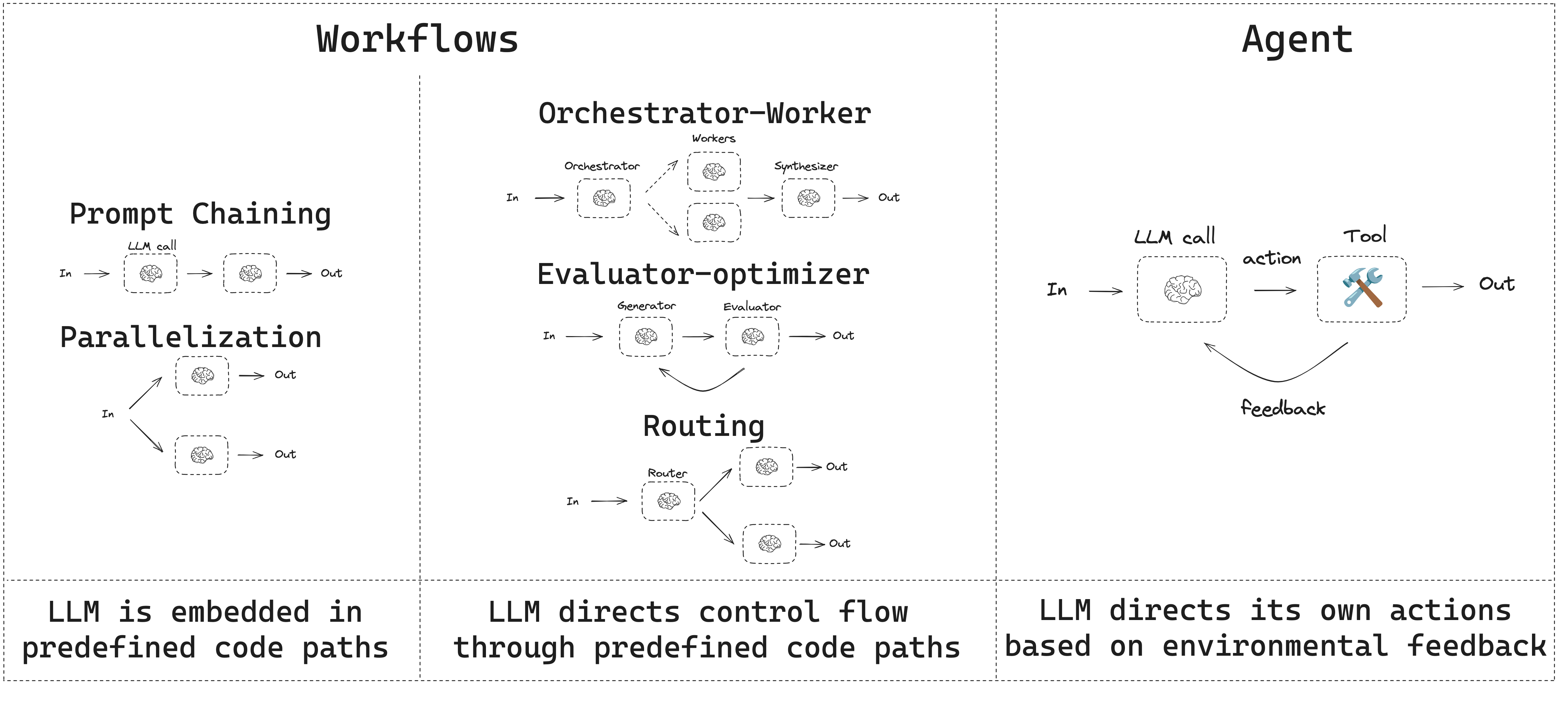
LangGraph 在构建智能体和工作流时提供了多项优势,包括持久化、流式输出,以及对调试和部署的支持。
TIP
使用 LangSmith 追踪并比较这些工作流模式。按照追踪快速入门了解数据如何流经每个步骤。我们还建议你设置 LangSmith Engine,它可以监控你的追踪、发现问题并提出修复建议。
安装
要构建工作流或智能体,你可以使用任何支持结构化输出和工具调用的对话模型。下面的示例使用 Anthropic:
- 安装依赖:
bash
pip install langchain_core langchain-anthropic langgraph- 初始化 LLM:
python
import os
import getpass

from langchain_anthropic import ChatAnthropic

def _set_env(var: str):
    if not os.environ.get(var):
        os.environ[var] = getpass.getpass(f"{var}: ")

_set_env("ANTHROPIC_API_KEY")

llm = ChatAnthropic(model="claude-sonnet-4-6")- 安装依赖
bash
npm install @langchain/langgraph @langchain/corebash
pnpm add @langchain/langgraph @langchain/corebash
yarn add @langchain/langgraph @langchain/corebash
bun add @langchain/langgraph @langchain/core- 初始化 LLM:
typescript
import { ChatAnthropic } from "@langchain/anthropic";

const llm = new ChatAnthropic({
  model: "claude-sonnet-4-6",
  apiKey: "<your_anthropic_key>"
});
LLM 与增强
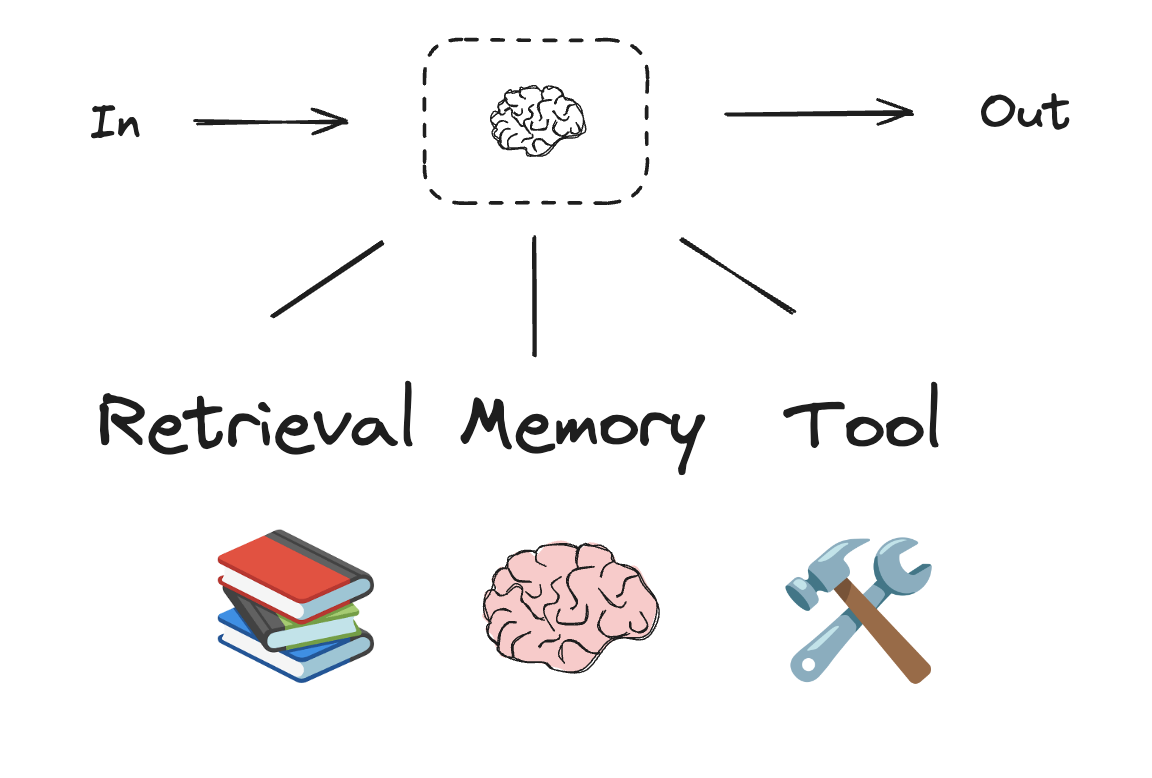
工作流和智能体系统基于 LLM 以及你为它们添加的各种增强。工具调用、结构化输出和短期记忆是定制 LLM 以满足你需求的几种选项。
python
# 结构化输出的 Schema
from pydantic import BaseModel, Field

class SearchQuery(BaseModel):
    search_query: str = Field(None, description="Query that is optimized web search.")
    justification: str = Field(
        None, description="Why this query is relevant to the user's request."
    )

# 用结构化输出的 Schema 增强 LLM
structured_llm = llm.with_structured_output(SearchQuery)

# 调用增强后的 LLM
output = structured_llm.invoke("How does Calcium CT score relate to high cholesterol?")

# 定义一个工具
def multiply(a: int, b: int) -> int:
    return a * b

# 用工具增强 LLM
llm_with_tools = llm.bind_tools([multiply])

# 使用触发工具调用的输入调用 LLM
msg = llm_with_tools.invoke("What is 2 times 3?")

# 获取工具调用
msg.tool_calls
typescript
import * as z from "zod";
import { tool } from "langchain";

// 结构化输出的 Schema
const SearchQuery = z.object({
  search_query: z.string().describe("Query that is optimized web search."),
  justification: z
    .string()
    .describe("Why this query is relevant to the user's request."),
});

// 用结构化输出的 Schema 增强 LLM
const structuredLlm = llm.withStructuredOutput(SearchQuery);

// 调用增强后的 LLM
const output = await structuredLlm.invoke(
  "How does Calcium CT score relate to high cholesterol?"
);

// 定义一个工具
const multiply = tool(
  ({ a, b }) => {
    return a * b;
  },
  {
    name: "multiply",
    description: "Multiply two numbers",
    schema: z.object({
      a: z.number(),
      b: z.number(),
    }),
  }
);

// 用工具增强 LLM
const llmWithTools = llm.bindTools([multiply]);

// 使用触发工具调用的输入调用 LLM
const msg = await llmWithTools.invoke("What is 2 times 3?");

// 获取工具调用
console.log(msg.tool_calls);
提示词链接
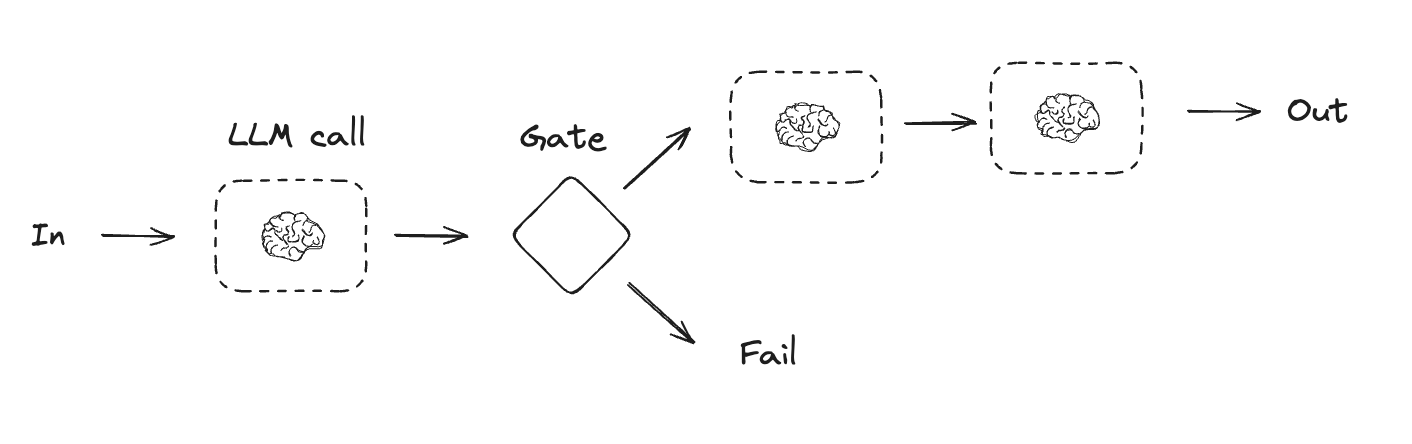
提示词链接是指每次 LLM 调用都处理上一次调用的输出。它通常用于执行可以分解为更小、可验证步骤的定义明确的任务。一些示例包括:
- 将文档翻译成不同的语言
- 验证生成内容的一致性
python
from typing_extensions import TypedDict
from langgraph.graph import StateGraph, START, END
from IPython.display import Image, display

# 图状态
class State(TypedDict):
    topic: str
    joke: str
    improved_joke: str
    final_joke: str

# 节点
def generate_joke(state: State):
    """First LLM call to generate initial joke"""

    msg = llm.invoke(f"Write a short joke about {state['topic']}")
    return {"joke": msg.content}

def check_punchline(state: State):
    """Gate function to check if the joke has a punchline"""

    # 简单检查——笑话中是否包含 "?" 或 "!"
    if "?" in state["joke"] or "!" in state["joke"]:
        return "Pass"
    return "Fail"

def improve_joke(state: State):
    """Second LLM call to improve the joke"""

    msg = llm.invoke(f"Make this joke funnier by adding wordplay: {state['joke']}")
    return {"improved_joke": msg.content}

def polish_joke(state: State):
    """Third LLM call for final polish"""
    msg = llm.invoke(f"Add a surprising twist to this joke: {state['improved_joke']}")
    return {"final_joke": msg.content}

# 构建工作流
workflow = StateGraph(State)

# 添加节点
workflow.add_node("generate_joke", generate_joke)
workflow.add_node("improve_joke", improve_joke)
workflow.add_node("polish_joke", polish_joke)

# 添加边以连接节点
workflow.add_edge(START, "generate_joke")
workflow.add_conditional_edges(
    "generate_joke", check_punchline, {"Fail": "improve_joke", "Pass": END}
)
workflow.add_edge("improve_joke", "polish_joke")
workflow.add_edge("polish_joke", END)

# 编译
chain = workflow.compile()

# 展示工作流
display(Image(chain.get_graph().draw_mermaid_png()))

# 调用
state = chain.invoke({"topic": "cats"})
print("Initial joke:")
print(state["joke"])
print("\n--- --- ---\n")
if "improved_joke" in state:
    print("Improved joke:")
    print(state["improved_joke"])
    print("\n--- --- ---\n")

    print("Final joke:")
    print(state["final_joke"])
else:
    print("Final joke:")
    print(state["joke"])
python
from langgraph.func import entrypoint, task

# 任务
@task
def generate_joke(topic: str):
    """First LLM call to generate initial joke"""
    msg = llm.invoke(f"Write a short joke about {topic}")
    return msg.content

def check_punchline(joke: str):
    """Gate function to check if the joke has a punchline"""
    # 简单检查——笑话中是否包含 "?" 或 "!"
    if "?" in joke or "!" in joke:
        return "Fail"

    return "Pass"

@task
def improve_joke(joke: str):
    """Second LLM call to improve the joke"""
    msg = llm.invoke(f"Make this joke funnier by adding wordplay: {joke}")
    return msg.content

@task
def polish_joke(joke: str):
    """Third LLM call for final polish"""
    msg = llm.invoke(f"Add a surprising twist to this joke: {joke}")
    return msg.content

@entrypoint()
def prompt_chaining_workflow(topic: str):
    original_joke = generate_joke(topic).result()
    if check_punchline(original_joke) == "Pass":
        return original_joke

    improved_joke = improve_joke(original_joke).result()
    return polish_joke(improved_joke).result()

# 调用
stream = prompt_chaining_workflow.stream_events("cats", version="v3")
for snapshot in stream.values:
    print(snapshot)
    print("\n")
typescript
import { StateGraph, StateSchema, GraphNode, ConditionalEdgeRouter } from "@langchain/langgraph";
import { z } from "zod/v4";

// 图状态
const State = new StateSchema({
  topic: z.string(),
  joke: z.string(),
  improvedJoke: z.string(),
  finalJoke: z.string(),
});

// 定义节点函数

// 第一次 LLM 调用,生成初始笑话
const generateJoke: GraphNode<typeof State> = async (state) => {
  const msg = await llm.invoke(`Write a short joke about ${state.topic}`);
  return { joke: msg.content };
};

// 门控函数,检查笑话是否有笑点
const checkPunchline: ConditionalEdgeRouter<typeof State, "improveJoke"> = (state) => {
  // 简单检查——笑话中是否包含 "?" 或 "!"
  if (state.joke?.includes("?") || state.joke?.includes("!")) {
    return "Pass";
  }
  return "Fail";
};

// 第二次 LLM 调用,改进笑话
const improveJoke: GraphNode<typeof State> = async (state) => {
  const msg = await llm.invoke(
    `Make this joke funnier by adding wordplay: ${state.joke}`
  );
  return { improvedJoke: msg.content };
};

// 第三次 LLM 调用,进行最终润色
const polishJoke: GraphNode<typeof State> = async (state) => {
  const msg = await llm.invoke(
    `Add a surprising twist to this joke: ${state.improvedJoke}`
  );
  return { finalJoke: msg.content };
};

// 构建工作流
const chain = new StateGraph(State)
  .addNode("generateJoke", generateJoke)
  .addNode("improveJoke", improveJoke)
  .addNode("polishJoke", polishJoke)
  .addEdge("__start__", "generateJoke")
  .addConditionalEdges("generateJoke", checkPunchline, {
    Pass: "improveJoke",
    Fail: "__end__"
  })
  .addEdge("improveJoke", "polishJoke")
  .addEdge("polishJoke", "__end__")
  .compile();

// 调用
const state = await chain.invoke({ topic: "cats" });
console.log("Initial joke:");
console.log(state.joke);
console.log("\n--- --- ---\n");
if (state.improvedJoke !== undefined) {
  console.log("Improved joke:");
  console.log(state.improvedJoke);
  console.log("\n--- --- ---\n");

  console.log("Final joke:");
  console.log(state.finalJoke);
} else {
  console.log("Joke failed quality gate - no punchline detected!");
}
typescript
import { task, entrypoint } from "@langchain/langgraph";

// 任务

// 第一次 LLM 调用,生成初始笑话
const generateJoke = task("generateJoke", async (topic: string) => {
  const msg = await llm.invoke(`Write a short joke about ${topic}`);
  return msg.content;
});

// 门控函数,检查笑话是否有笑点
function checkPunchline(joke: string) {
  // 简单检查——笑话中是否包含 "?" 或 "!"
  if (joke.includes("?") || joke.includes("!")) {
    return "Pass";
  }
  return "Fail";
}

  // 第二次 LLM 调用,改进笑话
const improveJoke = task("improveJoke", async (joke: string) => {
  const msg = await llm.invoke(
    `Make this joke funnier by adding wordplay: ${joke}`
  );
  return msg.content;
});

// 第三次 LLM 调用,进行最终润色
const polishJoke = task("polishJoke", async (joke: string) => {
  const msg = await llm.invoke(
    `Add a surprising twist to this joke: ${joke}`
  );
  return msg.content;
});

const workflow = entrypoint(
  "jokeMaker",
  async (topic: string) => {
    const originalJoke = await generateJoke(topic);
    if (checkPunchline(originalJoke) === "Pass") {
      return originalJoke;
    }
    const improvedJoke = await improveJoke(originalJoke);
    const polishedJoke = await polishJoke(improvedJoke);
    return polishedJoke;
  }
);

const stream = await workflow.streamEvents("cats", { version: "v3" });
for await (const snapshot of stream.values) {
  console.log(snapshot);
}
并行化
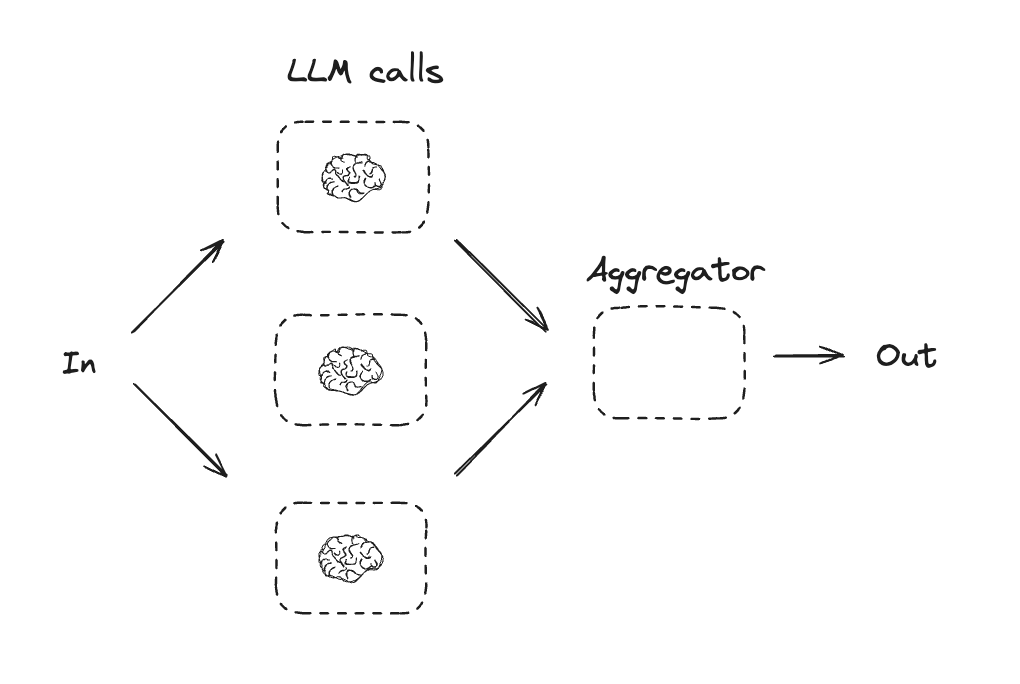
通过并行化,LLM 可以同时处理一个任务。这可以通过同时运行多个独立的子任务,或多次运行同一任务以检查不同的输出来实现。并行化通常用于:
- 拆分子任务并并行运行,从而提高速度
- 多次运行任务以检查不同的输出,从而提高信心
一些示例包括:
- 运行一个处理文档关键词的子任务,以及第二个检查格式错误的子任务
- 多次运行一个根据不同标准(如引用数量、使用的来源数量以及来源质量)对文档进行准确性评分的任务
python
# 图状态
class State(TypedDict):
    topic: str
    joke: str
    story: str
    poem: str
    combined_output: str

# 节点
def call_llm_1(state: State):
    """First LLM call to generate initial joke"""

    msg = llm.invoke(f"Write a joke about {state['topic']}")
    return {"joke": msg.content}

def call_llm_2(state: State):
    """Second LLM call to generate story"""

    msg = llm.invoke(f"Write a story about {state['topic']}")
    return {"story": msg.content}

def call_llm_3(state: State):
    """Third LLM call to generate poem"""

    msg = llm.invoke(f"Write a poem about {state['topic']}")
    return {"poem": msg.content}

def aggregator(state: State):
    """Combine the joke, story and poem into a single output"""

    combined = f"Here's a story, joke, and poem about {state['topic']}!\n\n"
    combined += f"STORY:\n{state['story']}\n\n"
    combined += f"JOKE:\n{state['joke']}\n\n"
    combined += f"POEM:\n{state['poem']}"
    return {"combined_output": combined}

# 构建工作流
parallel_builder = StateGraph(State)

# 添加节点
parallel_builder.add_node("call_llm_1", call_llm_1)
parallel_builder.add_node("call_llm_2", call_llm_2)
parallel_builder.add_node("call_llm_3", call_llm_3)
parallel_builder.add_node("aggregator", aggregator)

# 添加边以连接节点
parallel_builder.add_edge(START, "call_llm_1")
parallel_builder.add_edge(START, "call_llm_2")
parallel_builder.add_edge(START, "call_llm_3")
parallel_builder.add_edge("call_llm_1", "aggregator")
parallel_builder.add_edge("call_llm_2", "aggregator")
parallel_builder.add_edge("call_llm_3", "aggregator")
parallel_builder.add_edge("aggregator", END)
parallel_workflow = parallel_builder.compile()

# 展示工作流
display(Image(parallel_workflow.get_graph().draw_mermaid_png()))

# 调用
state = parallel_workflow.invoke({"topic": "cats"})
print(state["combined_output"])
python
@task
def call_llm_1(topic: str):
    """First LLM call to generate initial joke"""
    msg = llm.invoke(f"Write a joke about {topic}")
    return msg.content

@task
def call_llm_2(topic: str):
    """Second LLM call to generate story"""
    msg = llm.invoke(f"Write a story about {topic}")
    return msg.content

@task
def call_llm_3(topic):
    """Third LLM call to generate poem"""
    msg = llm.invoke(f"Write a poem about {topic}")
    return msg.content

@task
def aggregator(topic, joke, story, poem):
    """Combine the joke and story into a single output"""

    combined = f"Here's a story, joke, and poem about {topic}!\n\n"
    combined += f"STORY:\n{story}\n\n"
    combined += f"JOKE:\n{joke}\n\n"
    combined += f"POEM:\n{poem}"
    return combined

# 构建工作流
@entrypoint()
def parallel_workflow(topic: str):
    joke_fut = call_llm_1(topic)
    story_fut = call_llm_2(topic)
    poem_fut = call_llm_3(topic)
    return aggregator(
        topic, joke_fut.result(), story_fut.result(), poem_fut.result()
    ).result()

# 调用
stream = parallel_workflow.stream_events("cats", version="v3")
for snapshot in stream.values:
    print(snapshot)
    print("\n")
typescript
import { StateGraph, StateSchema, GraphNode } from "@langchain/langgraph";
import * as z from "zod";

// 图状态
const State = new StateSchema({
  topic: z.string(),
  joke: z.string(),
  story: z.string(),
  poem: z.string(),
  combinedOutput: z.string(),
});

// 节点
// 第一次 LLM 调用,生成初始笑话
const callLlm1: GraphNode<typeof State> = async (state) => {
  const msg = await llm.invoke(`Write a joke about ${state.topic}`);
  return { joke: msg.content };
};

// 第二次 LLM 调用,生成故事
const callLlm2: GraphNode<typeof State> = async (state) => {
  const msg = await llm.invoke(`Write a story about ${state.topic}`);
  return { story: msg.content };
};

// 第三次 LLM 调用,生成诗
const callLlm3: GraphNode<typeof State> = async (state) => {
  const msg = await llm.invoke(`Write a poem about ${state.topic}`);
  return { poem: msg.content };
};

// 将笑话、故事和诗合并为单个输出
const aggregator: GraphNode<typeof State> = async (state) => {
  const combined = `Here's a story, joke, and poem about ${state.topic}!\n\n` +
    `STORY:\n${state.story}\n\n` +
    `JOKE:\n${state.joke}\n\n` +
    `POEM:\n${state.poem}`;
  return { combinedOutput: combined };
};

// 构建工作流
const parallelWorkflow = new StateGraph(State)
  .addNode("callLlm1", callLlm1)
  .addNode("callLlm2", callLlm2)
  .addNode("callLlm3", callLlm3)
  .addNode("aggregator", aggregator)
  .addEdge("__start__", "callLlm1")
  .addEdge("__start__", "callLlm2")
  .addEdge("__start__", "callLlm3")
  .addEdge("callLlm1", "aggregator")
  .addEdge("callLlm2", "aggregator")
  .addEdge("callLlm3", "aggregator")
  .addEdge("aggregator", "__end__")
  .compile();

// 调用
const result = await parallelWorkflow.invoke({ topic: "cats" });
console.log(result.combinedOutput);
typescript
import { task, entrypoint } from "@langchain/langgraph";

// 任务

// 第一次 LLM 调用,生成初始笑话
const callLlm1 = task("generateJoke", async (topic: string) => {
  const msg = await llm.invoke(`Write a joke about ${topic}`);
  return msg.content;
});

// 第二次 LLM 调用,生成故事
const callLlm2 = task("generateStory", async (topic: string) => {
  const msg = await llm.invoke(`Write a story about ${topic}`);
  return msg.content;
});

// 第三次 LLM 调用,生成诗
const callLlm3 = task("generatePoem", async (topic: string) => {
  const msg = await llm.invoke(`Write a poem about ${topic}`);
  return msg.content;
});

// 合并输出
const aggregator = task("aggregator", async (params: {
  topic: string;
  joke: string;
  story: string;
  poem: string;
}) => {
  const { topic, joke, story, poem } = params;
  return `Here's a story, joke, and poem about ${topic}!\n\n` +
    `STORY:\n${story}\n\n` +
    `JOKE:\n${joke}\n\n` +
    `POEM:\n${poem}`;
});

// 构建工作流
const workflow = entrypoint(
  "parallelWorkflow",
  async (topic: string) => {
    const [joke, story, poem] = await Promise.all([
      callLlm1(topic),
      callLlm2(topic),
      callLlm3(topic),
    ]);

    return aggregator({ topic, joke, story, poem });
  }
);

// 调用
const stream = await workflow.streamEvents("cats", { version: "v3" });
for await (const snapshot of stream.values) {
  console.log(snapshot);
}
路由
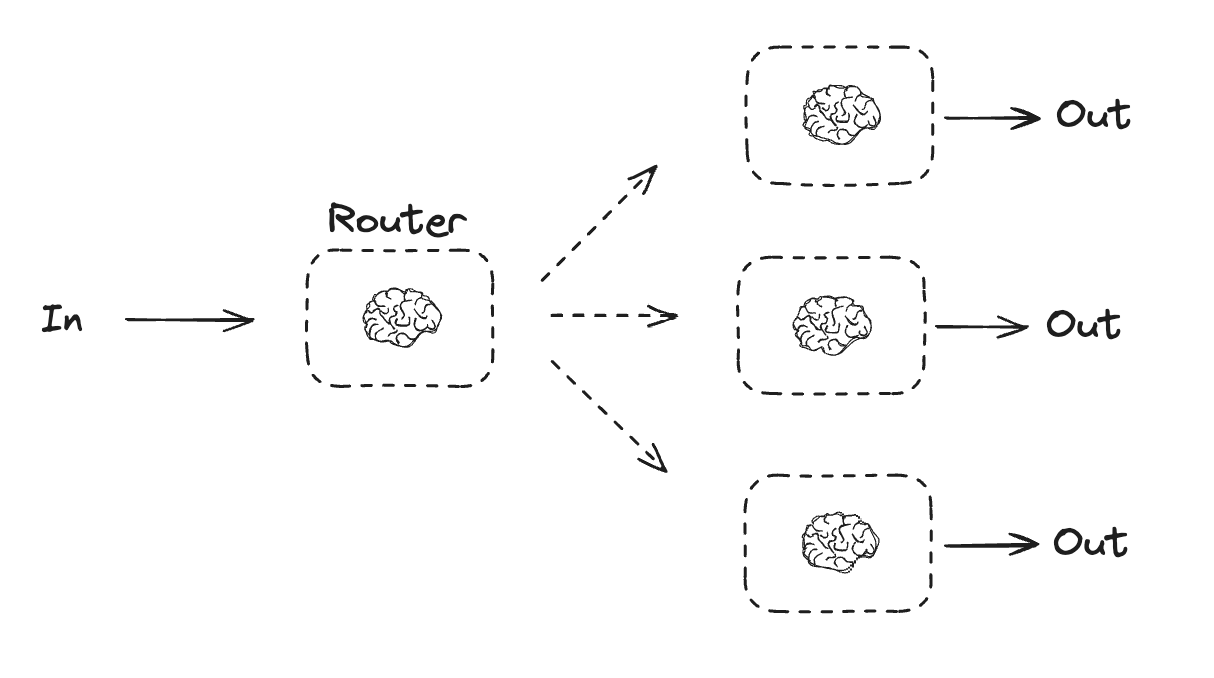
路由工作流处理输入,然后将它们导向特定于上下文的 task。这允许你为复杂任务定义专门的流程。例如,一个用于回答产品相关问题的构建工作流可能首先处理问题类型,然后将请求路由到定价、退款、退货等特定流程。
python
from typing_extensions import Literal
from langchain.messages import HumanMessage, SystemMessage

# 用作路由逻辑的结构化输出 Schema
class Route(BaseModel):
    step: Literal["poem", "story", "joke"] = Field(
        None, description="The next step in the routing process"
    )

# 用结构化输出的 Schema 增强 LLM
router = llm.with_structured_output(Route)

# 状态
class State(TypedDict):
    input: str
    decision: str
    output: str

# 节点
def llm_call_1(state: State):
    """Write a story"""

    result = llm.invoke(state["input"])
    return {"output": result.content}

def llm_call_2(state: State):
    """Write a joke"""

    result = llm.invoke(state["input"])
    return {"output": result.content}

def llm_call_3(state: State):
    """Write a poem"""

    result = llm.invoke(state["input"])
    return {"output": result.content}

def llm_call_router(state: State):
    """Route the input to the appropriate node"""

    # 运行带结构化输出的增强 LLM,作为路由逻辑
    decision = router.invoke(
        [
            SystemMessage(
                content="Route the input to story, joke, or poem based on the user's request."
            ),
            HumanMessage(content=state["input"]),
        ]
    )

    return {"decision": decision.step}

# 条件边函数,路由到相应的节点
def route_decision(state: State):
    # 返回你接下来要访问的节点名称
    if state["decision"] == "story":
        return "llm_call_1"
    elif state["decision"] == "joke":
        return "llm_call_2"
    elif state["decision"] == "poem":
        return "llm_call_3"

# 构建工作流
router_builder = StateGraph(State)

# 添加节点
router_builder.add_node("llm_call_1", llm_call_1)
router_builder.add_node("llm_call_2", llm_call_2)
router_builder.add_node("llm_call_3", llm_call_3)
router_builder.add_node("llm_call_router", llm_call_router)

# 添加边以连接节点
router_builder.add_edge(START, "llm_call_router")
router_builder.add_conditional_edges(
    "llm_call_router",
    route_decision,
    {  # route_decision 返回的名称 : 下一个要访问的节点名称
        "llm_call_1": "llm_call_1",
        "llm_call_2": "llm_call_2",
        "llm_call_3": "llm_call_3",
    },
)
router_builder.add_edge("llm_call_1", END)
router_builder.add_edge("llm_call_2", END)
router_builder.add_edge("llm_call_3", END)

# 编译工作流
router_workflow = router_builder.compile()

# 展示工作流
display(Image(router_workflow.get_graph().draw_mermaid_png()))

# 调用
state = router_workflow.invoke({"input": "Write me a joke about cats"})
print(state["output"])
python
from typing_extensions import Literal
from pydantic import BaseModel
from langchain.messages import HumanMessage, SystemMessage

# 用作路由逻辑的结构化输出 Schema
class Route(BaseModel):
    step: Literal["poem", "story", "joke"] = Field(
        None, description="The next step in the routing process"
    )

# 用结构化输出的 Schema 增强 LLM
router = llm.with_structured_output(Route)

@task
def llm_call_1(input_: str):
    """Write a story"""
    result = llm.invoke(input_)
    return result.content

@task
def llm_call_2(input_: str):
    """Write a joke"""
    result = llm.invoke(input_)
    return result.content

@task
def llm_call_3(input_: str):
    """Write a poem"""
    result = llm.invoke(input_)
    return result.content

def llm_call_router(input_: str):
    """Route the input to the appropriate node"""
    # 运行带结构化输出的增强 LLM,作为路由逻辑
    decision = router.invoke(
        [
            SystemMessage(
                content="Route the input to story, joke, or poem based on the user's request."
            ),
            HumanMessage(content=input_),
        ]
    )
    return decision.step

# 创建工作流
@entrypoint()
def router_workflow(input_: str):
    next_step = llm_call_router(input_)
    if next_step == "story":
        llm_call = llm_call_1
    elif next_step == "joke":
        llm_call = llm_call_2
    elif next_step == "poem":
        llm_call = llm_call_3

    return llm_call(input_).result()

# 调用
stream = router_workflow.stream_events("Write me a joke about cats", version="v3")
for snapshot in stream.values:
    print(snapshot)
    print("\n")
typescript
import { StateGraph, StateSchema, GraphNode, ConditionalEdgeRouter } from "@langchain/langgraph";
import * as z from "zod";

// 用作路由逻辑的结构化输出 Schema
const routeSchema = z.object({
  step: z.enum(["poem", "story", "joke"]).describe(
    "The next step in the routing process"
  ),
});

// 用结构化输出的 Schema 增强 LLM
const router = llm.withStructuredOutput(routeSchema);

// 图状态
const State = new StateSchema({
  input: z.string(),
  decision: z.string(),
  output: z.string(),
});

// 节点
// 写一个故事
const llmCall1: GraphNode<typeof State> = async (state) => {
  const result = await llm.invoke([{
    role: "system",
    content: "You are an expert storyteller.",
  }, {
    role: "user",
    content: state.input
  }]);
  return { output: result.content };
};

// 写一个笑话
const llmCall2: GraphNode<typeof State> = async (state) => {
  const result = await llm.invoke([{
    role: "system",
    content: "You are an expert comedian.",
  }, {
    role: "user",
    content: state.input
  }]);
  return { output: result.content };
};

// 写一首诗
const llmCall3: GraphNode<typeof State> = async (state) => {
  const result = await llm.invoke([{
    role: "system",
    content: "You are an expert poet.",
  }, {
    role: "user",
    content: state.input
  }]);
  return { output: result.content };
};

const llmCallRouter: GraphNode<typeof State> = async (state) => {
  // 将输入路由到相应的节点
  const decision = await router.invoke([
    {
      role: "system",
      content: "Route the input to story, joke, or poem based on the user's request."
    },
    {
      role: "user",
      content: state.input
    },
  ]);

  return { decision: decision.step };
};

// 条件边函数,路由到相应的节点
const routeDecision: ConditionalEdgeRouter<typeof State, "llmCall1" | "llmCall2" | "llmCall3"> = (state) => {
  // 返回你接下来要访问的节点名称
  if (state.decision === "story") {
    return "llmCall1";
  } else if (state.decision === "joke") {
    return "llmCall2";
  } else {
    return "llmCall3";
  }
};

// 构建工作流
const routerWorkflow = new StateGraph(State)
  .addNode("llmCall1", llmCall1)
  .addNode("llmCall2", llmCall2)
  .addNode("llmCall3", llmCall3)
  .addNode("llmCallRouter", llmCallRouter)
  .addEdge("__start__", "llmCallRouter")
  .addConditionalEdges(
    "llmCallRouter",
    routeDecision,
    ["llmCall1", "llmCall2", "llmCall3"],
  )
  .addEdge("llmCall1", "__end__")
  .addEdge("llmCall2", "__end__")
  .addEdge("llmCall3", "__end__")
  .compile();

// 调用
const state = await routerWorkflow.invoke({
  input: "Write me a joke about cats"
});
console.log(state.output);
typescript
import * as z from "zod";
import { task, entrypoint } from "@langchain/langgraph";

// 用作路由逻辑的结构化输出 Schema
const routeSchema = z.object({
  step: z.enum(["poem", "story", "joke"]).describe(
    "The next step in the routing process"
  ),
});

// 用结构化输出的 Schema 增强 LLM
const router = llm.withStructuredOutput(routeSchema);

// 任务
// 写一个故事
const llmCall1 = task("generateStory", async (input: string) => {
  const result = await llm.invoke([{
    role: "system",
    content: "You are an expert storyteller.",
  }, {
    role: "user",
    content: input
  }]);
  return result.content;
});

// 写一个笑话
const llmCall2 = task("generateJoke", async (input: string) => {
  const result = await llm.invoke([{
    role: "system",
    content: "You are an expert comedian.",
  }, {
    role: "user",
    content: input
  }]);
  return result.content;
});

// 写一首诗
const llmCall3 = task("generatePoem", async (input: string) => {
  const result = await llm.invoke([{
    role: "system",
    content: "You are an expert poet.",
  }, {
    role: "user",
    content: input
  }]);
  return result.content;
});

// 将输入路由到相应的节点
const llmCallRouter = task("router", async (input: string) => {
  const decision = await router.invoke([
    {
      role: "system",
      content: "Route the input to story, joke, or poem based on the user's request."
    },
    {
      role: "user",
      content: input
    },
  ]);
  return decision.step;
});

// 构建工作流
const workflow = entrypoint(
  "routerWorkflow",
  async (input: string) => {
    const nextStep = await llmCallRouter(input);

    let llmCall;
    if (nextStep === "story") {
      llmCall = llmCall1;
    } else if (nextStep === "joke") {
      llmCall = llmCall2;
    } else if (nextStep === "poem") {
      llmCall = llmCall3;
    }

    const finalResult = await llmCall(input);
    return finalResult;
  }
);

// 调用
const stream = await workflow.streamEvents("Write me a joke about cats", { version: "v3" });
for await (const snapshot of stream.values) {
  console.log(snapshot);
}
编排器-工作器
在编排器-工作器配置中,编排器:
- 将 task 分解为子任务
- 将子任务委托给工作器
- 将工作器的输出综合为最终结果
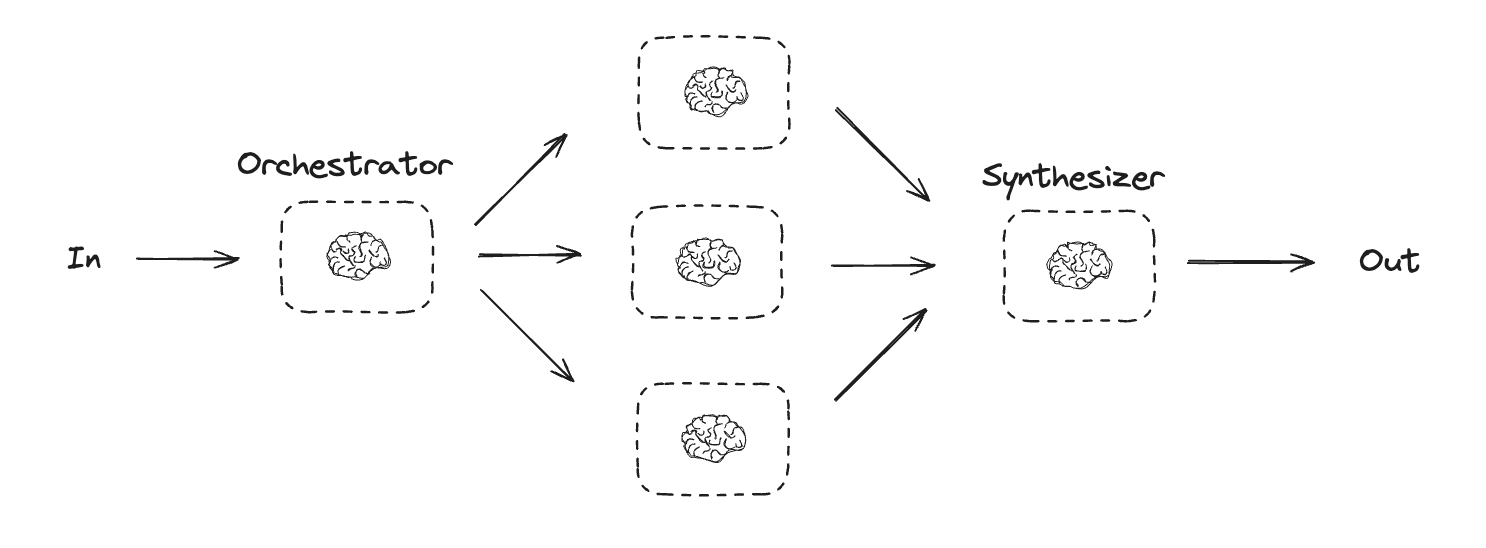
编排器-工作器工作流提供了更多的灵活性,通常用于无法像并行化那样预定义子任务的情况。这在需要编写代码或跨多个文件更新内容的工作流中很常见。例如,一个需要跨未知数量的文档更新多个 Python 库安装说明的工作流可能会使用这种模式。
python
from typing import Annotated, List
import operator

# 用于规划的结构化输出 Schema
class Section(BaseModel):
    name: str = Field(
        description="Name for this section of the report.",
    )
    description: str = Field(
        description="Brief overview of the main topics and concepts to be covered in this section.",
    )

class Sections(BaseModel):
    sections: List[Section] = Field(
        description="Sections of the report.",
    )

# 用结构化输出的 Schema 增强 LLM
planner = llm.with_structured_output(Sections)
python
from typing import List

# 用于规划的结构化输出 Schema
class Section(BaseModel):
    name: str = Field(
        description="Name for this section of the report.",
    )
    description: str = Field(
        description="Brief overview of the main topics and concepts to be covered in this section.",
    )

class Sections(BaseModel):
    sections: List[Section] = Field(
        description="Sections of the report.",
    )

# 用结构化输出的 Schema 增强 LLM
planner = llm.with_structured_output(Sections)

@task
def orchestrator(topic: str):
    """Orchestrator that generates a plan for the report"""
    # 生成查询
    report_sections = planner.invoke(
        [
            SystemMessage(content="Generate a plan for the report."),
            HumanMessage(content=f"Here is the report topic: {topic}"),
        ]
    )

    return report_sections.sections

@task
def llm_call(section: Section):
    """Worker writes a section of the report"""

    # 生成章节
    result = llm.invoke(
        [
            SystemMessage(content="Write a report section."),
            HumanMessage(
                content=f"Here is the section name: {section.name} and description: {section.description}"
            ),
        ]
    )

    # 将更新后的章节写入已完成的章节
    return result.content

@task
def synthesizer(completed_sections: list[str]):
    """Synthesize full report from sections"""
    final_report = "\n\n---\n\n".join(completed_sections)
    return final_report

@entrypoint()
def orchestrator_worker(topic: str):
    sections = orchestrator(topic).result()
    section_futures = [llm_call(section) for section in sections]
    final_report = synthesizer(
        [section_fut.result() for section_fut in section_futures]
    ).result()
    return final_report

# 调用
report = orchestrator_worker.invoke("Create a report on LLM scaling laws")
from IPython.display import Markdown
Markdown(report)
typescript
type SectionSchema = {
    name: string;
    description: string;
}
type SectionsSchema = {
    sections: SectionSchema[];
}

// 用结构化输出的 Schema 增强 LLM
const planner = llm.withStructuredOutput(sectionsSchema);
typescript
import * as z from "zod";
import { task, entrypoint } from "@langchain/langgraph";

// 用于规划的结构化输出 Schema
const sectionSchema = z.object({
  name: z.string().describe("Name for this section of the report."),
  description: z.string().describe(
    "Brief overview of the main topics and concepts to be covered in this section."
  ),
});

const sectionsSchema = z.object({
  sections: z.array(sectionSchema).describe("Sections of the report."),
});

// 用结构化输出的 Schema 增强 LLM
const planner = llm.withStructuredOutput(sectionsSchema);

// 任务
const orchestrator = task("orchestrator", async (topic: string) => {
  // 生成查询
  const reportSections = await planner.invoke([
    { role: "system", content: "Generate a plan for the report." },
    { role: "user", content: `Here is the report topic: ${topic}` },
  ]);

  return reportSections.sections;
});

const llmCall = task("sectionWriter", async (section: z.infer<typeof sectionSchema>) => {
  // 生成章节
  const result = await llm.invoke([
    {
      role: "system",
      content: "Write a report section.",
    },
    {
      role: "user",
      content: `Here is the section name: ${section.name} and description: ${section.description}`,
    },
  ]);

  return result.content;
});

const synthesizer = task("synthesizer", async (completedSections: string[]) => {
  // 将各章节综合成完整报告
  return completedSections.join("\n\n---\n\n");
});

// 构建工作流
const workflow = entrypoint(
  "orchestratorWorker",
  async (topic: string) => {
    const sections = await orchestrator(topic);
    const completedSections = await Promise.all(
      sections.map((section) => llmCall(section))
    );
    return synthesizer(completedSections);
  }
);

// 调用
const stream = await workflow.streamEvents("Create a report on LLM scaling laws", { version: "v3" });
for await (const snapshot of stream.values) {
  console.log(snapshot);
}
在 LangGraph 中创建工作器
编排器-工作器工作流很常见,LangGraph 内置了对它们的支持。Send API 允许你动态创建工作器节点并向它们发送特定的输入。每个工作器都有自己的状态,所有工作器的输出都写入一个编排器图可以访问的共享状态键。这使编排器能够访问所有工作器的输出,并将它们综合为最终输出。下面的示例遍历一个章节列表,并使用 Send API 向每个工作器发送一个章节。
python
from langgraph.types import Send

# 图状态
class State(TypedDict):
    topic: str  # 报告主题
    sections: list[Section]  # 报告章节列表
    completed_sections: Annotated[
        list, operator.add
    ]  # 所有工作器并行写入此键
    final_report: str  # 最终报告

# 工作器状态
class WorkerState(TypedDict):
    section: Section
    completed_sections: Annotated[list, operator.add]

# 节点
def orchestrator(state: State):
    """Orchestrator that generates a plan for the report"""

    # 生成查询
    report_sections = planner.invoke(
        [
            SystemMessage(content="Generate a plan for the report."),
            HumanMessage(content=f"Here is the report topic: {state['topic']}"),
        ]
    )

    return {"sections": report_sections.sections}

def llm_call(state: WorkerState):
    """Worker writes a section of the report"""

    # 生成章节
    section = llm.invoke(
        [
            SystemMessage(
                content="Write a report section following the provided name and description. Include no preamble for each section. Use markdown formatting."
            ),
            HumanMessage(
                content=f"Here is the section name: {state['section'].name} and description: {state['section'].description}"
            ),
        ]
    )

    # 将更新后的章节写入已完成的章节
    return {"completed_sections": [section.content]}

def synthesizer(state: State):
    """Synthesize full report from sections"""

    # 已完成的章节列表
    completed_sections = state["completed_sections"]

    # 将已完成的章节格式化为字符串,用作最终章节的上下文
    completed_report_sections = "\n\n---\n\n".join(completed_sections)

    return {"final_report": completed_report_sections}

# 条件边函数,创建 llm_call 工作器,每个工作器编写报告的一个章节
def assign_workers(state: State):
    """Assign a worker to each section in the plan"""

    # 通过 Send() API 并行启动章节编写
    return [Send("llm_call", {"section": s}) for s in state["sections"]]

# 构建工作流
orchestrator_worker_builder = StateGraph(State)

# 添加节点
orchestrator_worker_builder.add_node("orchestrator", orchestrator)
orchestrator_worker_builder.add_node("llm_call", llm_call)
orchestrator_worker_builder.add_node("synthesizer", synthesizer)

# 添加边以连接节点
orchestrator_worker_builder.add_edge(START, "orchestrator")
orchestrator_worker_builder.add_conditional_edges(
    "orchestrator", assign_workers, ["llm_call"]
)
orchestrator_worker_builder.add_edge("llm_call", "synthesizer")
orchestrator_worker_builder.add_edge("synthesizer", END)

# 编译工作流
orchestrator_worker = orchestrator_worker_builder.compile()

# 展示工作流
display(Image(orchestrator_worker.get_graph().draw_mermaid_png()))

# 调用
state = orchestrator_worker.invoke({"topic": "Create a report on LLM scaling laws"})

from IPython.display import Markdown
Markdown(state["final_report"])
typescript
import { StateGraph, StateSchema, ReducedValue, GraphNode, Send } from "@langchain/langgraph";
import * as z from "zod";

// 图状态
const State = new StateSchema({
  topic: z.string(),
  sections: z.array(z.custom<SectionsSchema>()),
  completedSections: new ReducedValue(
    z.array(z.string()).default(() => []),
    { reducer: (a, b) => a.concat(b) }
  ),
  finalReport: z.string(),
});

// 工作器状态
const WorkerState = new StateSchema({
  section: z.custom<SectionsSchema>(),
  completedSections: new ReducedValue(
    z.array(z.string()).default(() => []),
    { reducer: (a, b) => a.concat(b) }
  ),
});

// 节点
const orchestrator: GraphNode<typeof State> = async (state) => {
  // 生成查询
  const reportSections = await planner.invoke([
    { role: "system", content: "Generate a plan for the report." },
    { role: "user", content: `Here is the report topic: ${state.topic}` },
  ]);

  return { sections: reportSections.sections };
};

const llmCall: GraphNode<typeof WorkerState> = async (state) => {
  // 生成章节
  const section = await llm.invoke([
    {
      role: "system",
      content: "Write a report section following the provided name and description. Include no preamble for each section. Use markdown formatting.",
    },
    {
      role: "user",
      content: `Here is the section name: ${state.section.name} and description: ${state.section.description}`,
    },
  ]);

  // 将更新后的章节写入已完成的章节
  return { completedSections: [section.content] };
};

const synthesizer: GraphNode<typeof State> = async (state) => {
  // 已完成的章节列表
  const completedSections = state.completedSections;

  // 将已完成的章节格式化为字符串,用作最终章节的上下文
  const completedReportSections = completedSections.join("\n\n---\n\n");

  return { finalReport: completedReportSections };
};

// 条件边函数,创建 llm_call 工作器,每个工作器编写报告的一个章节
const assignWorkers: ConditionalEdgeRouter<typeof State, "llmCall"> = (state) => {
  // 通过 Send() API 并行启动章节编写
  return state.sections.map((section) =>
    new Send("llmCall", { section })
  );
};

// 构建工作流
const orchestratorWorker = new StateGraph(State)
  .addNode("orchestrator", orchestrator)
  .addNode("llmCall", llmCall)
  .addNode("synthesizer", synthesizer)
  .addEdge("__start__", "orchestrator")
  .addConditionalEdges(
    "orchestrator",
    assignWorkers,
    ["llmCall"]
  )
  .addEdge("llmCall", "synthesizer")
  .addEdge("synthesizer", "__end__")
  .compile();

// 调用
const state = await orchestratorWorker.invoke({
  topic: "Create a report on LLM scaling laws"
});
console.log(state.finalReport);
评估器-优化器
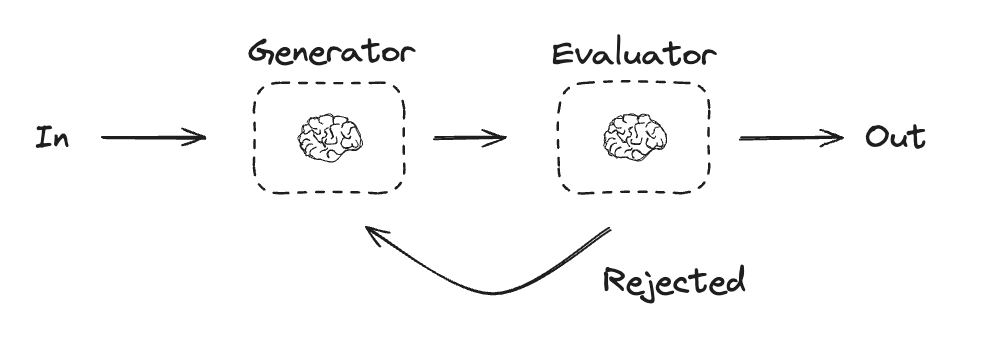
在评估器-优化器工作流中,一个 LLM 调用创建响应,另一个 LLM 调用评估该响应。如果评估器或人在回路确定响应需要改进,则会提供反馈并重新创建响应。这个循环会一直持续到生成可接受的响应。
当任务有特定的成功标准、但需要通过迭代来满足该标准时,通常会使用评估器-优化器工作流。例如,在两种语言之间翻译文本时并不总是能完美匹配。可能需要几次迭代才能生成在两种语言中具有相同含义的翻译。
python
# 图状态
class State(TypedDict):
    joke: str
    topic: str
    feedback: str
    funny_or_not: str

# 用于评估的结构化输出 Schema
class Feedback(BaseModel):
    grade: Literal["funny", "not funny"] = Field(
        description="Decide if the joke is funny or not.",
    )
    feedback: str = Field(
        description="If the joke is not funny, provide feedback on how to improve it.",
    )

# 用结构化输出的 Schema 增强 LLM
evaluator = llm.with_structured_output(Feedback)

# 节点
def llm_call_generator(state: State):
    """LLM generates a joke"""

    if state.get("feedback"):
        msg = llm.invoke(
            f"Write a joke about {state['topic']} but take into account the feedback: {state['feedback']}"
        )
    else:
        msg = llm.invoke(f"Write a joke about {state['topic']}")
    return {"joke": msg.content}

def llm_call_evaluator(state: State):
    """LLM evaluates the joke"""

    grade = evaluator.invoke(f"Grade the joke {state['joke']}")
    return {"funny_or_not": grade.grade, "feedback": grade.feedback}

# 条件边函数,根据评估器的反馈路由回笑话生成器或结束
def route_joke(state: State):
    """Route back to joke generator or end based upon feedback from the evaluator"""

    if state["funny_or_not"] == "funny":
        return "Accepted"
    elif state["funny_or_not"] == "not funny":
        return "Rejected + Feedback"

# 构建工作流
optimizer_builder = StateGraph(State)

# 添加节点
optimizer_builder.add_node("llm_call_generator", llm_call_generator)
optimizer_builder.add_node("llm_call_evaluator", llm_call_evaluator)

# 添加边以连接节点
optimizer_builder.add_edge(START, "llm_call_generator")
optimizer_builder.add_edge("llm_call_generator", "llm_call_evaluator")
optimizer_builder.add_conditional_edges(
    "llm_call_evaluator",
    route_joke,
    {  # route_joke 返回的名称 : 下一个要访问的节点名称
        "Accepted": END,
        "Rejected + Feedback": "llm_call_generator",
    },
)

# 编译工作流
optimizer_workflow = optimizer_builder.compile()

# 展示工作流
display(Image(optimizer_workflow.get_graph().draw_mermaid_png()))

# 调用
state = optimizer_workflow.invoke({"topic": "Cats"})
print(state["joke"])
python
# 用于评估的结构化输出 Schema
class Feedback(BaseModel):
    grade: Literal["funny", "not funny"] = Field(
        description="Decide if the joke is funny or not.",
    )
    feedback: str = Field(
        description="If the joke is not funny, provide feedback on how to improve it.",
    )

# 用结构化输出的 Schema 增强 LLM
evaluator = llm.with_structured_output(Feedback)

# 节点
@task
def llm_call_generator(topic: str, feedback: Feedback):
    """LLM generates a joke"""
    if feedback:
        msg = llm.invoke(
            f"Write a joke about {topic} but take into account the feedback: {feedback}"
        )
    else:
        msg = llm.invoke(f"Write a joke about {topic}")
    return msg.content

@task
def llm_call_evaluator(joke: str):
    """LLM evaluates the joke"""
    feedback = evaluator.invoke(f"Grade the joke {joke}")
    return feedback

@entrypoint()
def optimizer_workflow(topic: str):
    feedback = None
    while True:
        joke = llm_call_generator(topic, feedback).result()
        feedback = llm_call_evaluator(joke).result()
        if feedback.grade == "funny":
            break

    return joke

# 调用
stream = optimizer_workflow.stream_events("Cats", version="v3")
for snapshot in stream.values:
    print(snapshot)
    print("\n")
typescript
import { StateGraph, StateSchema, GraphNode, ConditionalEdgeRouter } from "@langchain/langgraph";
import * as z from "zod";

// 图状态
const State = new StateSchema({
  joke: z.string(),
  topic: z.string(),
  feedback: z.string(),
  funnyOrNot: z.string(),
});

// 用于评估的结构化输出 Schema
const feedbackSchema = z.object({
  grade: z.enum(["funny", "not funny"]).describe(
    "Decide if the joke is funny or not."
  ),
  feedback: z.string().describe(
    "If the joke is not funny, provide feedback on how to improve it."
  ),
});

// 用结构化输出的 Schema 增强 LLM
const evaluator = llm.withStructuredOutput(feedbackSchema);

// 节点
const llmCallGenerator: GraphNode<typeof State> = async (state) => {
  // LLM 生成一个笑话
  let msg;
  if (state.feedback) {
    msg = await llm.invoke(
      `Write a joke about ${state.topic} but take into account the feedback: ${state.feedback}`
    );
  } else {
    msg = await llm.invoke(`Write a joke about ${state.topic}`);
  }
  return { joke: msg.content };
};

const llmCallEvaluator: GraphNode<typeof State> = async (state) => {
  // LLM 评估这个笑话
  const grade = await evaluator.invoke(`Grade the joke ${state.joke}`);
  return { funnyOrNot: grade.grade, feedback: grade.feedback };
};

// 条件边函数,根据评估器的反馈路由回笑话生成器或结束
const routeJoke: ConditionalEdgeRouter<typeof State, "llmCallGenerator"> = (state) => {
  // 根据评估器的反馈,路由回笑话生成器或结束
  if (state.funnyOrNot === "funny") {
    return "Accepted";
  } else {
    return "Rejected + Feedback";
  }
};

// 构建工作流
const optimizerWorkflow = new StateGraph(State)
  .addNode("llmCallGenerator", llmCallGenerator)
  .addNode("llmCallEvaluator", llmCallEvaluator)
  .addEdge("__start__", "llmCallGenerator")
  .addEdge("llmCallGenerator", "llmCallEvaluator")
  .addConditionalEdges(
    "llmCallEvaluator",
    routeJoke,
    {
      // routeJoke 返回的名称 : 下一个要访问的节点名称
      "Accepted": "__end__",
      "Rejected + Feedback": "llmCallGenerator",
    }
  )
  .compile();

// 调用
const state = await optimizerWorkflow.invoke({ topic: "Cats" });
console.log(state.joke);
typescript
import * as z from "zod";
import { task, entrypoint } from "@langchain/langgraph";

// 用于评估的结构化输出 Schema
const feedbackSchema = z.object({
  grade: z.enum(["funny", "not funny"]).describe(
    "Decide if the joke is funny or not."
  ),
  feedback: z.string().describe(
    "If the joke is not funny, provide feedback on how to improve it."
  ),
});

// 用结构化输出的 Schema 增强 LLM
const evaluator = llm.withStructuredOutput(feedbackSchema);

// 任务
const llmCallGenerator = task("jokeGenerator", async (params: {
  topic: string;
  feedback?: z.infer<typeof feedbackSchema>;
}) => {
  // LLM 生成一个笑话
  const msg = params.feedback
    ? await llm.invoke(
        `Write a joke about ${params.topic} but take into account the feedback: ${params.feedback.feedback}`
      )
    : await llm.invoke(`Write a joke about ${params.topic}`);
  return msg.content;
});

const llmCallEvaluator = task("jokeEvaluator", async (joke: string) => {
  // LLM 评估这个笑话
  return evaluator.invoke(`Grade the joke ${joke}`);
});

// 构建工作流
const workflow = entrypoint(
  "optimizerWorkflow",
  async (topic: string) => {
    let feedback: z.infer<typeof feedbackSchema> | undefined;
    let joke: string;

    while (true) {
      joke = await llmCallGenerator({ topic, feedback });
      feedback = await llmCallEvaluator(joke);

      if (feedback.grade === "funny") {
        break;
      }
    }

    return joke;
  }
);

// 调用
const stream = await workflow.streamEvents("Cats", { version: "v3" });
for await (const snapshot of stream.values) {
  console.log(snapshot);
  console.log("\n");
}
智能体
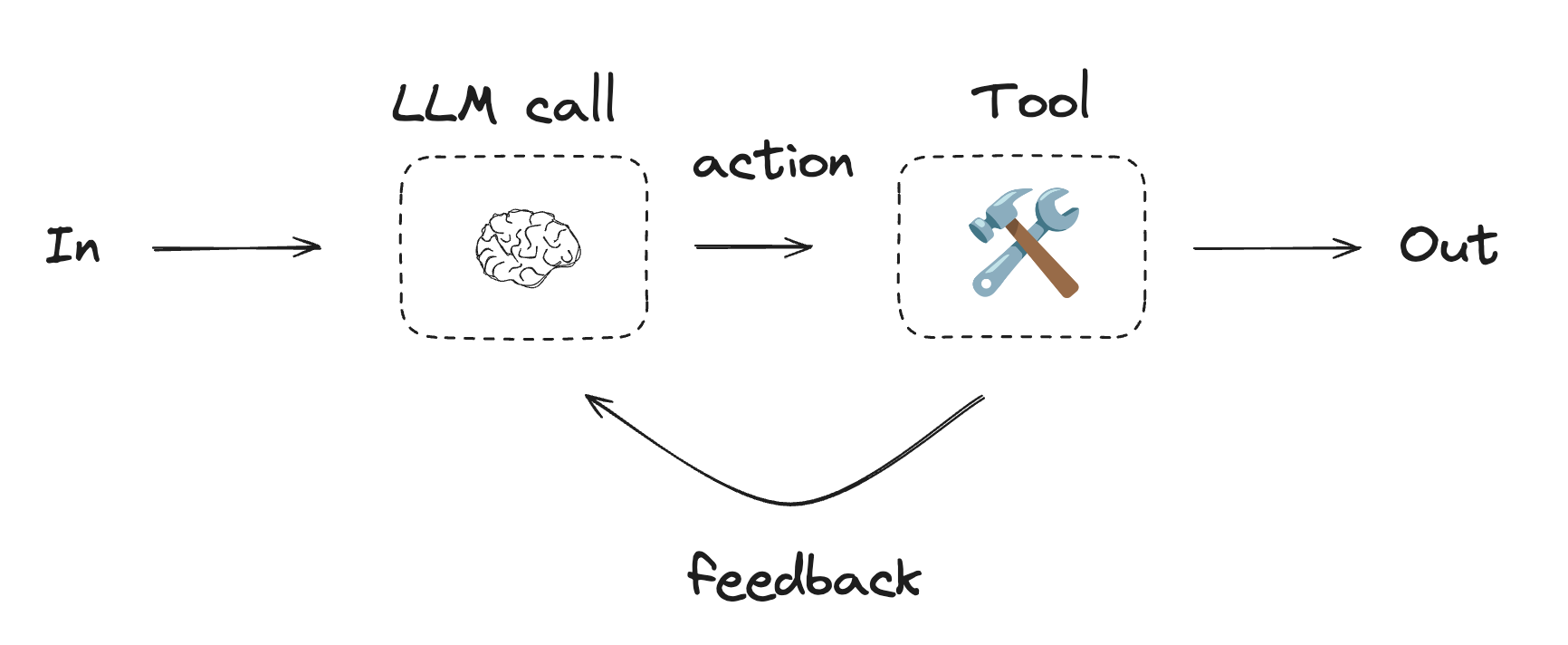
智能体通常被实现为使用工具执行操作的 LLM。它们在持续的反馈循环中运行,用于问题和解决方案不可预测的情况。智能体比工作流拥有更多的自主性,可以决定使用哪些工具以及如何解决问题。你仍然可以定义可用的工具集和智能体行为准则。
python
from langchain.tools import tool

# 定义工具
@tool
def multiply(a: int, b: int) -> int:
    """Multiply `a` and `b`.

    Args:
        a: First int
        b: Second int
    """
    return a * b

@tool
def add(a: int, b: int) -> int:
    """Adds `a` and `b`.

    Args:
        a: First int
        b: Second int
    """
    return a + b

@tool
def divide(a: int, b: int) -> float:
    """Divide `a` and `b`.

    Args:
        a: First int
        b: Second int
    """
    return a / b

# 用工具增强 LLM
tools = [add, multiply, divide]
tools_by_name = {tool.name: tool for tool in tools}
llm_with_tools = llm.bind_tools(tools)python
from langgraph.graph import MessagesState
from langchain.messages import SystemMessage, HumanMessage, ToolMessage

# 节点
def llm_call(state: MessagesState):
    """LLM decides whether to call a tool or not"""

    return {
        "messages": [
            llm_with_tools.invoke(
                [
                    SystemMessage(
                        content="You are a helpful assistant tasked with performing arithmetic on a set of inputs."
                    )
                ]
                + state["messages"]
            )
        ]
    }

def tool_node(state: MessagesState):
    """Performs the tool call"""

    result = []
    for tool_call in state["messages"][-1].tool_calls:
        tool = tools_by_name[tool_call["name"]]
        observation = tool.invoke(tool_call["args"])
        result.append(ToolMessage(content=observation, tool_call_id=tool_call["id"]))
    return {"messages": result}

# 条件边函数,根据 LLM 是否进行了工具调用,路由到工具节点或结束
def should_continue(state: MessagesState) -> Literal["tool_node", END]:
    """Decide if we should continue the loop or stop based upon whether the LLM made a tool call"""

    messages = state["messages"]
    last_message = messages[-1]

    # 如果 LLM 进行了工具调用,则执行操作
    if last_message.tool_calls:
        return "tool_node"

    # 否则,我们停止(回复用户)
    return END

# 构建工作流
agent_builder = StateGraph(MessagesState)

# 添加节点
agent_builder.add_node("llm_call", llm_call)
agent_builder.add_node("tool_node", tool_node)

# 添加边以连接节点
agent_builder.add_edge(START, "llm_call")
agent_builder.add_conditional_edges(
    "llm_call",
    should_continue,
    ["tool_node", END]
)
agent_builder.add_edge("tool_node", "llm_call")

# 编译智能体
agent = agent_builder.compile()

# 展示智能体
display(Image(agent.get_graph(xray=True).draw_mermaid_png()))

# 调用
messages = [HumanMessage(content="Add 3 and 4.")]
messages = agent.invoke({"messages": messages})
for m in messages["messages"]:
    m.pretty_print()
python
from langgraph.graph import add_messages
from langchain.messages import (
    SystemMessage,
    HumanMessage,
    ToolCall,
)
from langchain_core.messages import BaseMessage

@task
def call_llm(messages: list[BaseMessage]):
    """LLM decides whether to call a tool or not"""
    return llm_with_tools.invoke(
        [
            SystemMessage(
                content="You are a helpful assistant tasked with performing arithmetic on a set of inputs."
            )
        ]
        + messages
    )

@task
def call_tool(tool_call: ToolCall):
    """Performs the tool call"""
    tool = tools_by_name[tool_call["name"]]
    return tool.invoke(tool_call)

@entrypoint()
def agent(messages: list[BaseMessage]):
    llm_response = call_llm(messages).result()

    while True:
        if not llm_response.tool_calls:
            break

        # 执行工具
        tool_result_futures = [
            call_tool(tool_call) for tool_call in llm_response.tool_calls
        ]
        tool_results = [fut.result() for fut in tool_result_futures]
        messages = add_messages(messages, [llm_response, *tool_results])
        llm_response = call_llm(messages).result()

    messages = add_messages(messages, llm_response)
    return messages

# 调用
messages = [HumanMessage(content="Add 3 and 4.")]
stream = agent.stream_events(messages, version="v3")
for snapshot in stream.values:
    print(snapshot)
    print("\n")
typescript
import { tool } from "@langchain/core/tools";
import * as z from "zod";

// 定义工具
const multiply = tool(
  ({ a, b }) => {
    return a * b;
  },
  {
    name: "multiply",
    description: "Multiply two numbers together",
    schema: z.object({
      a: z.number().describe("first number"),
      b: z.number().describe("second number"),
    }),
  }
);

const add = tool(
  ({ a, b }) => {
    return a + b;
  },
  {
    name: "add",
    description: "Add two numbers together",
    schema: z.object({
      a: z.number().describe("first number"),
      b: z.number().describe("second number"),
    }),
  }
);

const divide = tool(
  ({ a, b }) => {
    return a / b;
  },
  {
    name: "divide",
    description: "Divide two numbers",
    schema: z.object({
      a: z.number().describe("first number"),
      b: z.number().describe("second number"),
    }),
  }
);

// 用工具增强 LLM
const tools = [add, multiply, divide];
const toolsByName = Object.fromEntries(tools.map((tool) => [tool.name, tool]));
const llmWithTools = llm.bindTools(tools);typescript
import { StateGraph, StateSchema, MessagesValue, GraphNode, ConditionalEdgeRouter } from "@langchain/langgraph";
import { ToolNode } from "@langchain/langgraph/prebuilt";
import {
  SystemMessage,
  ToolMessage
} from "@langchain/core/messages";

// 图状态
const State = new StateSchema({
  messages: MessagesValue,
});

// 节点
const llmCall: GraphNode<typeof State> = async (state) => {
  // LLM 决定是否调用工具
  const result = await llmWithTools.invoke([
    {
      role: "system",
      content: "You are a helpful assistant tasked with performing arithmetic on a set of inputs."
    },
    ...state.messages
  ]);

  return {
    messages: [result]
  };
};

const toolNode = new ToolNode(tools);

// 条件边函数,路由到工具节点或结束
const shouldContinue: ConditionalEdgeRouter<typeof State, "toolNode"> = (state) => {
  const messages = state.messages;
  const lastMessage = messages.at(-1);

  // 如果 LLM 进行了工具调用,则执行操作
  if (lastMessage?.tool_calls?.length) {
    return "toolNode";
  }
  // 否则,我们停止(回复用户)
  return "__end__";
};

// 构建工作流
const agentBuilder = new StateGraph(State)
  .addNode("llmCall", llmCall)
  .addNode("toolNode", toolNode)
  // 添加边以连接节点
  .addEdge("__start__", "llmCall")
  .addConditionalEdges(
    "llmCall",
    shouldContinue,
    ["toolNode", "__end__"]
  )
  .addEdge("toolNode", "llmCall")
  .compile();

// 调用
const messages = [{
  role: "user",
  content: "Add 3 and 4."
}];
const result = await agentBuilder.invoke({ messages });
console.log(result.messages);
typescript
import { task, entrypoint, addMessages } from "@langchain/langgraph";
import { BaseMessageLike, ToolCall } from "@langchain/core/messages";

const callLlm = task("llmCall", async (messages: BaseMessageLike[]) => {
  // LLM 决定是否调用工具
  return llmWithTools.invoke([
    {
      role: "system",
      content: "You are a helpful assistant tasked with performing arithmetic on a set of inputs."
    },
    ...messages
  ]);
});

const callTool = task("toolCall", async (toolCall: ToolCall) => {
  // 执行工具调用
  const tool = toolsByName[toolCall.name];
  return tool.invoke(toolCall.args);
});

const agent = entrypoint(
  "agent",
  async (messages) => {
    let llmResponse = await callLlm(messages);

    while (true) {
      if (!llmResponse.tool_calls?.length) {
        break;
      }

      // 执行工具
      const toolResults = await Promise.all(
        llmResponse.tool_calls.map((toolCall) => callTool(toolCall))
      );

      messages = addMessages(messages, [llmResponse, ...toolResults]);
      llmResponse = await callLlm(messages);
    }

    messages = addMessages(messages, [llmResponse]);
    return messages;
  }
);

// 调用
const messages = [{
  role: "user",
  content: "Add 3 and 4."
}];

const stream = await agent.streamEvents([messages], { version: "v3" });
for await (const snapshot of stream.values) {
  console.log(snapshot);
}
ToolNode
ToolNode 是一个在 LangGraph 工作流中执行工具的预构建节点。它会自动处理并行工具执行、错误处理和状态注入。
当你需要对图如何执行工具进行细粒度控制时,请使用 ToolNode。它是许多 LangGraph 智能体模式中驱动工具执行的构建块。
python
from langchain.tools import tool
from langgraph.prebuilt import ToolNode
from langgraph.graph import MessagesState, StateGraph

@tool
def search(query: str) -> str:
    """Search for information."""
    return f"Results for: {query}"

@tool
def calculator(expression: str) -> str:
    """Evaluate a math expression."""
    return str(eval(expression))

builder = StateGraph(MessagesState)
builder.add_node("tools", ToolNode([search, calculator]))
# ... add other nodes and edges
graph = builder.compile()
typescript
import { ToolNode } from "@langchain/langgraph/prebuilt";
import { tool } from "@langchain/core/tools";
import * as z from "zod";

const search = tool(
  ({ query }) => `Results for: ${query}`,
  {
    name: "search",
    description: "Search for information.",
    schema: z.object({ query: z.string() }),
  }
);

const calculator = tool(
  ({ expression }) => String(eval(expression)),
  {
    name: "calculator",
    description: "Evaluate a math expression.",
    schema: z.object({ expression: z.string() }),
  }
);

const toolNode = new ToolNode([search, calculator]);
从工具访问图状态和上下文
由 ToolNode 执行的工具将模型生成的参数作为它们的第一个参数。要读取并非由模型生成的图侧数据,请使用以下选项之一:
- 在 Python 中,从注入的
ToolRuntime参数读取状态和运行范围内的上下文。 - 在 JavaScript 中,从工具的类型为
ToolRuntime的第二个参数读取状态和运行范围内的上下文。
INFO
工具只能访问传给 ToolNode 的状态值。当 ToolNode 直接作为 StateGraph 节点添加时,该输入就是当前的图状态。如果你从另一个节点手动调用 ToolNode,请在工具需要自定义状态字段时传递完整的状态。例如,tool_node.invoke(state) 或 toolNode.invoke(state, config) 暴露完整状态,而只传递 {"messages": state["messages"]} 或 { messages: state.messages } 只会暴露 messages。
python
from dataclasses import dataclass

from langchain.messages import AIMessage
from langchain.tools import ToolRuntime, tool
from langgraph.graph import MessagesState, START, StateGraph
from langgraph.prebuilt import ToolNode

class State(MessagesState):
    user_id: str

@dataclass
class Context:
    organization_id: str

@tool
def get_user_info(runtime: ToolRuntime[Context, State]) -> str:
    """Look up user information."""
    # 读取传给 ToolNode 的当前图状态。
    user_id = runtime.state["user_id"]

    # 读取不属于图状态的显式每次运行值。
    organization_id = runtime.context.organization_id

    return f"User {user_id} in organization {organization_id}"

builder = StateGraph(State, context_schema=Context)
builder.add_node("tools", ToolNode([get_user_info]))
builder.add_edge(START, "tools")
graph = builder.compile()

result = graph.invoke(
    {
        "messages": [
            AIMessage(
                content="",
                tool_calls=[
                    {
                        "name": "get_user_info",
                        "args": {},
                        "id": "call_user_info",
                    }
                ],
            )
        ],
        "user_id": "user_123",
    },
    context=Context(organization_id="org_456"),
)
ts
import { AIMessage } from "@langchain/core/messages";
import { tool, type ToolRuntime } from "@langchain/core/tools";
import {
  MessagesValue,
  START,
  StateGraph,
  StateSchema,
} from "@langchain/langgraph";
import { ToolNode } from "@langchain/langgraph/prebuilt";
import * as z from "zod";

const State = new StateSchema({
  messages: MessagesValue,
  userId: z.string(),
});

const ContextSchema = z.object({
  organizationId: z.string(),
});

const getUserInfo = tool(
  async (
    _input,
    runtime: ToolRuntime<typeof State.Type, typeof ContextSchema>,
  ) => {
    // 读取传给 ToolNode 的当前图状态。
    const userIdFromState = runtime.state?.userId;
    const userIdFromTaskInput = (
      runtime.configurable as {
        __pregel_scratchpad?: { currentTaskInput?: { userId?: string } };
      }
    ).__pregel_scratchpad?.currentTaskInput?.userId;
    const userId = userIdFromState ?? userIdFromTaskInput;
    if (!userId) {
      throw new Error("Missing userId in ToolRuntime state.");
    }

    // 使用运行时上下文获取不属于图状态的显式每次运行值
    // (这些值不属于图状态)。
    const organizationId = runtime.context.organizationId;

    return `User ${userId} in organization ${organizationId}`;
  },
  {
    name: "get_user_info",
    description: "Look up user information.",
    schema: z.object({}),
  },
);

const graph = new StateGraph(State, ContextSchema)
  .addNode("tools", new ToolNode([getUserInfo]))
  .addEdge(START, "tools")
  .compile();

const result = await graph.invoke(
  {
    messages: [
      new AIMessage({
        content: "",
        tool_calls: [{ name: "get_user_info", args: {}, id: "call_user_info" }],
      }),
    ],
    userId: "user_123",
  },
  { context: { organizationId: "org_456" } },
);