外观
本指南解释了使用子图的机制。子图是作为另一个图中的 节点 使用的 图。
子图适用于:
- 构建 多智能体系统
- 在多个图中复用一组节点
- 分布式开发:当你想让不同团队独立开发图的不同部分时,你可以将每个部分定义为一个子图,只要子图接口(输入和输出模式)得到遵守,父图就可以在不知道子图任何细节的情况下构建
设置
bash
pip install -U langgraphbash
uv add langgraphbash
npm install @langchain/langgraphTIP
为 LangGraph 开发设置 LangSmith 注册 LangSmith,快速发现问题并提升你的 LangGraph 项目性能。LangSmith 让你可以使用 trace 数据来调试、测试和监控你使用 LangGraph 构建的 LLM 应用——了解更多关于 如何开始使用 LangSmith。
定义子图通信
在添加子图时,你需要定义父图和子图之间如何通信:
| 模式 | 何时使用 | 状态模式 |
|---|---|---|
| 在节点内调用子图 | 父图和子图具有不同的状态模式(没有共享的键),或者你需要在它们之间转换状态 | 你编写一个包装函数,将父图状态映射为子图输入,并将子图输出映射回父图状态 |
| 将子图作为节点添加 | 父图和子图共享状态键——子图读取和写入与父图相同的通道 | 你将编译后的子图直接传递给 add_node——无需包装函数 |
在节点内调用子图
当父图和子图具有不同的状态模式(没有共享的键)时,请在节点函数内调用子图。当你希望在 多智能体 系统中为每个智能体保留私有的消息历史时,这很常见。
节点函数在调用子图之前将父图状态转换为子图状态,并在返回之前将结果转换回父图状态。
python
from typing_extensions import TypedDict
from langgraph.graph.state import StateGraph, START

class SubgraphState(TypedDict):
    bar: str

# 子图

def subgraph_node_1(state: SubgraphState):
    return {"bar": "hi! " + state["bar"]}

subgraph_builder = StateGraph(SubgraphState)
subgraph_builder.add_node(subgraph_node_1)
subgraph_builder.add_edge(START, "subgraph_node_1")
subgraph = subgraph_builder.compile()

# 父图

class State(TypedDict):
    foo: str

def call_subgraph(state: State):
    # 将状态转换为子图状态
    subgraph_output = subgraph.invoke({"bar": state["foo"]})
    # 将响应转换回父图状态
    return {"foo": subgraph_output["bar"]}

builder = StateGraph(State)
builder.add_node("node_1", call_subgraph)
builder.add_edge(START, "node_1")
graph = builder.compile()
typescript
import { StateGraph, StateSchema, START } from "@langchain/langgraph";
import * as z from "zod";

const SubgraphState = new StateSchema({
  bar: z.string(),
});

// 子图
const subgraphBuilder = new StateGraph(SubgraphState)
  .addNode("subgraphNode1", (state) => {
    return { bar: "hi! " + state.bar };
  })
  .addEdge(START, "subgraphNode1");

const subgraph = subgraphBuilder.compile();

// 父图
const State = new StateSchema({
  foo: z.string(),
});

// 将状态转换为子图状态,然后再转换回来
const builder = new StateGraph(State)
  .addNode("node1", async (state) => {
    const subgraphOutput = await subgraph.invoke({ bar: state.foo });
    return { foo: subgraphOutput.bar };
  })
  .addEdge(START, "node1");

const graph = builder.compile();
完整示例:不同的状态模式
python
from typing_extensions import TypedDict
from langgraph.graph.state import StateGraph, START

# 定义子图
class SubgraphState(TypedDict):
    # 请注意,这些键均不与父图状态共享
    bar: str
    baz: str

def subgraph_node_1(state: SubgraphState):
    return {"baz": "baz"}

def subgraph_node_2(state: SubgraphState):
    return {"bar": state["bar"] + state["baz"]}

subgraph_builder = StateGraph(SubgraphState)
subgraph_builder.add_node(subgraph_node_1)
subgraph_builder.add_node(subgraph_node_2)
subgraph_builder.add_edge(START, "subgraph_node_1")
subgraph_builder.add_edge("subgraph_node_1", "subgraph_node_2")
subgraph = subgraph_builder.compile()

# 定义父图
class ParentState(TypedDict):
    foo: str

def node_1(state: ParentState):
    return {"foo": "hi! " + state["foo"]}

def node_2(state: ParentState):
    # 将状态转换为子图状态
    response = subgraph.invoke({"bar": state["foo"]})
    # 将响应转换回父图状态
    return {"foo": response["bar"]}

builder = StateGraph(ParentState)
builder.add_node("node_1", node_1)
builder.add_node("node_2", node_2)
builder.add_edge(START, "node_1")
builder.add_edge("node_1", "node_2")
graph = builder.compile()

stream = graph.stream_events({"foo": "foo"}, version="v3")
for event in stream:
    if event["method"] == "updates":
        print(event["params"]["namespace"], event["params"]["data"])
[] {'node_1': {'foo': 'hi! foo'}}
['node_2:577b710b-64ae-31fb-9455-6a4d4cc2b0b9'] {'subgraph_node_1': {'baz': 'baz'}}
['node_2:577b710b-64ae-31fb-9455-6a4d4cc2b0b9'] {'subgraph_node_2': {'bar': 'hi! foobaz'}}
[] {'node_2': {'foo': 'hi! foobaz'}}typescript
import { StateGraph, StateSchema, START } from "@langchain/langgraph";
import * as z from "zod";

// 定义子图
const SubgraphState = new StateSchema({
  // 请注意,这些键均不与父图状态共享
  bar: z.string(),
  baz: z.string(),
});

const subgraphBuilder = new StateGraph(SubgraphState)
  .addNode("subgraphNode1", (state) => {
    return { baz: "baz" };
  })
  .addNode("subgraphNode2", (state) => {
    return { bar: state.bar + state.baz };
  })
  .addEdge(START, "subgraphNode1")
  .addEdge("subgraphNode1", "subgraphNode2");

const subgraph = subgraphBuilder.compile();

// 定义父图
const ParentState = new StateSchema({
  foo: z.string(),
});

const builder = new StateGraph(ParentState)
  .addNode("node1", (state) => {
    return { foo: "hi! " + state.foo };
  })
  .addNode("node2", async (state) => {
    const response = await subgraph.invoke({ bar: state.foo });
    return { foo: response.bar };
  })
  .addEdge(START, "node1")
  .addEdge("node1", "node2");

const graph = builder.compile();

const stream = await graph.streamEvents(
  { foo: "foo" },
  { subgraphs: true, version: "v3" }
);
for await (const message of stream.messages) {
  for await (const token of message.text) {
    process.stdout.write(token);
  }
}- 将状态转换为子图状态
- 将响应转换回父图状态
[[], { node1: { foo: 'hi! foo' } }]
[['node2:9c36dd0f-151a-cb42-cbad-fa2f851f9ab7'], { subgraphNode1: { baz: 'baz' } }]
[['node2:9c36dd0f-151a-cb42-cbad-fa2f851f9ab7'], { subgraphNode2: { bar: 'hi! foobaz' } }]
[[], { node2: { foo: 'hi! foobaz' } }]
完整示例:不同的状态模式(两层子图)
这是一个包含两层子图的示例:父图 -> 子图 -> 孙图。
python
# 孙图
from typing_extensions import TypedDict
from langgraph.graph.state import StateGraph, START, END

class GrandChildState(TypedDict):
    my_grandchild_key: str

def grandchild_1(state: GrandChildState) -> GrandChildState:
    # 注意:子图或父图的键在这里不可访问
    return {"my_grandchild_key": state["my_grandchild_key"] + ", how are you"}

grandchild = StateGraph(GrandChildState)
grandchild.add_node("grandchild_1", grandchild_1)

grandchild.add_edge(START, "grandchild_1")
grandchild.add_edge("grandchild_1", END)

grandchild_graph = grandchild.compile()

# 子图
class ChildState(TypedDict):
    my_child_key: str

def call_grandchild_graph(state: ChildState) -> ChildState:
    # 注意:父图或孙图的键在这里不可访问
    grandchild_graph_input = {"my_grandchild_key": state["my_child_key"]}
    grandchild_graph_output = grandchild_graph.invoke(grandchild_graph_input)
    return {"my_child_key": grandchild_graph_output["my_grandchild_key"] + " today?"}

child = StateGraph(ChildState)
# 这里我们传递的是一个函数,而不是直接传递编译后的图(`grandchild_graph`)
child.add_node("child_1", call_grandchild_graph)
child.add_edge(START, "child_1")
child.add_edge("child_1", END)
child_graph = child.compile()

# 父图
class ParentState(TypedDict):
    my_key: str

def parent_1(state: ParentState) -> ParentState:
    # 注意:子图或孙图的键在这里不可访问
    return {"my_key": "hi " + state["my_key"]}

def parent_2(state: ParentState) -> ParentState:
    return {"my_key": state["my_key"] + " bye!"}

def call_child_graph(state: ParentState) -> ParentState:
    child_graph_input = {"my_child_key": state["my_key"]}
    child_graph_output = child_graph.invoke(child_graph_input)
    return {"my_key": child_graph_output["my_child_key"]}

parent = StateGraph(ParentState)
parent.add_node("parent_1", parent_1)
# 这里我们传递的是一个函数,而不是仅仅传递编译后的图(`child_graph`)
parent.add_node("child", call_child_graph)
parent.add_node("parent_2", parent_2)

parent.add_edge(START, "parent_1")
parent.add_edge("parent_1", "child")
parent.add_edge("child", "parent_2")
parent.add_edge("parent_2", END)

parent_graph = parent.compile()

stream = parent_graph.stream_events({"my_key": "Bob"}, version="v3")
for event in stream:
    if event["method"] == "updates":
        print(event["params"]["namespace"], event["params"]["data"])
[] {'parent_1': {'my_key': 'hi Bob'}}
['child:2e26e9ce-602f-862c-aa66-1ea5a4655e3b', 'child_1:781bb3b1-3971-84ce-810b-acf819a03f9c'] {'grandchild_1': {'my_grandchild_key': 'hi Bob, how are you'}}
['child:2e26e9ce-602f-862c-aa66-1ea5a4655e3b'] {'child_1': {'my_child_key': 'hi Bob, how are you today?'}}
[] {'child': {'my_key': 'hi Bob, how are you today?'}}
[] {'parent_2': {'my_key': 'hi Bob, how are you today? bye!'}}typescript
import { StateGraph, StateSchema, START, END } from "@langchain/langgraph";
import * as z from "zod";

// 孙图
const GrandChildState = new StateSchema({
  myGrandchildKey: z.string(),
});

const grandchild = new StateGraph(GrandChildState)
  .addNode("grandchild1", (state) => {
    // 注意:子图或父图的键在这里不可访问
    return { myGrandchildKey: state.myGrandchildKey + ", how are you" };
  })
  .addEdge(START, "grandchild1")
  .addEdge("grandchild1", END);

const grandchildGraph = grandchild.compile();

// 子图
const ChildState = new StateSchema({
  myChildKey: z.string(),
});

const child = new StateGraph(ChildState)
  .addNode("child1", async (state) => {
    // 注意:父图或孙图的键在这里不可访问
    const grandchildGraphInput = { myGrandchildKey: state.myChildKey };
    const grandchildGraphOutput = await grandchildGraph.invoke(grandchildGraphInput);
    return { myChildKey: grandchildGraphOutput.myGrandchildKey + " today?" };
  })
  .addEdge(START, "child1")
  .addEdge("child1", END);

const childGraph = child.compile();

// 父图
const ParentState = new StateSchema({
  myKey: z.string(),
});

const parent = new StateGraph(ParentState)
  .addNode("parent1", (state) => {
    // 注意:子图或孙图的键在这里不可访问
    return { myKey: "hi " + state.myKey };
  })
  .addNode("child", async (state) => {
    const childGraphInput = { myChildKey: state.myKey };
    const childGraphOutput = await childGraph.invoke(childGraphInput);
    return { myKey: childGraphOutput.myChildKey };
  })
  .addNode("parent2", (state) => {
    return { myKey: state.myKey + " bye!" };
  })
  .addEdge(START, "parent1")
  .addEdge("parent1", "child")
  .addEdge("child", "parent2")
  .addEdge("parent2", END);

const parentGraph = parent.compile();

const stream = await parentGraph.streamEvents(
  { myKey: "Bob" },
  { subgraphs: true, version: "v3" }
);
for await (const message of stream.messages) {
  for await (const token of message.text) {
    process.stdout.write(token);
  }
}- 我们将状态从子图状态通道(
myChildKey)转换为孙图状态通道(myGrandchildKey) - 我们将状态从孙图状态通道(
myGrandchildKey)转换回子图状态通道(myChildKey) - 我们在这里传递函数,而不是仅仅传递编译后的图(
grandchildGraph) - 我们将状态从父图状态通道(
myKey)转换为子图状态通道(myChildKey) - 我们将状态从子图状态通道(
myChildKey)转换回父图状态通道(myKey) - 我们在这里传递函数,而不是仅仅传递编译后的图(
childGraph)
[[], { parent1: { myKey: 'hi Bob' } }]
[['child:2e26e9ce-602f-862c-aa66-1ea5a4655e3b', 'child1:781bb3b1-3971-84ce-810b-acf819a03f9c'], { grandchild1: { myGrandchildKey: 'hi Bob, how are you' } }]
[['child:2e26e9ce-602f-862c-aa66-1ea5a4655e3b'], { child1: { myChildKey: 'hi Bob, how are you today?' } }]
[[], { child: { myKey: 'hi Bob, how are you today?' } }]
[[], { parent2: { myKey: 'hi Bob, how are you today? bye!' } }]
将子图作为节点添加
当父图和子图共享状态键时,你可以将编译后的子图直接传递给 add_node。无需包装函数——子图会自动读取和写入父图的状态通道。例如,在 多智能体 系统中,智能体通常通过一个共享的 messages 键进行通信。
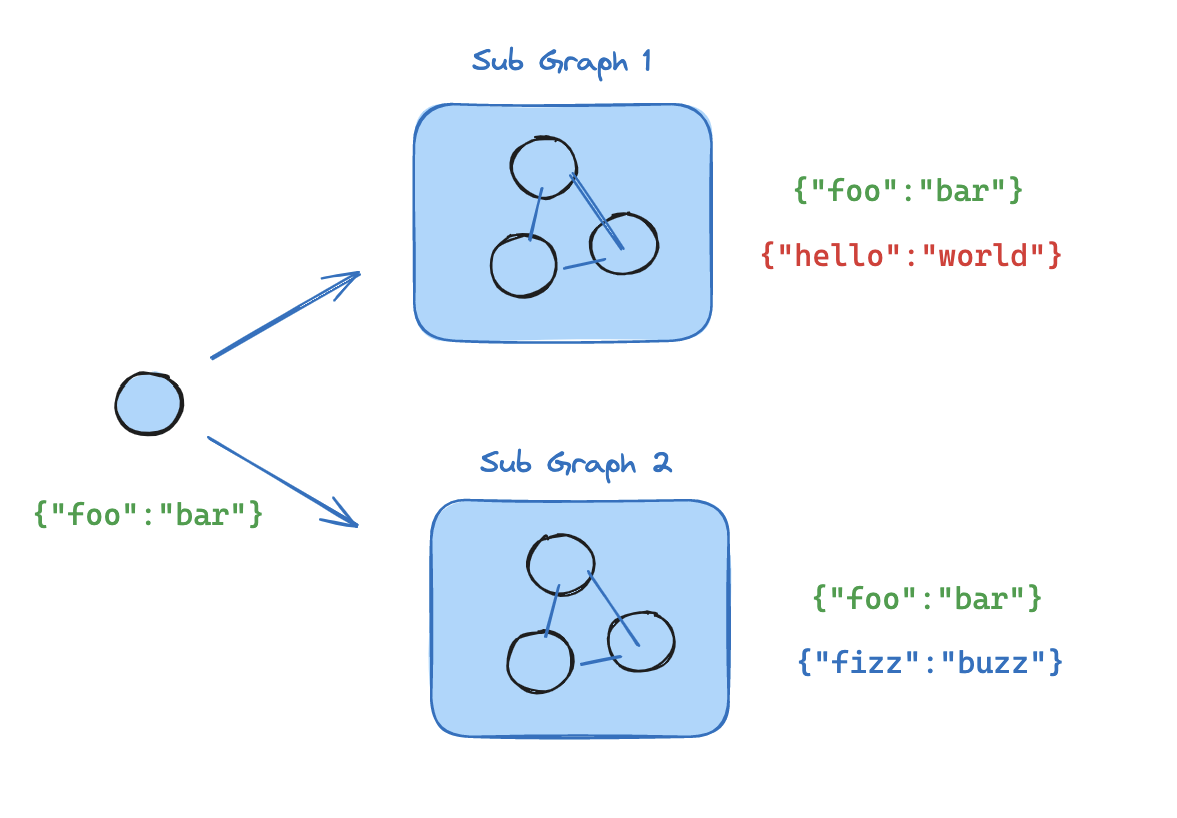
如果你的子图与父图共享状态键,你可以按照以下步骤将其添加到图中:
- 定义子图工作流(如下例中的
subgraph_builder)并编译它 - 在定义父图工作流时,将编译后的子图传递给
add_node方法
python
from typing_extensions import TypedDict
from langgraph.graph.state import StateGraph, START

class State(TypedDict):
    foo: str

# 子图

def subgraph_node_1(state: State):
    return {"foo": "hi! " + state["foo"]}

subgraph_builder = StateGraph(State)
subgraph_builder.add_node(subgraph_node_1)
subgraph_builder.add_edge(START, "subgraph_node_1")
subgraph = subgraph_builder.compile()

# 父图

builder = StateGraph(State)
builder.add_node("node_1", subgraph)
builder.add_edge(START, "node_1")
graph = builder.compile()- 定义子图工作流(如下例中的
subgraphBuilder)并编译它 - 在定义父图工作流时,将编译后的子图传递给
.addNode方法
typescript
import { StateGraph, StateSchema, START } from "@langchain/langgraph";
import * as z from "zod";

const State = new StateSchema({
  foo: z.string(),
});

// 子图
const subgraphBuilder = new StateGraph(State)
  .addNode("subgraphNode1", (state) => {
    return { foo: "hi! " + state.foo };
  })
  .addEdge(START, "subgraphNode1");

const subgraph = subgraphBuilder.compile();

// 父图
const builder = new StateGraph(State)
  .addNode("node1", subgraph)
  .addEdge(START, "node1");

const graph = builder.compile();
完整示例:共享状态模式
python
from typing_extensions import TypedDict
from langgraph.graph.state import StateGraph, START

# 定义子图
class SubgraphState(TypedDict):
    foo: str  # 与父图状态共享
    bar: str  # SubgraphState 私有

def subgraph_node_1(state: SubgraphState):
    return {"bar": "bar"}

def subgraph_node_2(state: SubgraphState):
    # 请注意,此节点使用了仅在子图中可用的状态键('bar')
    # 并在共享状态键('foo')上发送更新
    return {"foo": state["foo"] + state["bar"]}

subgraph_builder = StateGraph(SubgraphState)
subgraph_builder.add_node(subgraph_node_1)
subgraph_builder.add_node(subgraph_node_2)
subgraph_builder.add_edge(START, "subgraph_node_1")
subgraph_builder.add_edge("subgraph_node_1", "subgraph_node_2")
subgraph = subgraph_builder.compile()

# 定义父图
class ParentState(TypedDict):
    foo: str

def node_1(state: ParentState):
    return {"foo": "hi! " + state["foo"]}

builder = StateGraph(ParentState)
builder.add_node("node_1", node_1)
builder.add_node("node_2", subgraph)
builder.add_edge(START, "node_1")
builder.add_edge("node_1", "node_2")
graph = builder.compile()

stream = graph.stream_events({"foo": "foo"}, version="v3")
for event in stream:
    if event["method"] == "updates" and not event["params"]["namespace"]:
        print(event["params"]["data"])
{'node_1': {'foo': 'hi! foo'}}
{'node_2': {'foo': 'hi! foobar'}}typescript
import { StateGraph, StateSchema, START } from "@langchain/langgraph";
import * as z from "zod";

// 定义子图
const SubgraphState = new StateSchema({
  foo: z.string(),
  bar: z.string(),
});

const subgraphBuilder = new StateGraph(SubgraphState)
  .addNode("subgraphNode1", (state) => {
    return { bar: "bar" };
  })
  .addNode("subgraphNode2", (state) => {
    // 请注意,此节点使用了仅在子图中可用的状态键('bar')
    // 并在共享状态键('foo')上发送更新
    return { foo: state.foo + state.bar };
  })
  .addEdge(START, "subgraphNode1")
  .addEdge("subgraphNode1", "subgraphNode2");

const subgraph = subgraphBuilder.compile();

// 定义父图
const ParentState = new StateSchema({
  foo: z.string(),
});

const builder = new StateGraph(ParentState)
  .addNode("node1", (state) => {
    return { foo: "hi! " + state.foo };
  })
  .addNode("node2", subgraph)
  .addEdge(START, "node1")
  .addEdge("node1", "node2");

const graph = builder.compile();

const stream = await graph.streamEvents({ foo: "foo" }, { version: "v3" });
for await (const message of stream.messages) {
  for await (const token of message.text) {
    process.stdout.write(token);
  }
}- 此键与父图状态共享
- 此键是
SubgraphState私有的,父图不可见
{ node1: { foo: 'hi! foo' } }
{ node2: { foo: 'hi! foobar' } }
子图持久化
当你使用子图时,你需要决定在两次调用之间它的内部数据会发生什么。考虑一个委派给专家子智能体的客户支持机器人:它是否应该让“计费专家”子智能体记住客户之前的问题,还是每次被调用时都重新开始?
.compile() 上的 checkpointer 参数控制子图持久化:
| 模式 | checkpointer= | 行为 |
|---|---|---|
| 每次调用 | None(默认) | 每次调用都重新开始,并继承父图的检查点器,以支持单次调用内的 中断 和 持久化执行。 |
| 每线程 | True | 状态在同一线程上的多次调用之间累积。每次调用都从上次结束的地方继续。 |
| 无状态 | False | 完全不进行检查点持久化——像普通函数调用一样运行。不支持中断或持久化执行。 |
对于大多数应用来说,每次调用是正确的选择,包括子智能体处理独立请求的 多智能体 系统。当子智能体需要多轮对话记忆(例如,在多次交流中逐步构建上下文的调研助手)时,使用每线程模式。
INFO
父图必须使用检查点器编译,子图持久化功能(中断、状态检查、每线程记忆)才能工作。参见 持久化。
INFO
下面的示例使用 LangChain 的 create_agent,这是构建智能体的常用方式。create_agent 在底层生成一个 LangGraph 图,因此所有子图持久化概念都直接适用。如果你使用原生的 LangGraph StateGraph 构建,相同的模式和配置选项同样适用——详细信息参见 Graph API。
有状态
有状态子图继承父图的检查点器,这支持 中断、持久化 和状态检查。两种有状态模式的区别在于状态保留多长时间。
每次调用(默认)
当对子图的每次调用都是独立的,并且子智能体不需要记住之前调用的任何内容时,使用每次调用持久化。这是最常见的模式,尤其是对于子智能体处理一次性请求(如“查一下这位客户的订单”或“总结一下这份文档”)的 多智能体 系统。
省略 checkpointer 或将其设置为 None。每次调用都重新开始,但在单次调用内,子图继承父图的检查点器,并且可以使用 interrupt() 暂停和恢复。
下面的示例使用了两个子智能体(水果专家、蔬菜专家),它们被包装成外部智能体的工具:
python
from langchain.agents import create_agent
from langchain.tools import tool
from langgraph.checkpoint.memory import MemorySaver
from langgraph.types import Command, interrupt

@tool
def fruit_info(fruit_name: str) -> str:
    """Look up fruit info."""
    return f"Info about {fruit_name}"

@tool
def veggie_info(veggie_name: str) -> str:
    """Look up veggie info."""
    return f"Info about {veggie_name}"

# 子智能体——不设置 checkpointer(继承父图的)
fruit_agent = create_agent(
    model="gpt-5.4-mini",
    tools=[fruit_info],
    prompt="You are a fruit expert. Use the fruit_info tool. Respond in one sentence.",
)

veggie_agent = create_agent(
    model="gpt-5.4-mini",
    tools=[veggie_info],
    prompt="You are a veggie expert. Use the veggie_info tool. Respond in one sentence.",
)

# 将子智能体包装为外层智能体的工具
@tool
def ask_fruit_expert(question: str) -> str:
    """Ask the fruit expert. Use for ALL fruit questions."""
    response = fruit_agent.invoke(
        {"messages": [{"role": "user", "content": question}]},
    )
    return response["messages"][-1].content

@tool
def ask_veggie_expert(question: str) -> str:
    """Ask the veggie expert. Use for ALL veggie questions."""
    response = veggie_agent.invoke(
        {"messages": [{"role": "user", "content": question}]},
    )
    return response["messages"][-1].content

# 带 checkpointer 的外层智能体
agent = create_agent(
    model="gpt-5.4-mini",
    tools=[ask_fruit_expert, ask_veggie_expert],
    prompt=(
        "You have two experts: ask_fruit_expert and ask_veggie_expert. "
        "ALWAYS delegate questions to the appropriate expert."
    ),
    checkpointer=MemorySaver(),
)
中断
每次调用都可以使用 interrupt() 暂停和恢复。在工具函数中添加 interrupt(),以要求用户批准后才能继续:
python
@tool
def fruit_info(fruit_name: str) -> str:
    """Look up fruit info."""
    interrupt("continue?")
    return f"Info about {fruit_name}"
python
from langgraph.types import Command

config = {"configurable": {"thread_id": "1"}}

# Stream events - the subagent's tool calls interrupt()
stream = agent.stream_events(
  {"messages": [{"role": "user", "content": "Tell me about apples"}]},
  config=config,
  version="v3",
)
output = stream.output  # drive the stream to completion
# stream.interrupts contains pending interrupts (and stream.interrupted is True)

# Resume - approve the interrupt
resumed = agent.stream_events(Command(resume=True), config=config, version="v3")
final = resumed.output
多轮
每次调用都以全新的子智能体状态开始。子智能体不会记住之前的调用:
python
config = {"configurable": {"thread_id": "1"}}

# 第一次调用
response = agent.invoke(
    {"messages": [{"role": "user", "content": "Tell me about apples"}]},
    config=config,
)
# 子智能体消息数:4

# 第二次调用——子智能体重新开始,不记得苹果
response = agent.invoke(
    {"messages": [{"role": "user", "content": "Now tell me about bananas"}]},
    config=config,
)
# 子智能体消息数:4(依然是全新的!)
多次子图调用
对同一个子图的多次调用不会冲突,因为每次调用都有自己的检查点命名空间:
python
config = {"configurable": {"thread_id": "1"}}

# LLM 同时调用 ask_fruit_expert 询问苹果和香蕉
response = agent.invoke(
    {"messages": [{"role": "user", "content": "Tell me about apples and bananas"}]},
    config=config,
)
# 子智能体消息数:4(苹果——全新)
# 子智能体消息数:4(香蕉——全新)
typescript
import { createAgent, tool } from "langchain";
import { MemorySaver, Command, interrupt } from "@langchain/langgraph";
import * as z from "zod";

const fruitInfo = tool(
  (input) => `Info about ${input.fruitName}`,
  {
    name: "fruit_info",
    description: "Look up fruit info.",
    schema: z.object({ fruitName: z.string() }),
  }
);

const veggieInfo = tool(
  (input) => `Info about ${input.veggieName}`,
  {
    name: "veggie_info",
    description: "Look up veggie info.",
    schema: z.object({ veggieName: z.string() }),
  }
);

// 子智能体——不设置 checkpointer(继承父图的)
const fruitAgent = createAgent({
  model: "gpt-5.4-mini",
  tools: [fruitInfo],
  prompt: "You are a fruit expert. Use the fruit_info tool. Respond in one sentence.",
});

const veggieAgent = createAgent({
  model: "gpt-5.4-mini",
  tools: [veggieInfo],
  prompt: "You are a veggie expert. Use the veggie_info tool. Respond in one sentence.",
});

// 将子智能体包装为外层智能体的工具
const askFruitExpert = tool(
  async (input) => {
    const response = await fruitAgent.invoke({
      messages: [{ role: "user", content: input.question }],
    });
    return response.messages[response.messages.length - 1].content;
  },
  {
    name: "ask_fruit_expert",
    description: "Ask the fruit expert. Use for ALL fruit questions.",
    schema: z.object({ question: z.string() }),
  }
);

const askVeggieExpert = tool(
  async (input) => {
    const response = await veggieAgent.invoke({
      messages: [{ role: "user", content: input.question }],
    });
    return response.messages[response.messages.length - 1].content;
  },
  {
    name: "ask_veggie_expert",
    description: "Ask the veggie expert. Use for ALL veggie questions.",
    schema: z.object({ question: z.string() }),
  }
);

// 带 checkpointer 的外层智能体
const agent = createAgent({
  model: "gpt-5.4-mini",
  tools: [askFruitExpert, askVeggieExpert],
  prompt:
    "You have two experts: ask_fruit_expert and ask_veggie_expert. " +
    "ALWAYS delegate questions to the appropriate expert.",
  checkpointer: new MemorySaver(),
});
中断
每次调用都可以使用 interrupt() 暂停和恢复。在工具函数中添加 interrupt(),以要求用户批准后才能继续:
typescript
const fruitInfo = tool(
  (input) => {
    interrupt("continue?");
    return `Info about ${input.fruitName}`;
  },
  {
    name: "fruit_info",
    description: "Look up fruit info.",
    schema: z.object({ fruitName: z.string() }),
  }
);
typescript
const config = { configurable: { thread_id: "1" } };

// 调用——子智能体的工具会触发 interrupt()
let response = await agent.invoke(
  { messages: [{ role: "user", content: "Tell me about apples" }] },
  config,
);
// response 包含 __interrupt__

// 恢复——批准中断
response = await agent.invoke(new Command({ resume: true }), config);
// 子智能体消息数:4
多轮
每次调用都以全新的子智能体状态开始。子智能体不会记住之前的调用:
typescript
const config = { configurable: { thread_id: "1" } };

// 第一次调用
let response = await agent.invoke(
  { messages: [{ role: "user", content: "Tell me about apples" }] },
  config,
);
// 子智能体消息数:4

// 第二次调用——子智能体重新开始,不记得苹果
response = await agent.invoke(
  { messages: [{ role: "user", content: "Now tell me about bananas" }] },
  config,
);
// 子智能体消息数:4(依然是全新的!)
多次子图调用
对同一个子图的多次调用不会冲突,因为每次调用都有自己的检查点命名空间:
typescript
const config = { configurable: { thread_id: "1" } };

// LLM 同时调用 ask_fruit_expert 询问苹果和香蕉
const response = await agent.invoke(
  { messages: [{ role: "user", content: "Tell me about apples and bananas" }] },
  config,
);
// 子智能体消息数:4(苹果——全新)
// 子智能体消息数:4(香蕉——全新)
每线程
当子智能体需要记住之前的交互时,使用每线程持久化。例如,在多次交流中逐步构建上下文的调研助手,或者跟踪自己已经编辑过哪些文件的编码助手。子智能体的对话历史和状态会在同一线程上的多次调用之间累积。每次调用都从上次结束的地方继续。
使用 checkpointer=True 编译以启用此行为。
WARNING
每线程子图不支持并行工具调用。当 LLM 可以将每线程子智能体作为工具访问时,它可能会尝试并行多次调用该工具(例如,同时向水果专家询问苹果和香蕉)。这会导致检查点冲突,因为两次调用写入的是同一个命名空间。
下面的示例使用 LangChain 的 ToolCallLimitMiddleware 来防止这种情况。如果你使用纯 LangGraph StateGraph 构建,则需要自己防止并行工具调用——例如,通过配置你的模型禁用并行工具调用,或者添加逻辑确保同一个子图不会被并行多次调用。
下面的示例使用了使用 checkpointer=True 编译的水果专家子智能体:
python
from langchain.agents import create_agent
from langchain.agents.middleware import ToolCallLimitMiddleware
from langchain.tools import tool
from langgraph.checkpoint.memory import MemorySaver
from langgraph.types import Command, interrupt

@tool
def fruit_info(fruit_name: str) -> str:
    """Look up fruit info."""
    return f"Info about {fruit_name}"

# 使用 checkpointer=True 的子智能体,用于持久化状态
fruit_agent = create_agent(
    model="gpt-5.4-mini",
    tools=[fruit_info],
    prompt="You are a fruit expert. Use the fruit_info tool. Respond in one sentence.",
    checkpointer=True,
)

# 将子智能体包装为外层智能体的工具
@tool
def ask_fruit_expert(question: str) -> str:
    """Ask the fruit expert. Use for ALL fruit questions."""
    response = fruit_agent.invoke(
        {"messages": [{"role": "user", "content": question}]},
    )
    return response["messages"][-1].content

# 带 checkpointer 的外层智能体
# 使用 ToolCallLimitMiddleware 防止并行调用每线程子智能体,
# 这会导致检查点冲突。
agent = create_agent(
    model="gpt-5.4-mini",
    tools=[ask_fruit_expert],
    prompt="You have a fruit expert. ALWAYS delegate fruit questions to ask_fruit_expert.",
    middleware=[
        ToolCallLimitMiddleware(tool_name="ask_fruit_expert", run_limit=1),
    ],
    checkpointer=MemorySaver(),
)
中断
每线程子智能体与每次调用一样支持 interrupt()。在工具函数中添加 interrupt(),以要求用户批准:
python
@tool
def fruit_info(fruit_name: str) -> str:
    """Look up fruit info."""
    interrupt("continue?")
    return f"Info about {fruit_name}"
python
from langgraph.types import Command

config = {"configurable": {"thread_id": "1"}}

# Stream events - the subagent's tool calls interrupt()
stream = agent.stream_events(
  {"messages": [{"role": "user", "content": "Tell me about apples"}]},
  config=config,
  version="v3",
)
output = stream.output  # drive the stream to completion
# stream.interrupts contains pending interrupts (and stream.interrupted is True)

# Resume - approve the interrupt
resumed = agent.stream_events(Command(resume=True), config=config, version="v3")
final = resumed.output
多轮
状态在多次调用之间累积——子智能体会记住过去的对话:
python
config = {"configurable": {"thread_id": "1"}}

# 第一次调用
response = agent.invoke(
    {"messages": [{"role": "user", "content": "Tell me about apples"}]},
    config=config,
)
# 子智能体消息数:4

# 第二次调用——子智能体会记住苹果的对话
response = agent.invoke(
    {"messages": [{"role": "user", "content": "Now tell me about bananas"}]},
    config=config,
)
# 子智能体消息数:8(累积!)
多次子图调用
当你有多个不同的每线程子图时(例如,一个水果专家和一个蔬菜专家),每个子图都需要自己的存储空间,这样它们的检查点才不会互相覆盖。这被称为命名空间隔离。
如果你 在节点内调用子图,LangGraph 会根据调用顺序分配命名空间(第一次调用、第二次调用等)。这意味着重新排列你的调用顺序可能会混淆哪个子图加载哪个状态。为避免这种情况,请将每个子智能体包装在具有唯一节点名称的自己的 StateGraph 中——这会给每个子图一个稳定、唯一的命名空间:
python
from langgraph.graph import MessagesState, StateGraph

def create_sub_agent(model, *, name, **kwargs):
    """Wrap an agent with a unique node name for namespace isolation."""
    agent = create_agent(model=model, name=name, **kwargs)
    return (
        StateGraph(MessagesState)
        .add_node(name, agent)  # 唯一名称 → 稳定命名空间  #
        .add_edge("__start__", name)
        .compile()
    )

fruit_agent = create_sub_agent(
    "gpt-5.4-mini", name="fruit_agent",
    tools=[fruit_info], prompt="...", checkpointer=True,
)
veggie_agent = create_sub_agent(
    "gpt-5.4-mini", name="veggie_agent",
    tools=[veggie_info], prompt="...", checkpointer=True,
)

config = {"configurable": {"thread_id": "1"}}

# 第一次调用——LLM 同时调用水果和蔬菜专家
response = agent.invoke(
    {"messages": [{"role": "user", "content": "Tell me about cherries and broccoli"}]},
    config=config,
)
# 水果子智能体消息数:4
# 蔬菜子智能体消息数:4

# 第二次调用——两个智能体独立累积
response = agent.invoke(
    {"messages": [{"role": "user", "content": "Now tell me about oranges and carrots"}]},
    config=config,
)
# 水果子智能体消息数:8(记得樱桃!)
# 蔬菜子智能体消息数:8(记得西兰花!)
作为节点添加 的子图已经自动获得基于名称的命名空间,因此它们不需要这个包装器。
typescript
import { createAgent, tool, toolCallLimitMiddleware } from "langchain";
import { MemorySaver, Command, interrupt } from "@langchain/langgraph";
import * as z from "zod";

const fruitInfo = tool(
  (input) => `Info about ${input.fruitName}`,
  {
    name: "fruit_info",
    description: "Look up fruit info.",
    schema: z.object({ fruitName: z.string() }),
  }
);

// 使用 checkpointer=true 的子智能体,用于持久化状态
const fruitAgent = createAgent({
  model: "gpt-5.4-mini",
  tools: [fruitInfo],
  prompt: "You are a fruit expert. Use the fruit_info tool. Respond in one sentence.",
  checkpointer: true,
});

// 将子智能体包装为外层智能体的工具
const askFruitExpert = tool(
  async (input) => {
    const response = await fruitAgent.invoke({
      messages: [{ role: "user", content: input.question }],
    });
    return response.messages[response.messages.length - 1].content;
  },
  {
    name: "ask_fruit_expert",
    description: "Ask the fruit expert. Use for ALL fruit questions.",
    schema: z.object({ question: z.string() }),
  }
);

// 带 checkpointer 的外层智能体
// 使用 toolCallLimitMiddleware 防止并行调用每线程子智能体,
// 这会导致检查点冲突。
const agent = createAgent({
  model: "gpt-5.4-mini",
  tools: [askFruitExpert],
  prompt: "You have a fruit expert. ALWAYS delegate fruit questions to ask_fruit_expert.",
  middleware: [
    toolCallLimitMiddleware({ toolName: "ask_fruit_expert", runLimit: 1 }),
  ],
  checkpointer: new MemorySaver(),
});
中断
每线程子智能体与每次调用一样支持 interrupt()。在工具函数中添加 interrupt(),以要求用户批准:
typescript
const fruitInfo = tool(
  (input) => {
    interrupt("continue?");
    return `Info about ${input.fruitName}`;
  },
  {
    name: "fruit_info",
    description: "Look up fruit info.",
    schema: z.object({ fruitName: z.string() }),
  }
);
typescript
const config = { configurable: { thread_id: "1" } };

// 调用——子智能体的工具会触发 interrupt()
let response = await agent.invoke(
  { messages: [{ role: "user", content: "Tell me about apples" }] },
  config,
);
// response 包含 __interrupt__

// 恢复——批准中断
response = await agent.invoke(new Command({ resume: true }), config);
// 子智能体消息数:4
多轮
状态在多次调用之间累积——子智能体会记住过去的对话:
typescript
const config = { configurable: { thread_id: "1" } };

// 第一次调用
let response = await agent.invoke(
  { messages: [{ role: "user", content: "Tell me about apples" }] },
  config,
);
// 子智能体消息数:4

// 第二次调用——子智能体会记住苹果的对话
response = await agent.invoke(
  { messages: [{ role: "user", content: "Now tell me about bananas" }] },
  config,
);
// 子智能体消息数:8(累积!)
多次子图调用
当你有多个不同的每线程子图时(例如,一个水果专家和一个蔬菜专家),每个子图都需要自己的存储空间,这样它们的检查点才不会互相覆盖。这被称为命名空间隔离。
如果你 在节点内调用子图,LangGraph 会根据调用顺序分配命名空间(第一次调用、第二次调用等)。这意味着重新排列你的调用顺序可能会混淆哪个子图加载哪个状态。为避免这种情况,请将每个子智能体包装在具有唯一节点名称的自己的 StateGraph 中——这会给每个子图一个稳定、唯一的命名空间:
typescript
import { StateGraph, StateSchema, MessagesValue, START } from "@langchain/langgraph";

function createSubAgent(model: string, { name, ...kwargs }: { name: string; [key: string]: any }) {
  const agent = createAgent({ model, name, ...kwargs });
  return new StateGraph(new StateSchema({ messages: MessagesValue }))
    .addNode(name, agent)  // 唯一名称 → 稳定命名空间
    .addEdge(START, name)
    .compile();
}

const fruitAgent = createSubAgent("gpt-5.4-mini", {
  name: "fruit_agent", tools: [fruitInfo], prompt: "...", checkpointer: true,
});
const veggieAgent = createSubAgent("gpt-5.4-mini", {
  name: "veggie_agent", tools: [veggieInfo], prompt: "...", checkpointer: true,
});
const config = { configurable: { thread_id: "1" } };

// 第一次调用——LLM 同时调用水果和蔬菜专家
let response = await agent.invoke(
  { messages: [{ role: "user", content: "Tell me about cherries and broccoli" }] },
  config,
);
// 水果子智能体消息数:4
// 蔬菜子智能体消息数:4

// 第二次调用——两个智能体独立累积
response = await agent.invoke(
  { messages: [{ role: "user", content: "Now tell me about oranges and carrots" }] },
  config,
);
// 水果子智能体消息数:8(记得樱桃!)
// 蔬菜子智能体消息数:8(记得西兰花!)
作为节点添加 的子图已经自动获得基于名称的命名空间,因此它们不需要这个包装器。
无状态
当你想要像普通函数调用一样运行子智能体,而不需要任何检查点持久化开销时,使用此模式。子图无法暂停/恢复,也不能受益于 持久化执行。使用 checkpointer=False 编译。
WARNING
没有检查点持久化,子图就没有持久化执行能力。如果进程在运行中途崩溃,子图无法恢复,必须从头重新运行。
python
subgraph_builder = StateGraph(...)
subgraph = subgraph_builder.compile(checkpointer=False)
typescript
const subgraphBuilder = new StateGraph(...);
const subgraph = subgraphBuilder.compile({ checkpointer: false });
检查点器参考
使用 .compile() 上的 checkpointer 参数控制子图持久化:
python
subgraph = builder.compile(checkpointer=False) # or True / Nonetypescript
const subgraph = builder.compile({ checkpointer: false }); // or true, or null| 功能 | 每次调用(默认) | 每线程 | 无状态 |
|---|---|---|---|
checkpointer= | None | True | False |
| 中断(HITL) | ✅ | ✅ | ❌ |
| 多轮记忆 | ❌ | ✅ | ❌ |
| 多次调用(不同子图) | ✅ | ⚠️ | ✅ |
| 多次调用(相同子图) | ✅ | ❌ | ✅ |
| 状态检查 | ⚠️ | ✅ | ❌ |
- 中断(HITL):子图可以使用 interrupt() 暂停执行并等待用户输入,然后从中断处继续。
- 多轮记忆:子图在同一 线程 内的多次调用之间保留其状态。每次调用都从上次结束的地方继续,而不是重新开始。
- 多次调用(不同子图):可以在单个节点内调用多个不同的子图实例,而不会产生检查点命名空间冲突。
- 多次调用(相同子图):可以在单个节点内多次调用同一个子图实例。使用有状态持久化时,这些调用会写入同一个检查点命名空间并发生冲突——请改用每次调用持久化。
- 状态检查:可以通过
get_state(config, subgraphs=True)获取子图的状态,用于调试和监控。
查看子图状态
当你启用 持久化 时,你可以使用 subgraphs 选项检查子图状态。使用 无状态 检查点持久化(checkpointer=False)时,不会保存子图检查点,因此子图状态不可用。
INFO
查看子图状态要求 LangGraph 能够静态发现子图——即它是 作为节点添加 的,或 在节点内调用 的。当子图在 工具 函数或其他间接方式(例如 子智能体 模式)中被调用时,此功能不生效。无论嵌套层级如何,中断仍然会传播到顶层图。
每次调用
仅返回当前调用的子图状态。每次调用都重新开始。
python
from langgraph.graph import START, StateGraph
from langgraph.checkpoint.memory import MemorySaver
from langgraph.types import interrupt, Command
from typing_extensions import TypedDict

class State(TypedDict):
    foo: str

# 子图
def subgraph_node_1(state: State):
    value = interrupt("Provide value:")
    return {"foo": state["foo"] + value}

subgraph_builder = StateGraph(State)
subgraph_builder.add_node(subgraph_node_1)
subgraph_builder.add_edge(START, "subgraph_node_1")
subgraph = subgraph_builder.compile()  # 继承父图的检查点器

# 父图
builder = StateGraph(State)
builder.add_node("node_1", subgraph)
builder.add_edge(START, "node_1")

checkpointer = MemorySaver()
graph = builder.compile(checkpointer=checkpointer)

config = {"configurable": {"thread_id": "1"}}

graph.invoke({"foo": ""}, config)

# 查看当前调用的子图状态
subgraph_state = graph.get_state(config, subgraphs=True).tasks[0].state

# 恢复子图
graph.invoke(Command(resume="bar"), config)
每线程
返回该线程上所有调用的累积子图状态。
python
from langgraph.graph import START, StateGraph, MessagesState
from langgraph.checkpoint.memory import MemorySaver

# 具有自身持久化状态的子图
subgraph_builder = StateGraph(MessagesState)
# ... 添加节点和边
subgraph = subgraph_builder.compile(checkpointer=True)

# 父图
builder = StateGraph(MessagesState)
builder.add_node("agent", subgraph)
builder.add_edge(START, "agent")

checkpointer = MemorySaver()
graph = builder.compile(checkpointer=checkpointer)

config = {"configurable": {"thread_id": "1"}}

graph.invoke({"messages": [{"role": "user", "content": "hi"}]}, config)
graph.invoke({"messages": [{"role": "user", "content": "what did I say?"}]}, config)

# 查看累积的子图状态(包含两次调用的消息)
subgraph_state = graph.get_state(config, subgraphs=True).tasks[0].state
每次调用
仅返回当前调用的子图状态。每次调用都重新开始。
typescript
import { StateGraph, StateSchema, START, MemorySaver, interrupt, Command } from "@langchain/langgraph";
import * as z from "zod";

const State = new StateSchema({
  foo: z.string(),
});

// 子图
const subgraphBuilder = new StateGraph(State)
  .addNode("subgraphNode1", (state) => {
    const value = interrupt("Provide value:");
    return { foo: state.foo + value };
  })
  .addEdge(START, "subgraphNode1");

const subgraph = subgraphBuilder.compile();  // 继承父图的检查点器

// 父图
const builder = new StateGraph(State)
  .addNode("node1", subgraph)
  .addEdge(START, "node1");

const checkpointer = new MemorySaver();
const graph = builder.compile({ checkpointer });

const config = { configurable: { thread_id: "1" } };

await graph.invoke({ foo: "" }, config);

// 查看当前调用的子图状态
const subgraphState = (await graph.getState(config, { subgraphs: true })).tasks[0].state;

// 恢复子图
await graph.invoke(new Command({ resume: "bar" }), config);
每线程
返回该线程上所有调用的累积子图状态。
typescript
import { StateGraph, StateSchema, MessagesValue, START, MemorySaver } from "@langchain/langgraph";

// 具有自身持久化状态的子图
const SubgraphState = new StateSchema({
  messages: MessagesValue,
});

const subgraphBuilder = new StateGraph(SubgraphState);
// ... 添加节点和边
const subgraph = subgraphBuilder.compile({ checkpointer: true });

// 父图
const builder = new StateGraph(SubgraphState)
  .addNode("agent", subgraph)
  .addEdge(START, "agent");

const checkpointer = new MemorySaver();
const graph = builder.compile({ checkpointer });

const config = { configurable: { thread_id: "1" } };

await graph.invoke({ messages: [{ role: "user", content: "hi" }] }, config);
await graph.invoke({ messages: [{ role: "user", content: "what did I say?" }] }, config);

// 查看累积的子图状态(包含两次调用的消息)
const subgraphState = (await graph.getState(config, { subgraphs: true })).tasks[0].state;
流式子图输出
要观察嵌套的图执行,我们推荐 事件流:stream.subgraphs 投影可以发现每个嵌套的运行,并暴露其 path、messages 和 values,而无需解析命名空间字符串。
python
stream = graph.stream_events({"foo": "foo"}, version="v3")

for subgraph in stream.subgraphs:
    print(subgraph.graph_name, subgraph.path)

    for snapshot in subgraph.values:
        print(subgraph.path, snapshot)
如果你需要原始协议事件,请直接迭代流,并根据 event["method"] 和 event["params"]["namespace"] 进行过滤:
python
stream = graph.stream_events({"foo": "foo"}, version="v3")
for event in stream:
    if event["method"] == "updates":
        print(event["params"]["namespace"], event["params"]["data"])
typescript
const stream = await graph.streamEvents(
  { foo: "foo" },
  {
    subgraphs: true,
    version: "v3",
  }
);
for await (const snapshot of stream.values) {
  console.log(snapshot);
}- 设置
subgraphs: true以流式子图的输出。
从子图流式传输
python
from typing_extensions import TypedDict
from langgraph.graph.state import StateGraph, START

# 定义子图
class SubgraphState(TypedDict):
    foo: str
    bar: str

def subgraph_node_1(state: SubgraphState):
    return {"bar": "bar"}

def subgraph_node_2(state: SubgraphState):
    # 请注意,此节点使用了仅在子图中可用的状态键('bar')
    # 并在共享状态键('foo')上发送更新
    return {"foo": state["foo"] + state["bar"]}

subgraph_builder = StateGraph(SubgraphState)
subgraph_builder.add_node(subgraph_node_1)
subgraph_builder.add_node(subgraph_node_2)
subgraph_builder.add_edge(START, "subgraph_node_1")
subgraph_builder.add_edge("subgraph_node_1", "subgraph_node_2")
subgraph = subgraph_builder.compile()

# 定义父图
class ParentState(TypedDict):
    foo: str

def node_1(state: ParentState):
    return {"foo": "hi! " + state["foo"]}

builder = StateGraph(ParentState)
builder.add_node("node_1", node_1)
builder.add_node("node_2", subgraph)
builder.add_edge(START, "node_1")
builder.add_edge("node_1", "node_2")
graph = builder.compile()

stream = graph.stream_events({"foo": "foo"}, version="v3")
for event in stream:
    if event["method"] == "updates":
        print(event["params"]["namespace"], event["params"]["data"])
[] {'node_1': {'foo': 'hi! foo'}}
['node_2:e58e5673-a661-ebb0-70d4-e298a7fc28b7'] {'subgraph_node_1': {'bar': 'bar'}}
['node_2:e58e5673-a661-ebb0-70d4-e298a7fc28b7'] {'subgraph_node_2': {'foo': 'hi! foobar'}}
[] {'node_2': {'foo': 'hi! foobar'}}typescript
import { StateGraph, StateSchema, START } from "@langchain/langgraph";
import * as z from "zod";

// 定义子图
const SubgraphState = new StateSchema({
  foo: z.string(),
  bar: z.string(),
});

const subgraphBuilder = new StateGraph(SubgraphState)
  .addNode("subgraphNode1", (state) => {
    return { bar: "bar" };
  })
  .addNode("subgraphNode2", (state) => {
    // 请注意,此节点使用了仅在子图中可用的状态键('bar')
    // 并在共享状态键('foo')上发送更新
    return { foo: state.foo + state.bar };
  })
  .addEdge(START, "subgraphNode1")
  .addEdge("subgraphNode1", "subgraphNode2");

const subgraph = subgraphBuilder.compile();

// 定义父图
const ParentState = new StateSchema({
  foo: z.string(),
});

const builder = new StateGraph(ParentState)
  .addNode("node1", (state) => {
    return { foo: "hi! " + state.foo };
  })
  .addNode("node2", subgraph)
  .addEdge(START, "node1")
  .addEdge("node1", "node2");

const graph = builder.compile();

const stream = await graph.streamEvents(
  { foo: "foo" },
  {
    subgraphs: true,
    version: "v3",
  }
);
for await (const snapshot of stream.values) {
  console.log(snapshot);
}- 设置
subgraphs: true以流式子图的输出。
[[], { node1: { foo: 'hi! foo' } }]
[['node2:e58e5673-a661-ebb0-70d4-e298a7fc28b7'], { subgraphNode1: { bar: 'bar' } }]
[['node2:e58e5673-a661-ebb0-70d4-e298a7fc28b7'], { subgraphNode2: { foo: 'hi! foobar' } }]
[[], { node2: { foo: 'hi! foobar' } }]